Question

Error on generic inquiry when switching to modern UI

  • August 11, 2026
  • 3 replies
  • 29 views

Forum|alt.badge.img

I have a generic inquiry containing filters and pivot tables When I tried to switch to the modern UI no results were given and an errror message “Object reference not set to instance of object” was displayed

I then made a copy of this generic inquiry, published it and tried again to switch to the modern UI (without the additional filters and pivot tables) I still got the same error. 

The pivot tables on the original generic inquiry are also used on dashboards

3 replies

Naveen Boga
Captain II
Forum|alt.badge.img+20
  • Captain II
  • August 11, 2026

@suemackeown13  Can you please share the xml copy of the Generic Inquiry here. (Hope you are using default Acumatica tables in the GI)


jinin
Pro I
Forum|alt.badge.img+12
  • Pro I
  • August 11, 2026

Hi ​@suemackeown13 ,

Since the copy failed too without the filters and pivots, the issue is likely in the core definition — Results Grid, Conditions, Relations, or Navigation settings — not the pivots.

Common causes:

  • A results column with a blank/duplicate caption, or a formula referencing a field that no longer exists

  • Navigation/Entry Screen pointing to an invalid screen or key field

  • Conditions referencing a removed field

  • Custom usr fields from an unpublished or changed customization

Two quick steps:

  1. Check the trace (System > Management > Trace) right after the error — it usually names the component that failed.

  2. Strip your copy back to one data source and a few simple columns, no conditions or navigation. If that works in Modern UI, add pieces back until it breaks.

Your dashboards should keep working off the original GI meanwhile, so just leave that one untouched while you test.

What version are you on? Modern UI GI handling has changed between recent builds and there may be a known issue.


mohammadnawaz51
Varsity I
Forum|alt.badge.img+7

@suemackeown13

If this is a custom GI, or if modifications have been made to the standard GI, it may cause this issue.

To resolve it:

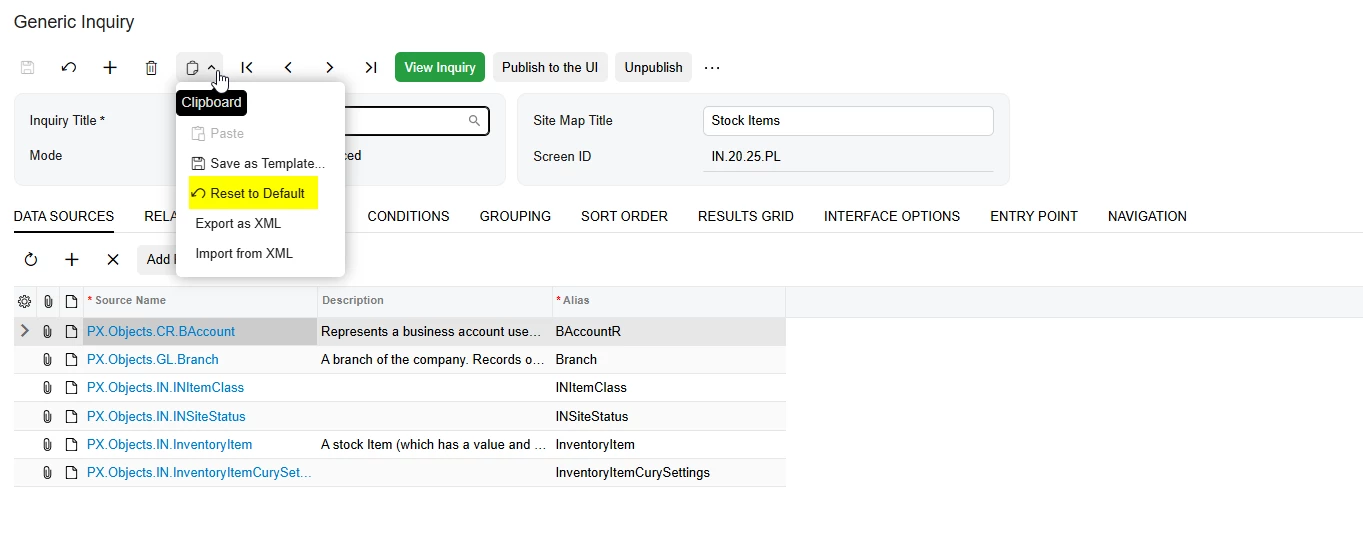
  1. Navigate to Generic Inquiry.
  2. Open the respective GI.
  3. Click Reset to restore the GI to its standard configuration.