Question

Email notification

  • October 13, 2026
  • 6 replies
  • 55 views
  • Translate All

Forum|alt.badge.img

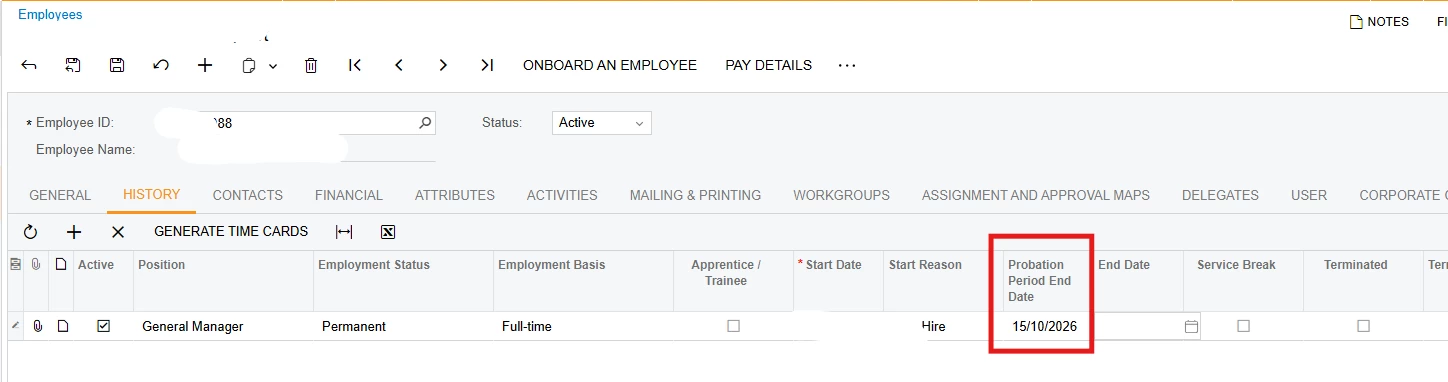
Hi, I have a requirement to send an email notification to remind the admin that their employee’s probationary will end in 2 days. It’s found under employees screen > history tab for the position.

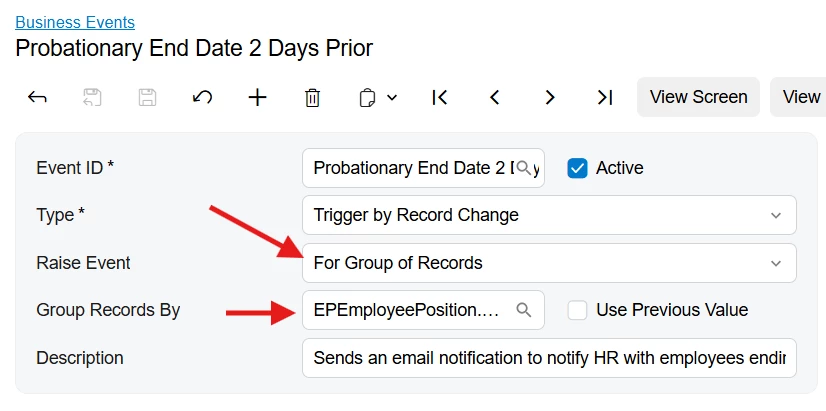
I had it working by creating a Business event + GI, but it only triggers an email notification when there is only one record in the GI. If there are multiple employees with the same probationary end date, it doesn’t trigger. Any thoughts? Attached is my BE and GI setup with the email notification. Thanks heaps!

6 replies

mohammadnawaz51
Varsity I
Forum|alt.badge.img+8

​@MarkD Is GI showing all records ??This usually happens when the Business Event is not configured to raise the event per GI row, or the GI result does not have a unique key per employee/position history row.

Translate

Forum|alt.badge.img
  • Author
  • Semi-Pro I
  • October 13, 2026

​@mohammadnawaz51 - The GI will only show employees that will end their probationary in 2 days. Ie., if 3 employees probationary end date is October 15, 2026, all those 3 employees will appear in the GI. My business event setup is triggered when employee is inserted in the GI, but it’s not working if there is more than 1 employee in the GI. Please check the GI, BE that I setup.


Translate

npetrosov31
Jr Varsity I
Forum|alt.badge.img+2

Hi ​@MarkD ,


Do you want to send 3 records by 1 email? This setup will create 3 email in case 3 records appear in the GI. I made it work on my machine, just want to know which scenario do you want to go with to make proper suggestions.


Thanks,

Norayr Petrosov.

Translate

alanconroy31
Jr Varsity I
Forum|alt.badge.img

​@MarkD Try adding in the EPEmployee.Status field to your results grid.

Translate

Forum|alt.badge.img
  • Author
  • Semi-Pro I
  • October 13, 2026

Hi ​@MarkD ,


Do you want to send 3 records by 1 email? This setup will create 3 email in case 3 records appear in the GI. I made it work on my machine, just want to know which scenario do you want to go with to make proper suggestions.


Thanks,

Norayr Petrosov.

Thanks. I want the 3 records in one email. That would be better, rather than one email for each row. Could be in a table or whatever you suggest as long as it works 🙂

Translate

KrunalDoshi
Pro I
Forum|alt.badge.img+7

Hi ​@MarkD,

You can configure the Business Event to Raise by Group of Records and set Group Records by to EPEmployeePosition.ProbationPeriodEndDate. This allows you to trigger a single email for a group of records rather than sending a separate email for each record.

In the email template, you can then loop through the records returned by the Generic Inquiry (GI) and include all of them in the same email.

For an example of how to embed a list of GI records in an email template, refer to this Acumatica Community post:


Hope this is helpful!

Translate