



I have GI. I need dispaly value in this format. How i can do this?
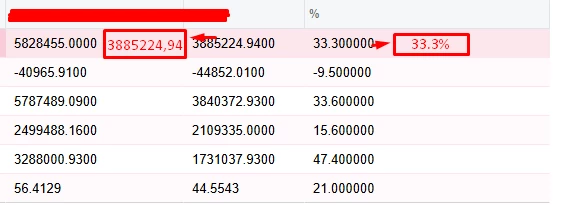
I have GI. I need dispaly value in this format. How i can do this?
Best answer by bwhite49
Try this for column 1. Replace OrderQty with your field
=Concat(iif([SOLine.OrderQty]<0,'-','')+Replace(Replace(Left(PadLeft(CStr(Abs([SOLine.OrderQty])),16,'~'),3)+Left(Right(PadLeft(CStr(Abs([SOLine.OrderQty])),16,'~'),13),3)+Left(Right(PadLeft(CStr(Abs([SOLine.OrderQty])),16,'~'),10),3)+','+Left(Right(PadLeft(CStr(Abs([SOLine.OrderQty])),16,'~'),4),2),'~,',''),'~',''))
and this for column 2
=Concat(iif([SOLine.OrderQty]<0,'-','')+Replace(Replace(Left(PadLeft(CStr(Abs([SOLine.OrderQty])),16,'~'),3)+Left(Right(PadLeft(CStr(Abs([SOLine.OrderQty])),16,'~'),13),3)+Left(Right(PadLeft(CStr(Abs([SOLine.OrderQty])),16,'~'),10),3)+'.'+Left(Right(PadLeft(CStr(Abs([SOLine.OrderQty])),16,'~'),4),1),'~,',''),'~','')+'%')
Enter your E-mail address. We'll send you an e-mail with instructions to reset your password.




