


Answer

Dashboards - Add Empty / Spacer Widgets

  • July 14, 2023
  • 6 replies
  • 234 views

Michaelh
Pro I
Forum|alt.badge.img+2

I’m trying to make Dashboards to show poeple how to do their jobs. This often comes in list formats. Like the following, where every word or letter is a widget.

Create        Release
  A                    A

  B                    B

  C                   C

                        D


The current Dashboard formats don’t allow this, becuase you can’t have a widget (D) to the right of an empty space. I would like to have a “blank” or “spacer” widget we can add to make whitespace for user readability on dashboards. I think this would greatly enhance what is often the first screen type any user encounters when logging in.

Best answer by lauraj46

Hi @Michael Hansen ,

As per the S160 training guide:

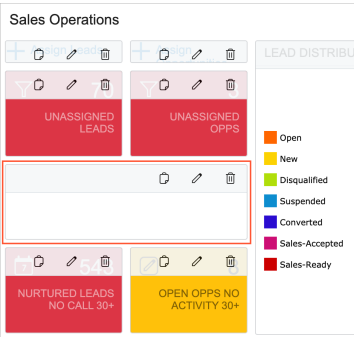
An embedded page widget can be used to display a white rectangle or square of the needed size. You can place it between other widgets in a row or between rows to add more white space to your dashboard. To create such a widget, you type about:blank instead of a URL in the widget settings and the system displays it as a white rectangle or square (see the following screenshot).

Hope this helps!

Laura

6 replies

lauraj46
Captain II
Forum|alt.badge.img+8
  • Captain II
  • Answer
  • July 14, 2023

Hi @Michael Hansen ,

As per the S160 training guide:

An embedded page widget can be used to display a white rectangle or square of the needed size. You can place it between other widgets in a row or between rows to add more white space to your dashboard. To create such a widget, you type about:blank instead of a URL in the widget settings and the system displays it as a white rectangle or square (see the following screenshot).

Hope this helps!

Laura


Michaelh
Pro I
Forum|alt.badge.img+2
  • Author
  • Pro I
  • July 14, 2023

Awesome, can we move this to discussions so others can see it too please? 


lauraj46
Captain II
Forum|alt.badge.img+8
  • Captain II
  • July 14, 2023

Hi @Michael Hansen ,

I’m not sure if it’s possible to move the thread.  Maybe repost your question?  @Chris Hackett is this something that you can help with?

Laura


Michaelh
Pro I
Forum|alt.badge.img+2
  • Author
  • Pro I
  • July 14, 2023

For anyone following along, it’s an embedded page widget with the URL set to: 

about:blank


It works exactly as I wanted it to, THANK YOU @lauraj46 !!!


Chris Hackett
Community Manager
Forum|alt.badge.img
  • Acumatica Community Manager
  • July 14, 2023

Hi @Michael Hansen - I have moved


Michaelh
Pro I
Forum|alt.badge.img+2
  • Author
  • Pro I
  • July 14, 2023

Thanks Chris!

