Answer

Dashboard Parameter: Default SalesSubID

  • October 16, 2023
  • 2 replies
  • 112 views

kdavis45
Semi-Pro I
Forum|alt.badge.img+1

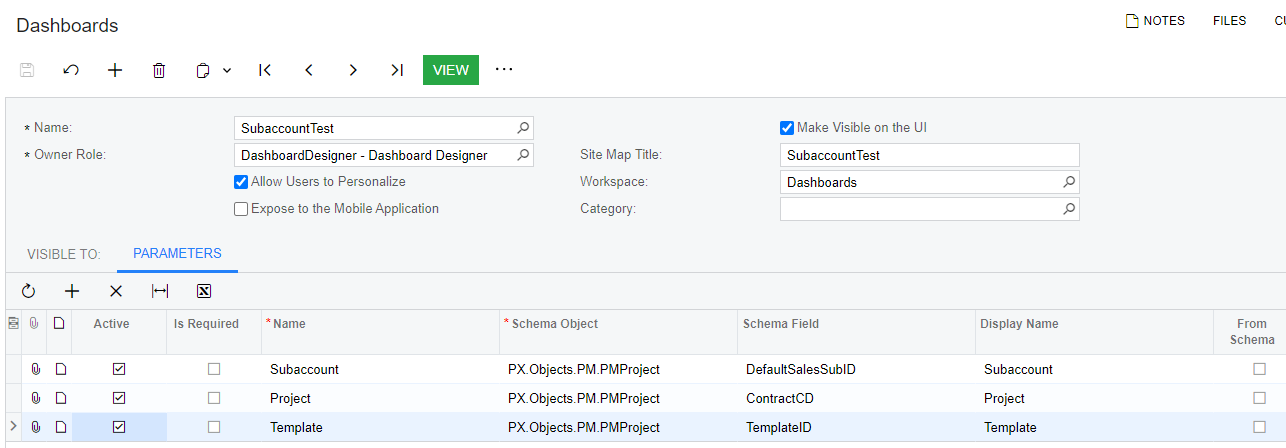
I’m trying to create a dashboard with parameters for project and/or subaccount. The project parameter shows a magnifying glass with available projects, but the subaccount does not. The parameters are setup the exact same way and I’ve tried multiple data sources for the subaccount (GL.Sub and PMProject, both ID and CD, and with and without “From Schema”) and none of them give me the magnifying glass.


I added Project Template as a test and it behaved the same as the project parameter. What am I missing?
 

Best answer by hkabiri

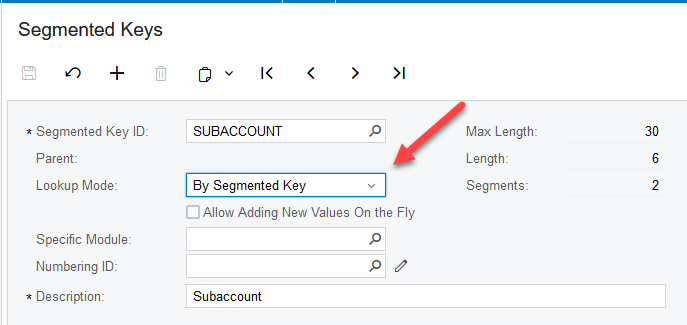
@kdavis45 that is nothing to do with parameter or field you selected. This is the option selected on the segmented keys (ScreenId=CS202000) and Segmented Key ID =SUBACCOUNT

If you switch the Lookup Mode from By segment: All Available segment values to By Segmented Key, you can see the parameter shows with Magnifier Glass which means you can only select from what is available on the list.


2 replies

hkabiri
Acumatica Moderator
Forum|alt.badge.img+8
  • Acumatica Support Team
  • Answer
  • October 16, 2023

@kdavis45 that is nothing to do with parameter or field you selected. This is the option selected on the segmented keys (ScreenId=CS202000) and Segmented Key ID =SUBACCOUNT

If you switch the Lookup Mode from By segment: All Available segment values to By Segmented Key, you can see the parameter shows with Magnifier Glass which means you can only select from what is available on the list.


kdavis45
Semi-Pro I
Forum|alt.badge.img+1
  • Author
  • Semi-Pro I
  • October 16, 2023

Thank you, @hkabiri - that’s exactly what I was missing!