Customer Statement Report Blank When Using @Today in email template

  • April 13, 2026
  • 7 replies
  • 46 views

Forum|alt.badge.img

Hi Team,

I’m facing an issue with the Customer Statement report while using an Automation Scheduler and would appreciate your help.

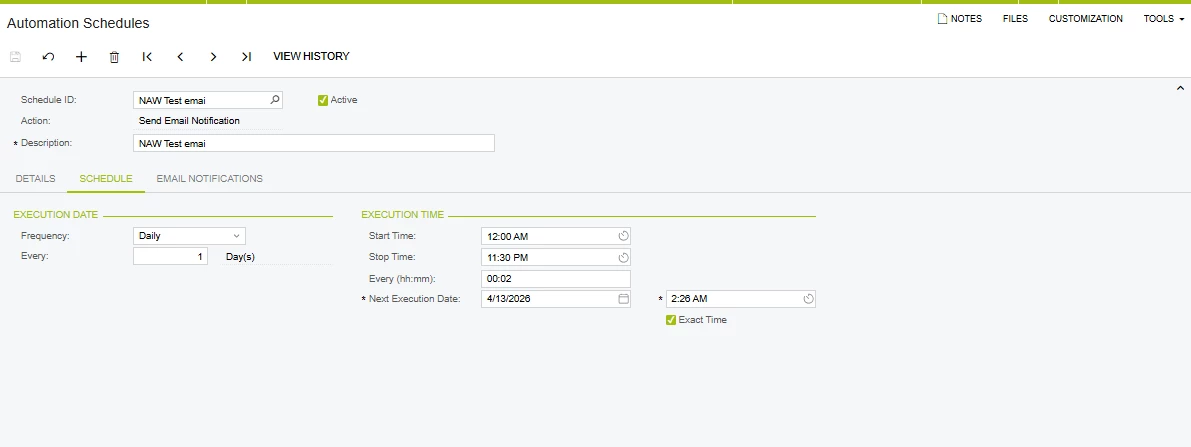
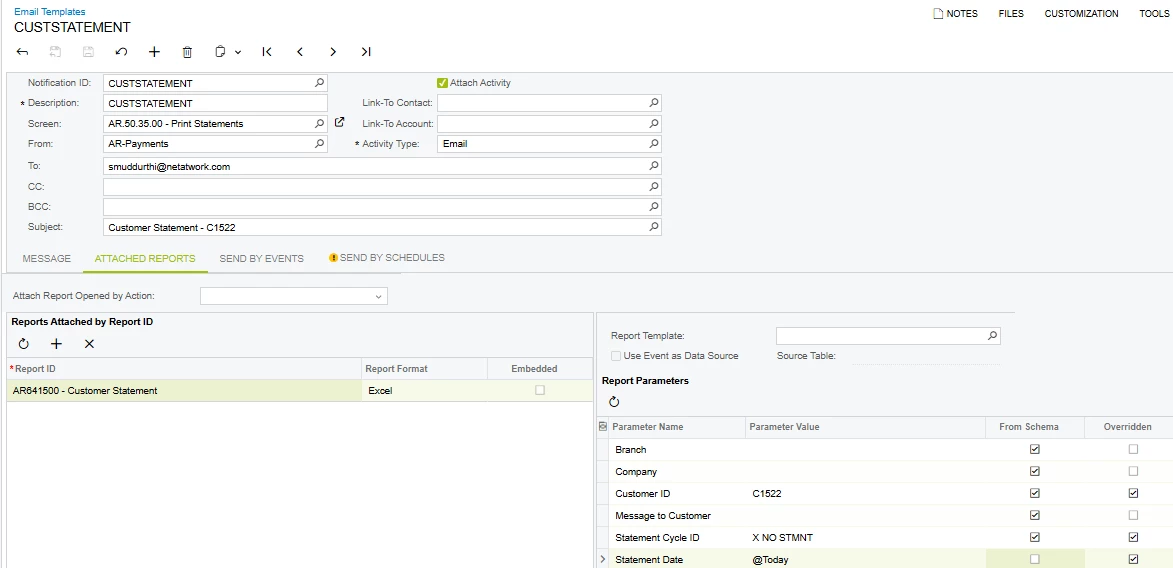
I have created an Automation Schedule to send the Customer Statement report for a single customer via an Email Template. The overall flow is working fine — the email is triggered and the report is attached successfully.

However, I’m facing an issue with the Statement Date parameter:

  • When I manually pass the date in the format 10/04/2026, the report generates correctly with data.
  • But when I use dynamic values like @Today or select Statement Date from schema, the report is generated as blank (no data).

It seems like the parameter is not being resolved correctly when using dynamic values.

Could anyone please help with:

  • Why dynamic parameters (like @Today or schema fields) are not working in this case?
  • Any specific format or configuration required for Statement Date in Automation Schedules or Email Templates?
  • Steps to fix or best practices to handle this scenari0
  • Thanks in advance!


7 replies

Forum|alt.badge.img
  • Jr Varsity I
  • April 13, 2026

Hi ​@smuddurthi81 please see below solution:

  1. Automation Schedule → Filters tab → Statement Date:

    •  Check "Relative" checkbox

    • Set date picker to @Today or @Today-1

    • Don't use free-text @Today

  2. OR set Report Default:

    • Edit Customer Statement report → Parameters → Statement Date Default = =@Today()

  3. Email Template:

    • Build Schema → Statement Date → Default Value = =@Today()

    • Validate formula (green check)

Root cause: Automation Schedules reject raw @Today text; need Relative checkbox or report-level defaults


Manikanta Dhulipudi
Captain II
Forum|alt.badge.img+16

@smuddurthi81 Can you select the customer statement date in the filter and try?


Forum|alt.badge.img
  • Author
  • Semi-Pro I
  • April 13, 2026

@nasir Thank you for the update. I have tried the third approach, but the report is still generated as blank. Also, this requirement is only for a single customer, not for all customers. I believe that modifying the report itself would impact all customers, which we want to avoid.


Manikanta Dhulipudi
Captain II
Forum|alt.badge.img+16

@smuddurthi81 I dont think currently date filter will not work for customer statement report.

Modify report as of today filter and send the statement.


Forum|alt.badge.img
  • Jr Varsity I
  • April 14, 2026

@smuddurthi81 The issue is NOT just @Today— it’s that Automation Schedule is NOT passing parameters correctly to the report &  When parameters fail → report runs with NULL filters → returns blank

In your Email Template → Report Parameters:

🔹 DO THIS:

Instead of: @Today

Use: Statement Date = fixed formula via expression

=Date()

Also Uncheck From Schema


Forum|alt.badge.img
  • Author
  • Semi-Pro I
  • April 14, 2026

@smuddurthi81 I dont think currently date filter will not work for customer statement report.

Modify report as of today filter and send the statement.

@Manikanta Dhulipudi Thanks for the update and it’s helpful.


Manikanta Dhulipudi
Captain II
Forum|alt.badge.img+16

Thanks for the Update ​@smuddurthi81.I’ve tried this steps for another customer.