Question

Creating a production order gi with production nbr, operation , labor details to be displayed using sales order , sales order requested date and order date

  • Nov 9, 2026 11:13 AM UTC
  • 6 replies
  • 39 views
  • Translate All

Forum|alt.badge.img

Hi Experts, I am trying to create GI for production order where i  need to display production Nbr, start date and end date, operation, with labor details( labour time, employee, and sales order from which production order is created and also production which is not linked with any sales order.


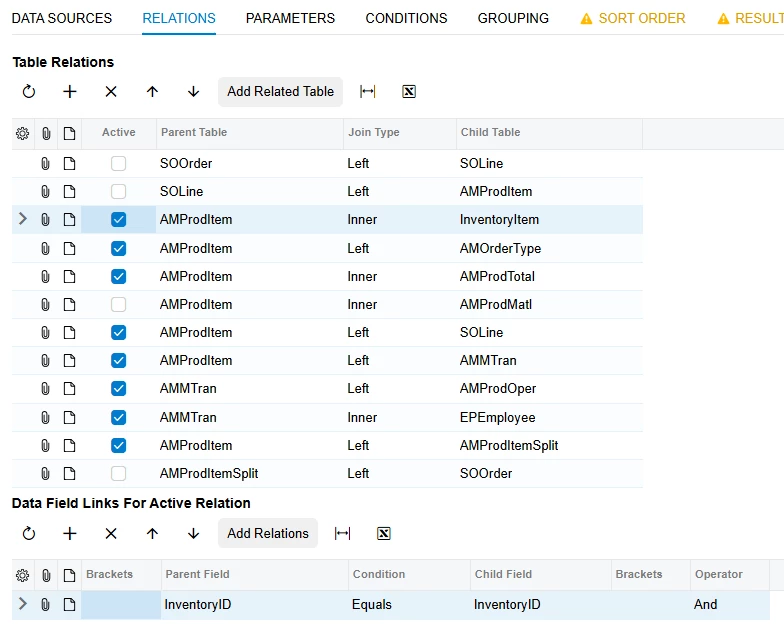
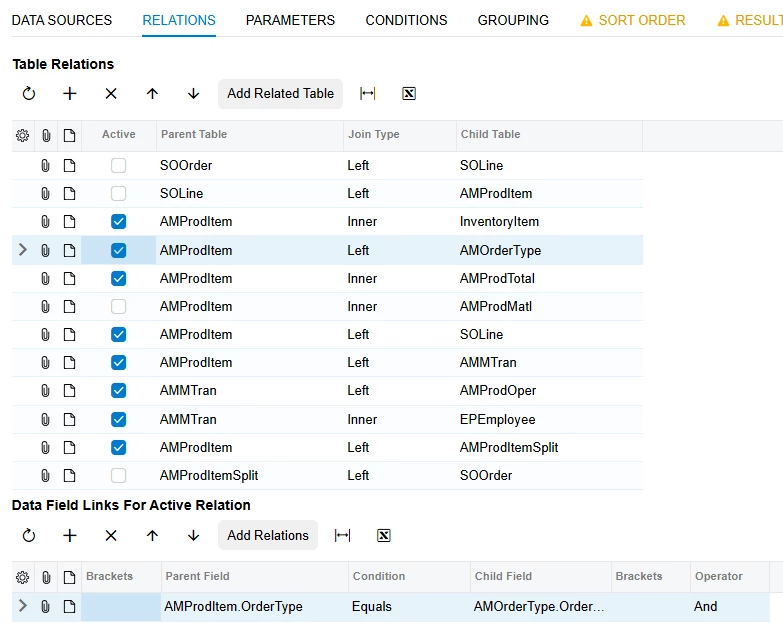
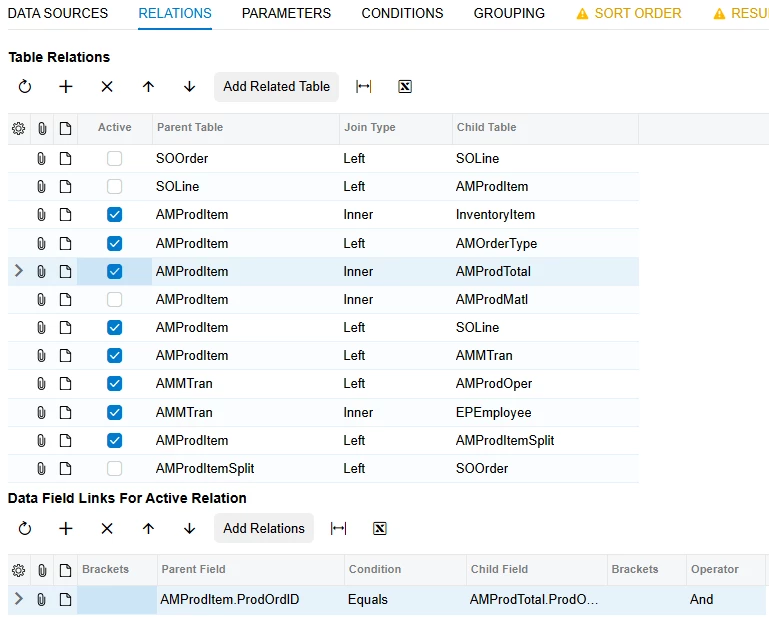
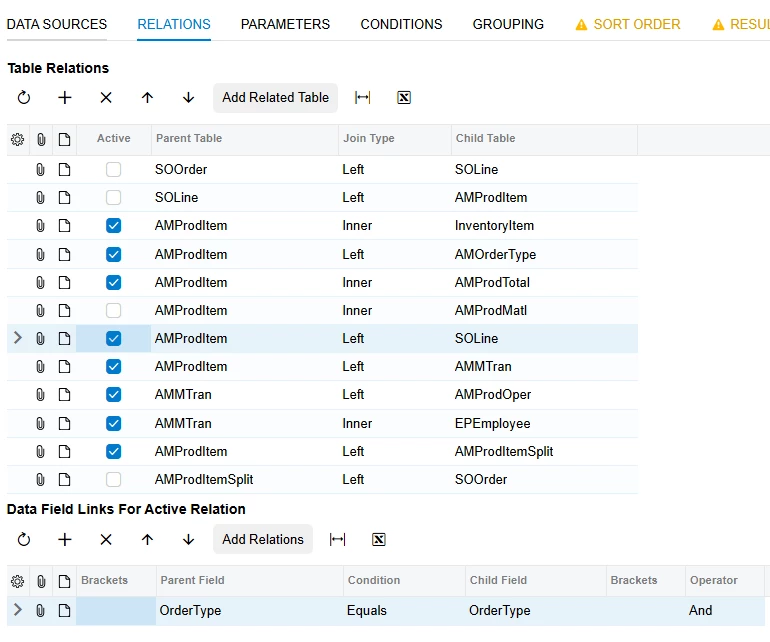
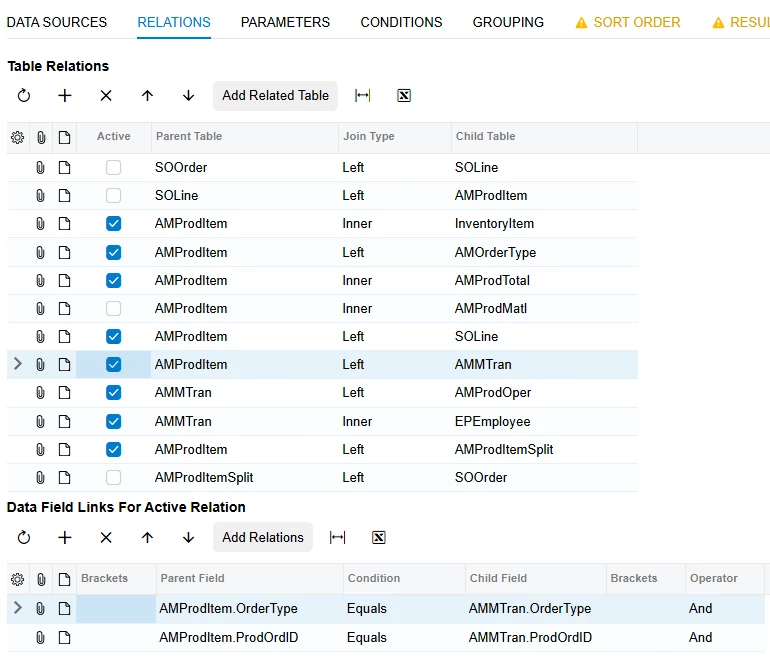
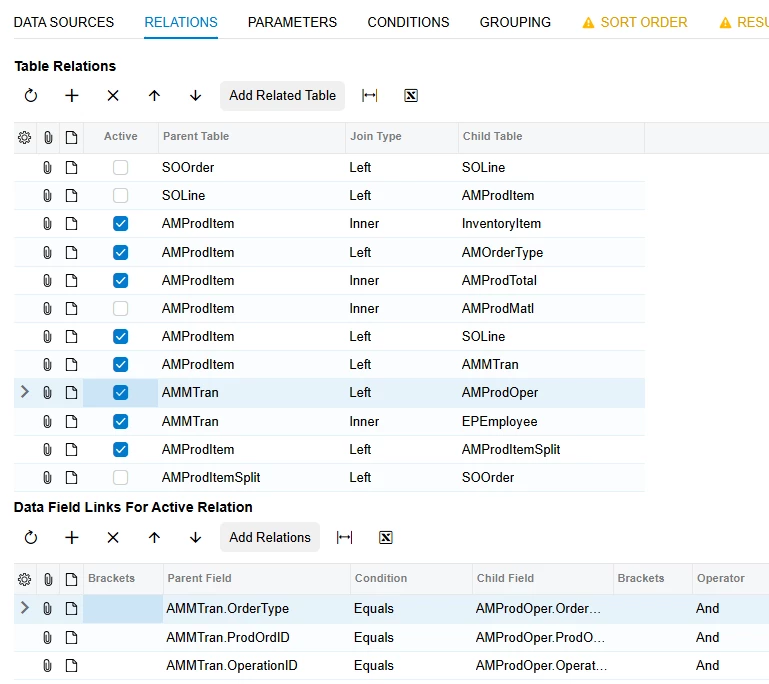
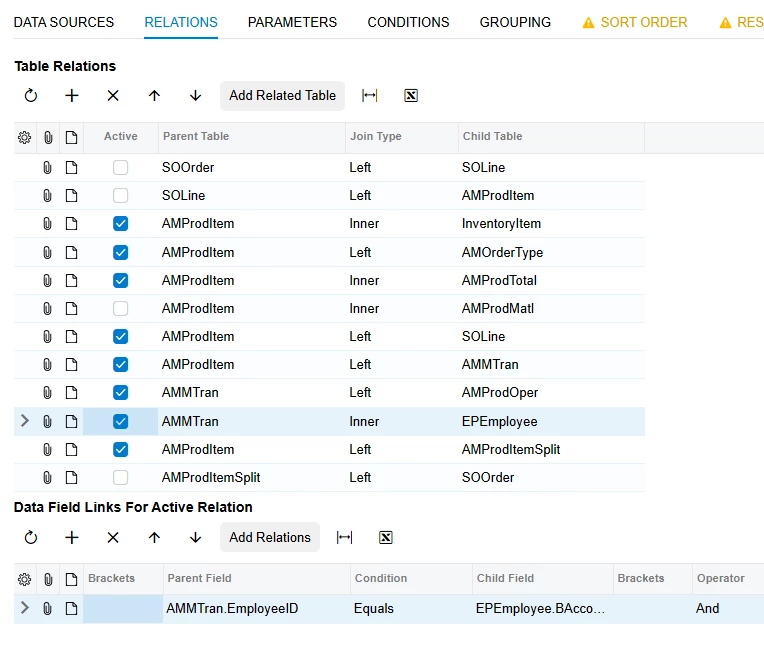
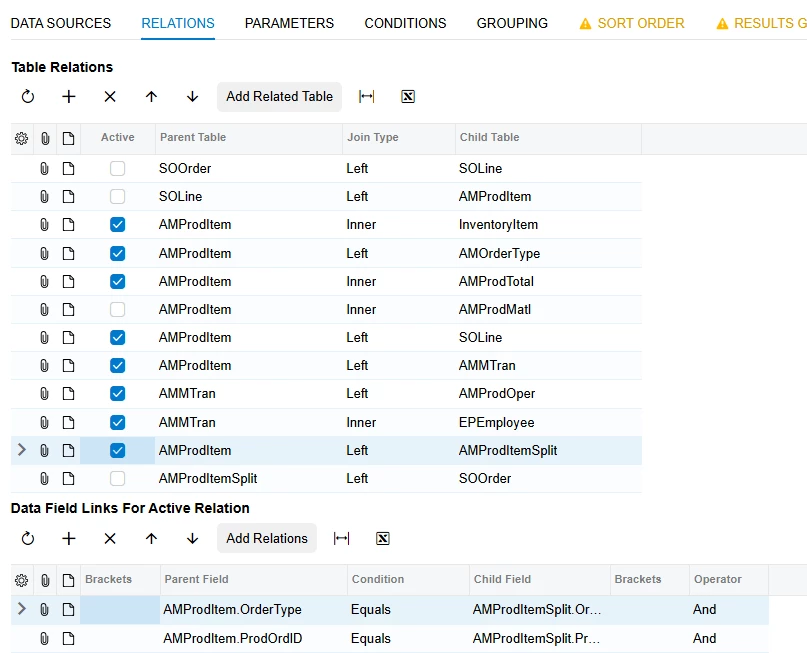
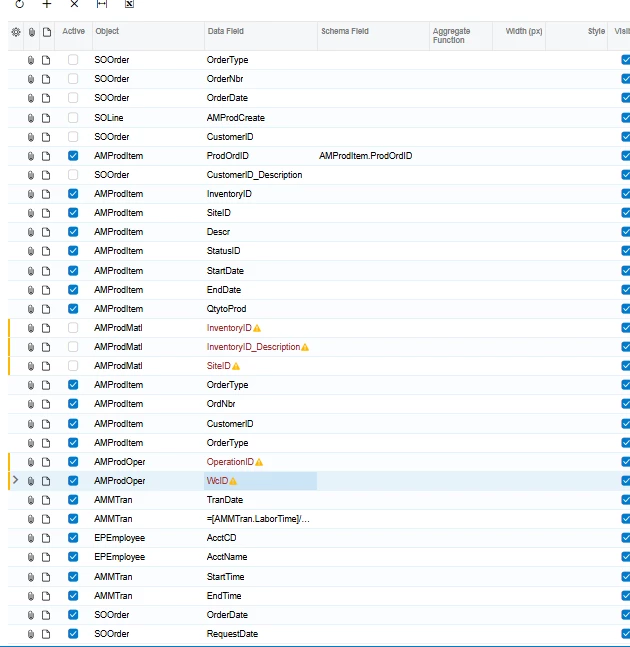
here i am attaching screenshots for GI:-
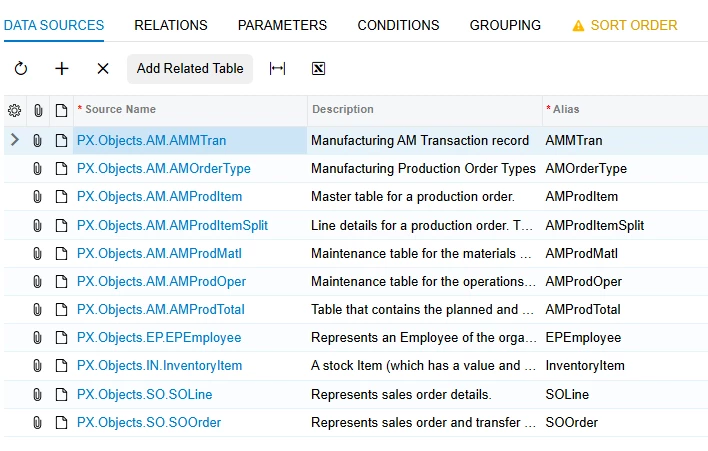
After creating this GI i am unable to get the proper data as required , please let me know if i am missing out something.

6 replies

dgodsill97
Varsity II
Forum|alt.badge.img+6
  • Varsity II
  • Nov 9, 2026 2:42 PM UTC

Look at the Production Order Labor Efficiency report for the tables you need.  This article explains the manufacturing tables.particularly the transaction codes for the different labor types in AMMTran.   https://help.acumatica.com/Help?ScreenId=ShowWiki&pageid=1ce567e9-7d64-4f0d-aa14-d894a35a8fc3

Translate

Steve Milner
Varsity III
Forum|alt.badge.img+7

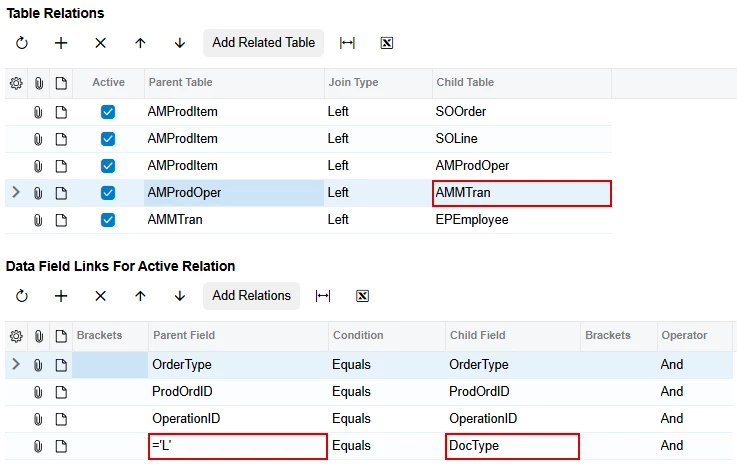
@vishalsharma49 dgodsill97's pointer is the right model. The Production Order Labor Efficiency report (AM653000) joins AMProdItem to AMProdOper on OrderType and ProdOrdID, AMProdOper to AMMTran on OrderType, ProdOrdID and OperationID, then AMMTran to EPEmployee on EmployeeID. It only shows the employee labor detail when AMMTran.DocType is L. AMMTran holds every manufacturing transaction (material, move, labor, cost and others), so add a condition AMMTran.DocType Equals L.

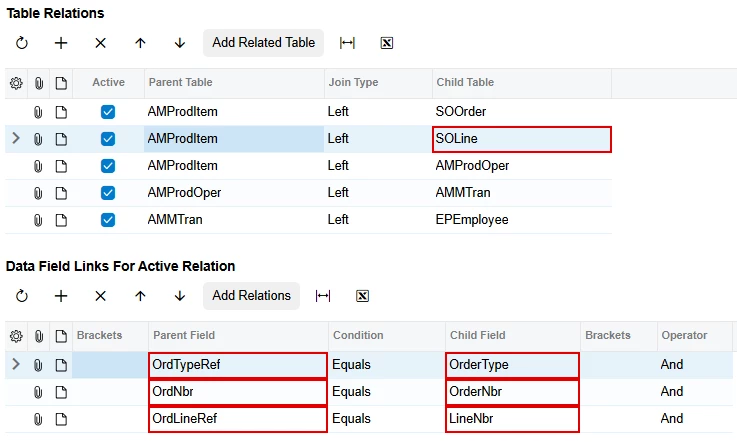
The sales order join is the part that's off. AMProdItem.OrderType is the production order type, so OrderType = OrderType won't find the sales order the production order came from. That link lives in three other AMProdItem fields: OrdTypeRef, OrdNbr and OrdLineRef (Sales Order Type, Sales Order Nbr., SO Line Nbr.). They're filled when the production order is created from or linked to a sales order line, and blank otherwise.

Left join SOLine on OrdTypeRef = OrderType, OrdNbr = OrderNbr and OrdLineRef = LineNbr. Left join SOOrder on the first two to get Date and Requested On. Right now SOOrder isn't joined at all, because both of its relations are unchecked. The left join keeps production orders that have no sales order. Their sales order columns just come back empty.

Translate

Forum|alt.badge.img

@vishalsharma49 dgodsill97's pointer is the right model. The Production Order Labor Efficiency report (AM653000) joins AMProdItem to AMProdOper on OrderType and ProdOrdID, AMProdOper to AMMTran on OrderType, ProdOrdID and OperationID, then AMMTran to EPEmployee on EmployeeID. It only shows the employee labor detail when AMMTran.DocType is L. AMMTran holds every manufacturing transaction (material, move, labor, cost and others), so add a condition AMMTran.DocType Equals L.

The sales order join is the part that's off. AMProdItem.OrderType is the production order type, so OrderType = OrderType won't find the sales order the production order came from. That link lives in three other AMProdItem fields: OrdTypeRef, OrdNbr and OrdLineRef (Sales Order Type, Sales Order Nbr., SO Line Nbr.). They're filled when the production order is created from or linked to a sales order line, and blank otherwise.

Left join SOLine on OrdTypeRef = OrderType, OrdNbr = OrderNbr and OrdLineRef = LineNbr. Left join SOOrder on the first two to get Date and Requested On. Right now SOOrder isn't joined at all, because both of its relations are unchecked. The left join keeps production orders that have no sales order. Their sales order columns just come back empty.

Hi can you please show me in UI because i tried using your concept but data not comming as required.

Translate

Steve Milner
Varsity III
Forum|alt.badge.img+7
  • Varsity III
  • Nov 10, 2026 4:57 PM UTC

@vishalsharma49 I built this on 2026 R1 with demo data so you can see it.

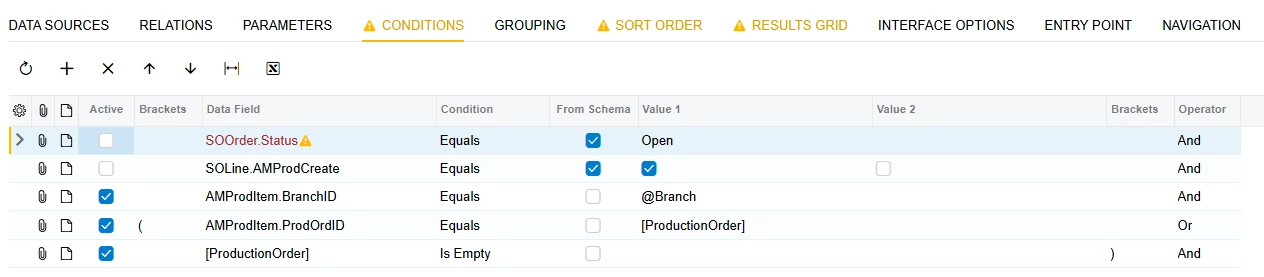
One correction to my first reply. I said to add AMMTran.DocType Equals L as a condition. A condition removes every production order with no labor posted. In the test data it cut 80 production orders down to 42 and dropped 2 of the 3 tied to a sales order. Put the L on the AMMTran join instead, and every production order stays in the list.

All five joins are Left, with AMProdItem as the top table. SOOrder and SOLine hang off AMProdItem on its sales order reference fields. SOLine uses all three, shown below. SOOrder uses only the first two.

AMProdOper joins AMProdItem on OrderType and ProdOrdID. AMMTran joins AMProdOper on OrderType, ProdOrdID and OperationID, plus a fourth link: type ='L' in Parent Field and pick DocType as Child Field. EPEmployee joins AMMTran on EmployeeID = BAccountID.

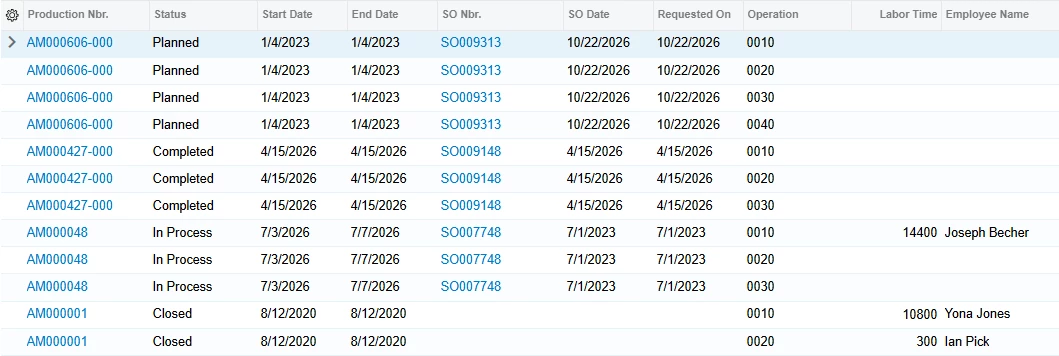
My version has nothing on the Conditions tab. In the result, AM000606-000 has a sales order and no labor yet, so its operations list with the labor columns blank. AM000001 has labor and no sales order.

Labor Time comes back in seconds, so 14400 is 4 hours. Divide by 3600 if you want hours.

Translate

Forum|alt.badge.img

@vishalsharma49 I built this on 2026 R1 with demo data so you can see it.

One correction to my first reply. I said to add AMMTran.DocType Equals L as a condition. A condition removes every production order with no labor posted. In the test data it cut 80 production orders down to 42 and dropped 2 of the 3 tied to a sales order. Put the L on the AMMTran join instead, and every production order stays in the list.

All five joins are Left, with AMProdItem as the top table. SOOrder and SOLine hang off AMProdItem on its sales order reference fields. SOLine uses all three, shown below. SOOrder uses only the first two.

AMProdOper joins AMProdItem on OrderType and ProdOrdID. AMMTran joins AMProdOper on OrderType, ProdOrdID and OperationID, plus a fourth link: type ='L' in Parent Field and pick DocType as Child Field. EPEmployee joins AMMTran on EmployeeID = BAccountID.

My version has nothing on the Conditions tab. In the result, AM000606-000 has a sales order and no labor yet, so its operations list with the labor columns blank. AM000001 has labor and no sales order.

Labor Time comes back in seconds, so 14400 is 4 hours. Divide by 3600 if you want hours.

Hi can you please share me the result grid ?

this is my result grid which i am using but for operation and workcenter its showing me Error;-The wcID field cannot be used because either the table with the AMProdOper alias is not joined with other tables on the Relations tab or the corresponding relation is inactive.

Translate

Steve Milner
Varsity III
Forum|alt.badge.img+7
  • Varsity III
  • Nov 10, 2026 7:16 PM UTC

@vishalsharma49 OperationID and WcID are the right fields, so the Results Grid isn't the problem. That warning comes from the Relations tab.

For each Results Grid row, the GI checks that the row's table connects up to the top table (AMProdItem in my version) through active relations. It starts at the active relation where that table is the Child Table, moves to that relation's Parent Table, and keeps climbing. AMProdOper doesn't get there. Either it isn't the Child Table on any active relation, or the relations above it don't reach the top.

Your AMMTran and EPEmployee rows aren't flagged, so those tables connect and AMProdOper is the only one cut off.

Set the rows to match the relations screenshot in my last reply. AMProdOper is the Child Table under AMProdItem, joined on OrderType and ProdOrdID. AMMTran is the Child Table under AMProdOper. Both have Active checked.

Translate