

Solved

cannot open and creating a new report

  • Feb 19, 2026 8:59 AM UTC
  • 5 replies
  • 101 views
  • Translate All

Forum|alt.badge.img

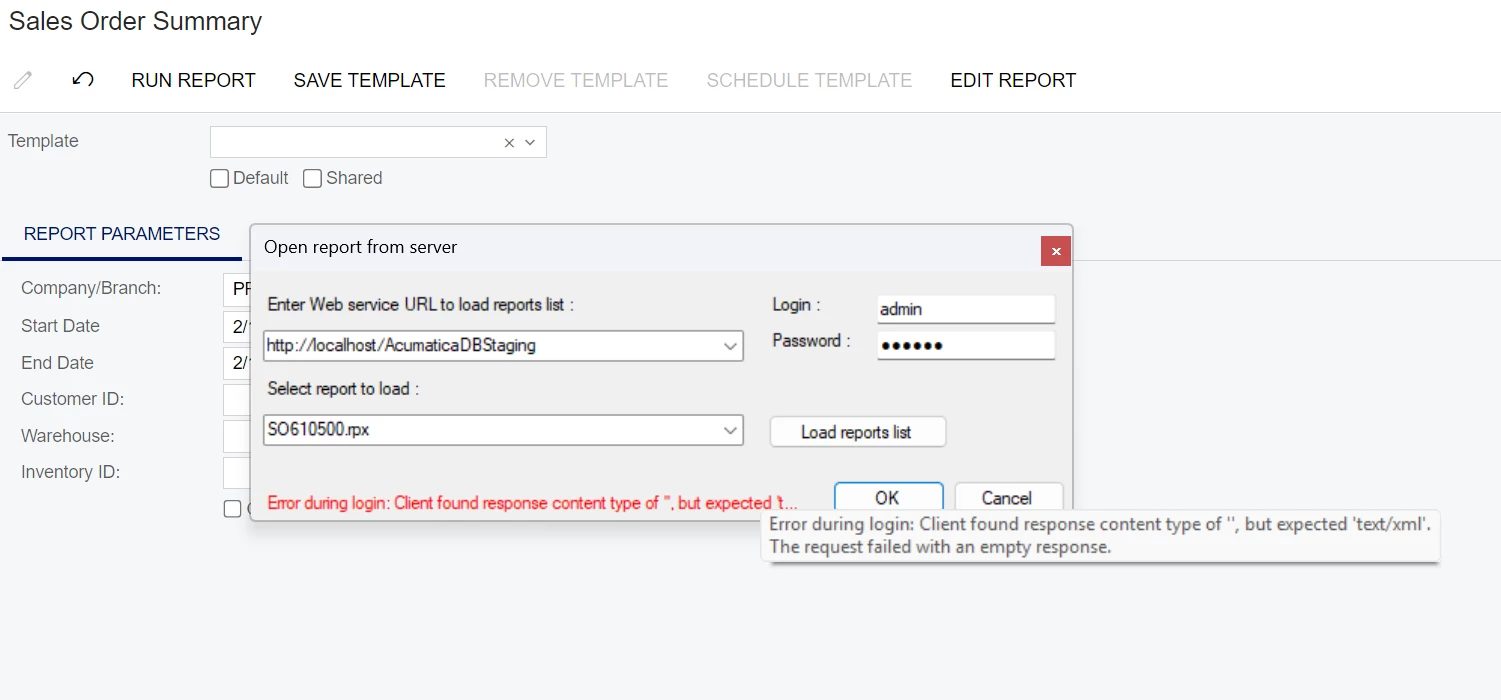
Hi, I have a problem when opening a report and creating a new report, Maybe someone knows why?

I am using report designer version 17

and acumatica version 2024 R2
 

Best answer by aryanjadhav50

Hi ​@mujib 

What I Think here is your Acumatica version and Report Designer version are not matching.

Download and install the Report Designer from your 2024 R2 instance:
Go to Help → About
Download the Report Designer for that exact build.

If it still fails:
Verify the IIS site is running
Confirm you can log into the site in a browser
Make sure you are not mixing HTTP and HTTPS.

Please let me know if its working or not.

View original

5 replies

Forum|alt.badge.img+1
  • Jr Varsity II
  • Answer
  • Feb 19, 2026 9:10 AM UTC

Hi ​@mujib 

What I Think here is your Acumatica version and Report Designer version are not matching.

Download and install the Report Designer from your 2024 R2 instance:
Go to Help → About
Download the Report Designer for that exact build.

If it still fails:
Verify the IIS site is running
Confirm you can log into the site in a browser
Make sure you are not mixing HTTP and HTTPS.

Please let me know if its working or not.

Translate

Forum|alt.badge.img+5
  • Varsity III
  • Feb 19, 2026 9:19 AM UTC

hey ​@mujib ,

In addition to what ​@aryanjadhav50 has shared, please make sure the username that you’re using has the report designer role assigned. Also if multiple tenants are there and make sure to add tenant name along with the username, for instance: username@TenantName.

Also, while trying to login, make sure to click on Load Reports List before entering any Report ID. If it still triggers the error, make sure that the username has access to the report in Acumatica.

Hope this Helps!!

Translate

DasunPerera91
Acumatica Employee
Forum|alt.badge.img+2
  • Acumatica Employee
  • Feb 19, 2026 2:15 PM UTC

Forum|alt.badge.img
  • Author
  • Freshman I
  • Feb 20, 2026 1:28 AM UTC

Hi ​@aryanjadhav50 ​@harshitasethia74 ​@DasunPerera91 Thanks for the answer, I have upgraded the report designer to the same version as Acumatica ERP and it worked👍

Translate

Forum|alt.badge.img+1
  • Jr Varsity II
  • Feb 20, 2026 11:23 AM UTC

Hi ​@aryanjadhav50 ​@harshitasethia74 ​@DasunPerera91 Thanks for the answer, I have upgraded the report designer to the same version as Acumatica ERP and it worked👍

Glad you got the solution.

Translate