Solved

Cannot get INLocation.LocationCD to be a lookup parameter on a report

  • September 23, 2021
  • 15 replies
  • 727 views
  • Translate All

Forum|alt.badge.img

The report only has one table, INLocation.  I want a parameter linked to LocationCD to be a lookup.  I cannot get that to work.  Here is my setup:
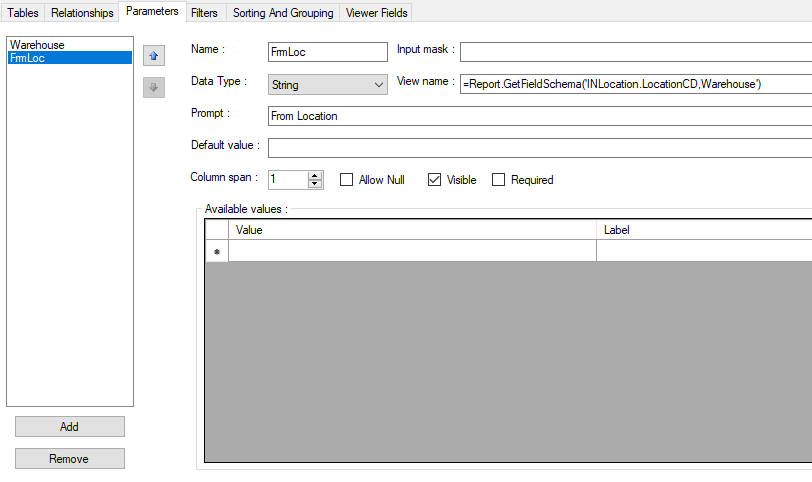
 

What are the rules for adding a lookup parameter to a report?

Best answer by Naveen Boga

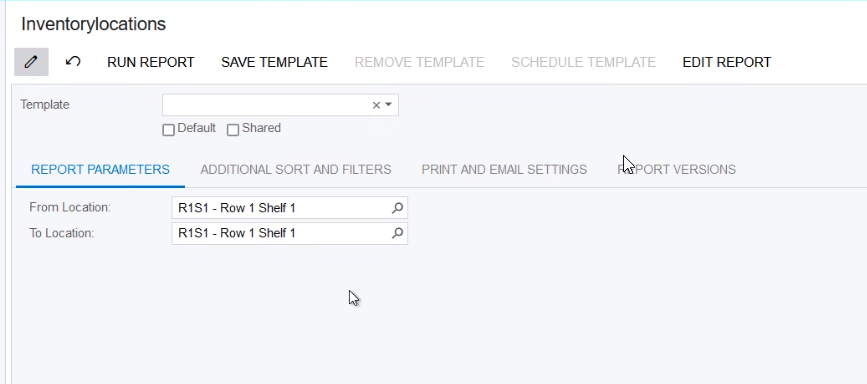
Hi @brucewarrell96  It seems Selector is NOT working with INLocation table, instead I have worked with INLocationStatus table and it is working as selector. 

Please find the attached report and screenshot. Hope this helps!!


View original

15 replies

Naveen Boga
Captain II
Forum|alt.badge.img+20

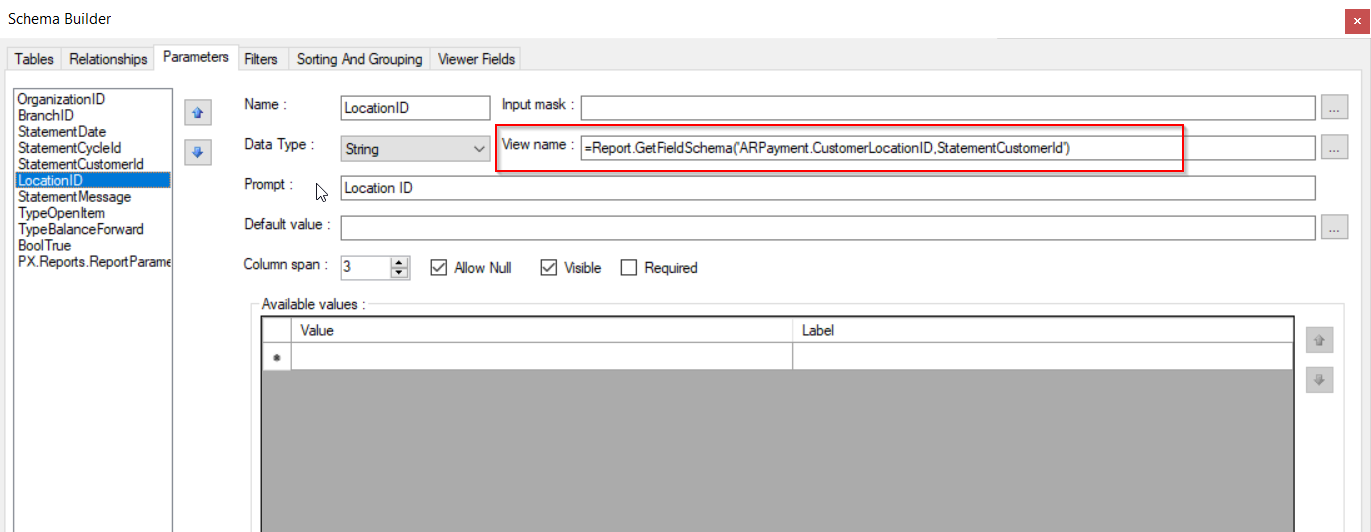
Hi @brucewarrell96  Long back I have tried like below to get the Location ID filter. Hope this helps you as well.

=Report.GetFieldSchema('ARPayment.CustomerLocationID,StatementCustomerId')


Translate

Forum|alt.badge.img

@Naveen B - my image is similar to yours but not having much luck.

Translate

Naveen Boga
Captain II
Forum|alt.badge.img+20

@brucewarrell96  Hope you have tried this way as well? 

Instead of LocationCD below, try with LocationID


=Report.GetFieldSchema('INLocation.LocationID,Warehouse')


Translate

Forum|alt.badge.img

Tried that - no luck.

Translate

Naveen Boga
Captain II
Forum|alt.badge.img+20

Hi @brucewarrell96 If possible, Can you please attach your report here.

Translate

Forum|alt.badge.img

@Naveen B  - see attached.  Thanks.

Translate

Naveen Boga
Captain II
Forum|alt.badge.img+20

@brucewarrell96  Thanks for sharing this and will look into it and let you know.

Translate

Naveen Boga
Captain II
Forum|alt.badge.img+20
  • Captain II
  • Answer
  • September 27, 2021

Hi @brucewarrell96  It seems Selector is NOT working with INLocation table, instead I have worked with INLocationStatus table and it is working as selector. 

Please find the attached report and screenshot. Hope this helps!!


Translate

Forum|alt.badge.img

Thank you.  That worked.  I didn’t need to add the table to the report.  I just added the table reference in the view field.

Translate

Naveen Boga
Captain II
Forum|alt.badge.img+20

Great News :) Thanks for sharing the update.

Translate

Any other solutions for this?  We were using the INLocationStatus table which was working fine until we upgraded to 21 R2.  Now we’re not getting any records on the Selector popup.

Translate

  • Freshman I
  • June 30, 2022

I’m having the same issue. Cannot get Location selector to populate. Used same setup as the on provided in the solution and no luck.

Translate

darylbowman
Captain II
Forum|alt.badge.img+17

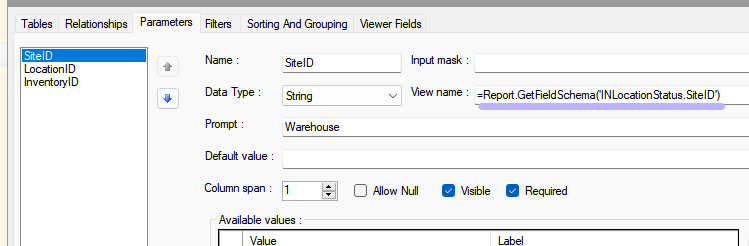
Try creating a SiteID parameter like this:


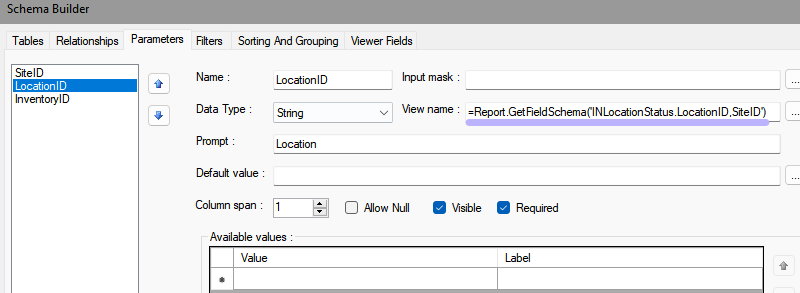
Then define the LocationID parameter like this:


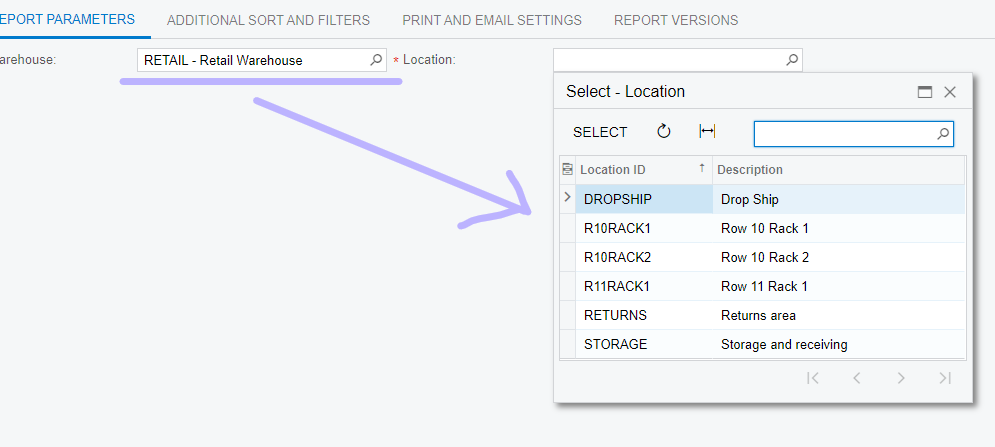
After picking the Warehouse, you should get this result:


Translate

Forum|alt.badge.img
  • Freshman II
  • December 17, 2024

Is there a list of item selectors available somewhere? I am having issues with the look up on Project ID. 

Translate

Forum|alt.badge.img+1
  • Varsity III
  • January 14, 2025

Hi, I was able to output the parameter by using =Report.GetFieldSchema('ARPayment.CustomerLocationID,CustomerID') without even declaring the table or the relationship. However, this parameter does not apply to the filter. Would anyone know if that needs to be created a table/relationship? Thank you. 

Translate