


Question

Business Event Error When Selecting Screen

  • April 21, 2026
  • 8 replies
  • 66 views

mnecaise
Varsity I
Forum|alt.badge.img

Looking to see if anyone else has come across this error in business events:
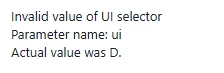
This is the first time I’ve run across it, and it shows up when I click on an existing business event, or when I try to select the screen in creating a new business event. Our current business events seem to be running without issue I just can’t access to make changes or create a new one. Our partner is opening a case with Acumatica, but I thought I’d reach out to the community as well for answers/suggestions. We’re in 24R2 with a few weeks to go before we are ready to upgrade. On a side note, the error does not occur in our 25R2 sandbox. Thanks! 

8 replies

Forum|alt.badge.img+3

@mnecaise 

This error doesn’t appear to be a common one. Could you please check the UI setting in the Site Map screen and confirm whether the configuration is correct?

Also, try restarting the application and then attempt to open the Business Event screen again.


KrunalDoshi
Varsity III
Forum|alt.badge.img+1
  • Varsity III
  • April 22, 2026

Hi ​@mnecaise,

I have seen such behavior not exactly on the BE screen but let's see on any GI or other data entry screens. This could be due to any customizations. Try unpublishing all customization or may be the related customization depends on which you may have created the BE.

Hope this helps!


Naveen Boga
Captain II
Forum|alt.badge.img+20
  • Captain II
  • April 22, 2026

Hi ​@mnecaise  While you're creating the business event, are you getting this error for all screens or only a specific one?

If it's happening for all screens, it might be related to a UI setting in the Site Map screen. If it's specific to one screen, I'd suggest checking the customizations related to that screen, try unpublishing the customization package for that screen and verify if the issue goes away.


Forum|alt.badge.img
  • Jr Varsity I
  • April 22, 2026

@mnecaise i would suggest try to unpublish the customization by selecting those GI which have customized or else create another simple GI by adding one or two tables and run the bizz events check whether error is reflecting or not if not then it is causing because of customize package.


mnecaise
Varsity I
Forum|alt.badge.img
  • Author
  • Varsity I
  • April 22, 2026

The UI appears to be correct in the site map. I have tried resetting the cache and restarting the application and still receive the same error. The error is occurring both when an existing business event is selected for viewing, and when clicking on the magnifying glass to select the screen for a new business event. I’m not even able to select a screen. We haven’t made any changes to our customizations since everything was copied over to the sandbox, so I would think if it was customization related, we would be running into the issue in both instances, not just in live. 


KrunalDoshi
Varsity III
Forum|alt.badge.img+1
  • Varsity III
  • April 22, 2026

The UI appears to be correct in the site map. I have tried resetting the cache and restarting the application and still receive the same error. The error is occurring both when an existing business event is selected for viewing, and when clicking on the magnifying glass to select the screen for a new business event. I’m not even able to select a screen. We haven’t made any changes to our customizations since everything was copied over to the sandbox, so I would think if it was customization related, we would be running into the issue in both instances, not just in live. 

I would suggest publishing the customization with cleanup once since it is sandbox copied over from live. That should resolve the issue.


mohammadnawaz51
Jr Varsity II
Forum|alt.badge.img+6

@mnecaise 


Sometimes when opening a Business Event, it may throw an error if there is an issue with the Generic Inquiry (GI) linked to it.

Could you please check if there are any errors when you try to view the associated GI?

Let me know what you find.


mnecaise
Varsity I
Forum|alt.badge.img
  • Author
  • Varsity I
  • April 23, 2026

@mohammadnawaz51 unfortunately it isn’t the GI. The error is thrown before a GI can even be selected.




