Question

Blank Report Attached in Email Template Notification via Business Event

  • September 24, 2025
  • 16 replies
  • 322 views
  • Translate All

Dipak Nilkanth
Pro III
Forum|alt.badge.img+14

Hello Community, 

I created a new custom report to display payment details. The report runs correctly from the Report screen when I provide the parameters DocType and RefNbr of the payment.

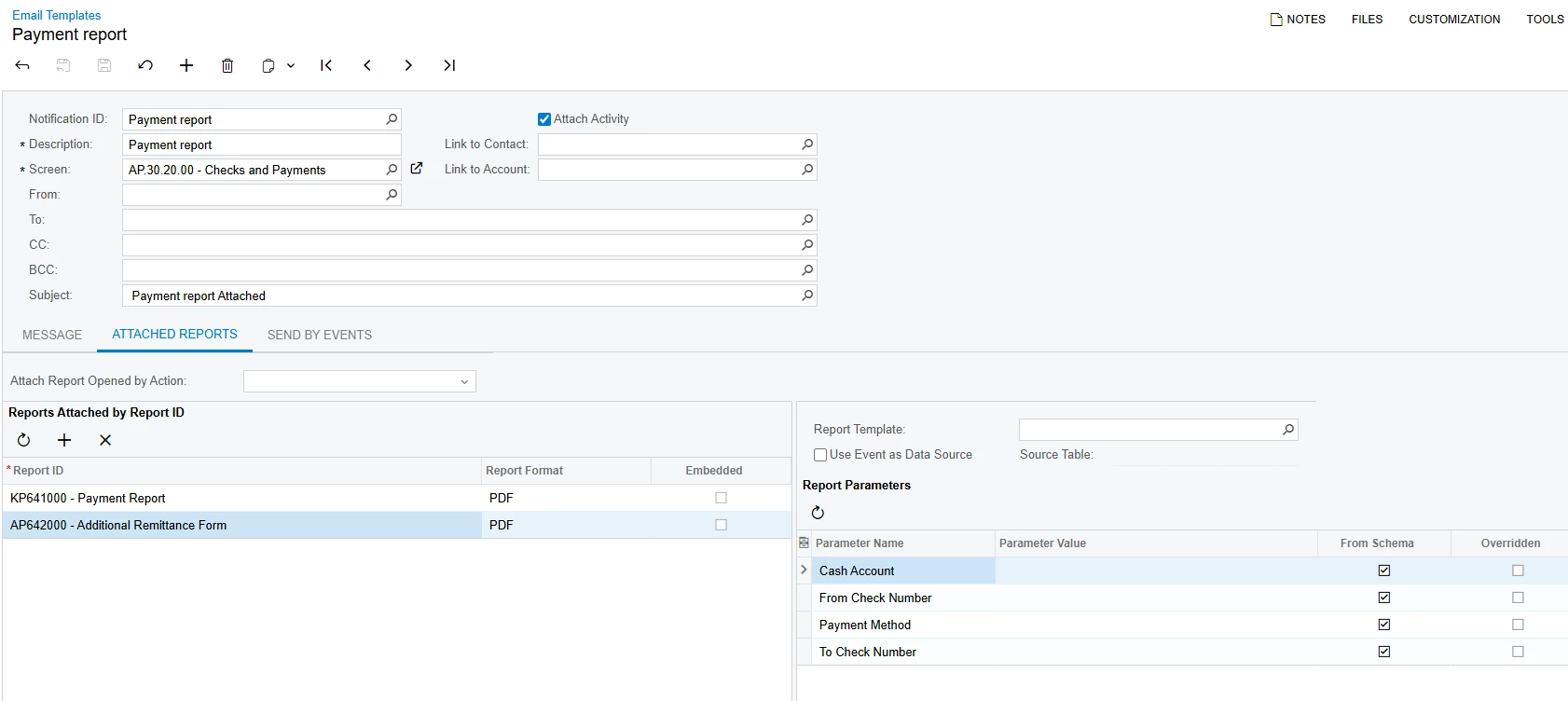
To automate this after releasing a payment, I created a Business Event and added an Email Template subscriber. In the Email Templates screen, I attached my custom report with the parameters defined.

However, when the Business Event triggers and sends the email, the attached report is always blank. I have tried both enabling and disabling the “Use Event as Data Source” option, but the result is the same.

Steps to Reproduce:

  1. Create a custom report that takes DocType and RefNbr as parameters (works fine when run directly).

  2. Create a Business Event triggered after releasing a payment.

  3. Add an Email Template as a subscriber.

  4. Attach the custom report in the Email Template with required parameters.

  5. Trigger the event → The email is sent but the attached report is blank.

    Is there anything I need to change here ?


Could someone please guide me on how to properly configure the parameters or data source so that the report generates correctly when triggered through a Business Event?

16 replies

lauraj46
Captain II
Forum|alt.badge.img+9
  • Captain II
  • September 24, 2025

Hi ​@DipakNilkanth ,

Could the timing be such that the business event fires before the payment has been released?  You might review the trigger conditions and also check the conditions on the report schema. 

I would also recommend checking the Business Event History to see if there are any errors related to the report generation.

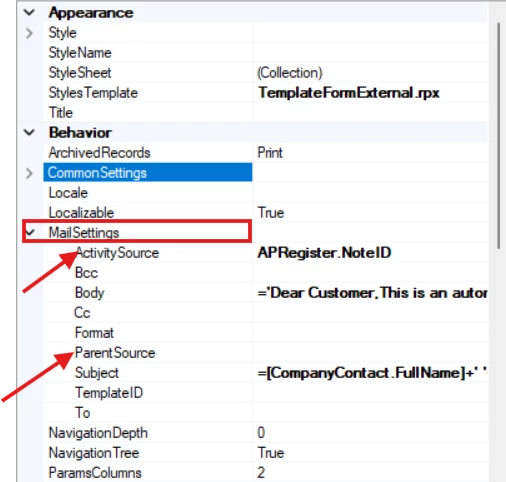
I don’t believe that the ActivitySource or ParentSource should have any impact. 

Hope this helps!

Laura

Translate

Dipak Nilkanth
Pro III
Forum|alt.badge.img+14

Hi ​@lauraj46, thanks for your valuable insights on this.

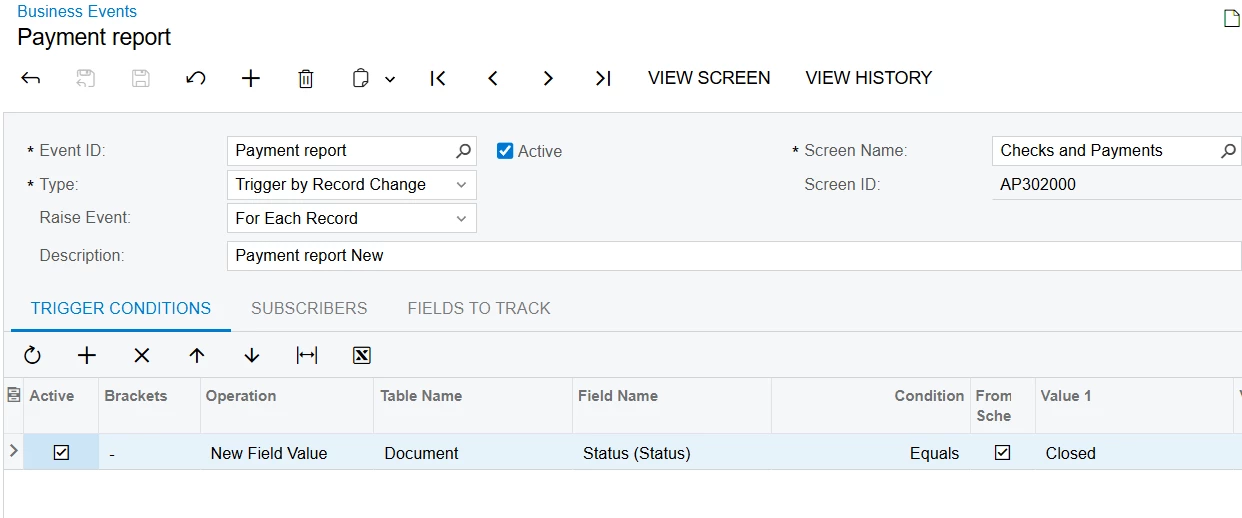
I have set the Business Event trigger condition to Status = Closed (after releasing the payment, the status becomes Closed). The Business Event is triggering correctly after the status changes.
 

BE

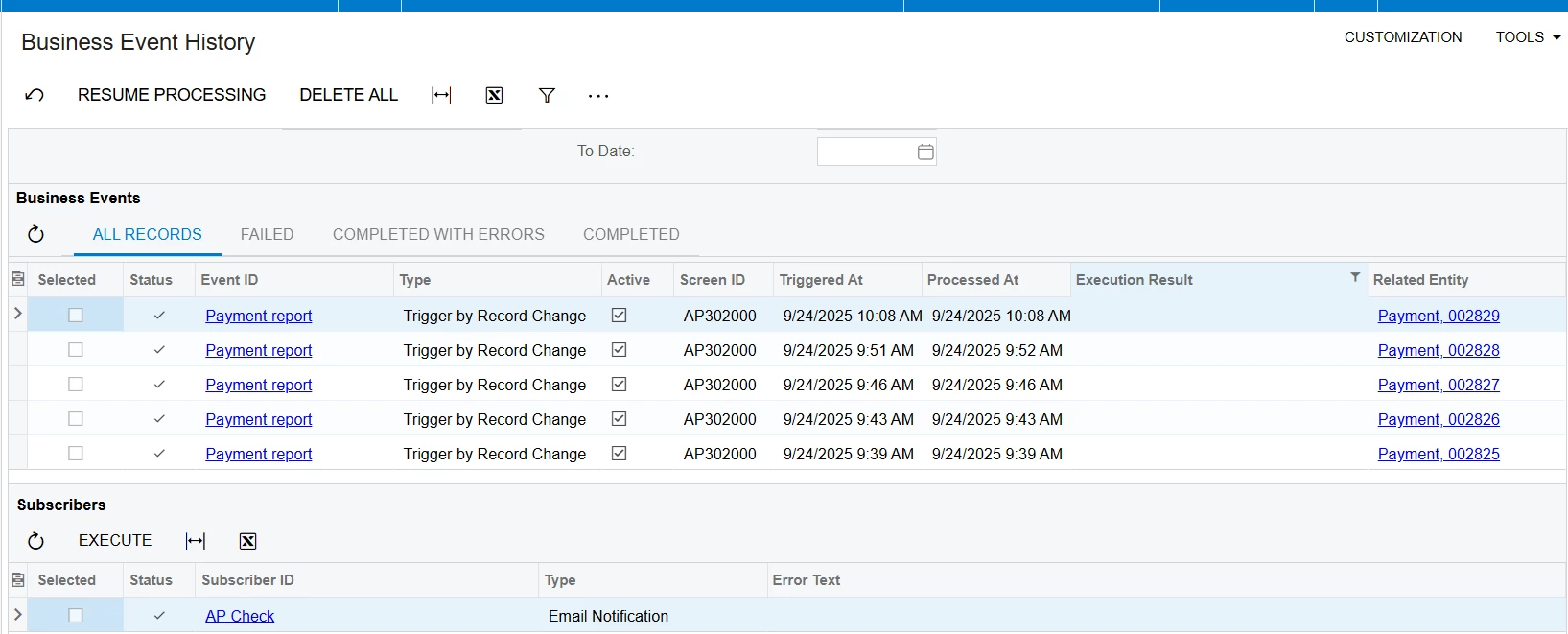
I also checked the Business Event history, and there are no issues there as well.
 

BE History
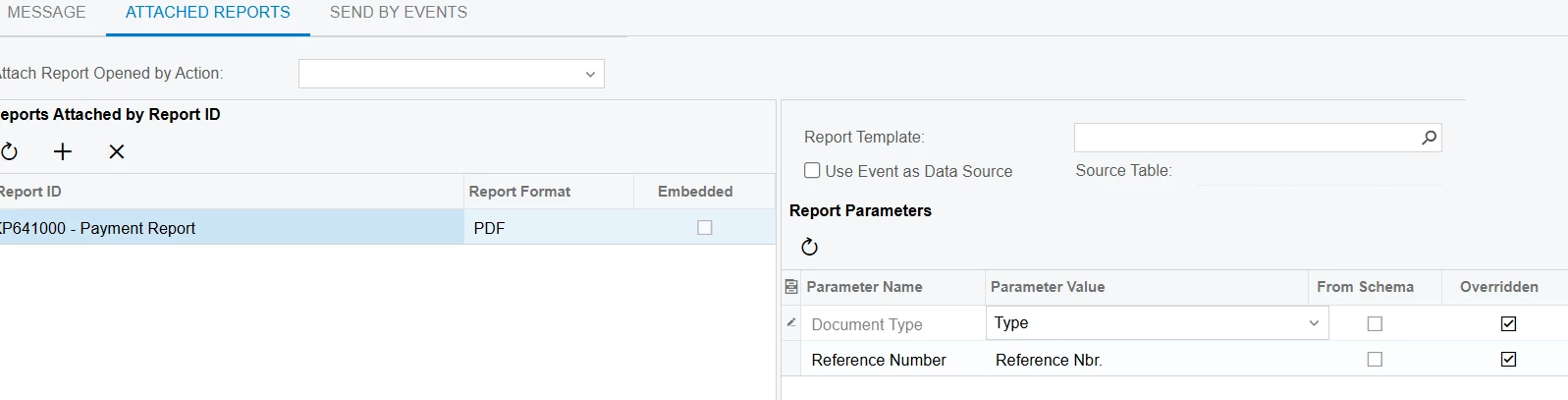
Report parameters


Translate

lauraj46
Captain II
Forum|alt.badge.img+9
  • Captain II
  • September 25, 2025

Hi ​@DipakNilkanth,

Are there any filters on your report related to the payment status?

Laura

Translate

Dipak Nilkanth
Pro III
Forum|alt.badge.img+14

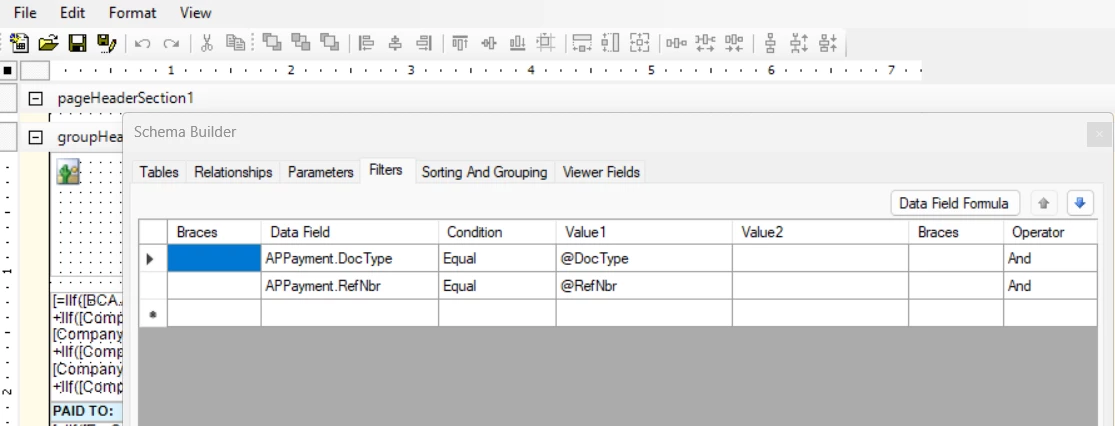
​@lauraj46, Nope. its pretty simple , filtered with DocType and RefNbr.


Translate

lauraj46
Captain II
Forum|alt.badge.img+9
  • Captain II
  • September 25, 2025

Hmmm… in that case I’m not sure.  Maybe one of the other experts on this site some thoughts.

Translate

jhouser
Captain II
Forum|alt.badge.img+7
  • Captain II
  • September 25, 2025

Hi ​@DipakNilkanth For what it’s worth, I’ve done this successfully with the Additional Remittance Form. I left Parameter Values empty. Also, my Mail Settings in the report are empty. You might try with that report and if it works, compare for differences? 

Translate

Dipak Nilkanth
Pro III
Forum|alt.badge.img+14

Hi ​@jhouser,

I have attached my custom report here. Could you please try adding it to your Email Template and confirm if it works on your side?

I also tested with the additional Remittance form, but unfortunately had no luck.

Translate

jhouser
Captain II
Forum|alt.badge.img+7
  • Captain II
  • September 25, 2025

Sounds like the issue is not specific to the custom report. Can you send a screenshot with the ATACHED REPORTS settings for Additional Remittance Form where it didn't work?

Also, do you have any restriction groups active for vendors?

Translate

Dipak Nilkanth
Pro III
Forum|alt.badge.img+14

Hi ​@jhouser,

Below is the configuration I am using for ATACHED REPORTS settings for the Email templates.


Translate

jhouser
Captain II
Forum|alt.badge.img+7
  • Captain II
  • September 26, 2025

​@DipakNilkanth I have Use Event as Data Source selected and APPayment as the source table. 

Do you have any active vendor restriction groups?

Translate

Dipak Nilkanth
Pro III
Forum|alt.badge.img+14

​@DipakNilkanth I have Use Event as Data Source selected and APPayment as the source table. 

Do you have any active vendor restriction groups?

Hi ​@jhouser, I tried both with Selected/UnSelected the DataSource as APPayment.
No, I do not have  nay vendor Restriction groups, I am working on Sales demo data.
 

Translate

Chris Hackett
Community Manager
Forum|alt.badge.img
  • Acumatica Community Manager
  • November 5, 2025

Hi ​@DipakNilkanth were you able to find a solution? Thank you!

Translate

Dipak Nilkanth
Pro III
Forum|alt.badge.img+14

Hi ​@Chris Hackett, Unfortunately, I was not able to find a solution for this issue.

Translate

Forum|alt.badge.img
  • Varsity I
  • May 20, 2026

is this still open? i have the same issue?

Translate

Forum|alt.badge.img
  • Jr Varsity II
  • June 16, 2026

I am also having the same issue if someone found the solution it would be great if it could be posted.

Translate

jhouser
Captain II
Forum|alt.badge.img+7
  • Captain II
  • October 13, 2026

I just encountered this issue in 26R1. Solution was to select Parameter Values instead of using From Schema. 

Translate