

Answer

Barcodes cannot be scanned

  • September 4, 2024
  • 4 replies
  • 157 views

Forum|alt.badge.img+5

Hello.

We are having issues with barcodes generated from Report Designer.

While we are able to scan these barcodes locally, the client cannot consistently scan them.

For instance, on the production order form, they can scan some, but not others.

And in General, the barcodes being printed are not crisp and clean.

The client does not like the aesthetics of these slightly blurry barcodes.

We have played with all of the barcode settings.  The image below is not the current settings, I am just including it here to show where we have been working.
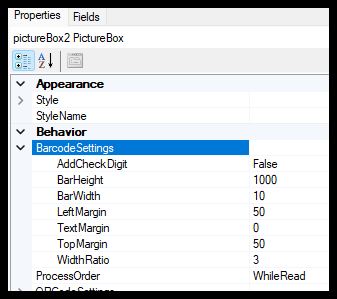
 

Are there any other settings/properties in Report Designer that could allow us to improve the quality of the barcodes being printed?

Best answer by ltussing03

It turns out it is the size of the value they are trying to represent as a barcode and the size of the stock they are printing on.  Simply a limitation of Report Designer.

4 replies

Forum|alt.badge.img+1
  • Varsity I
  • September 4, 2024

Good morning @ltussing03 

Barcodes…they are nice in theory but working with them in Report Designer isn’t always fun.

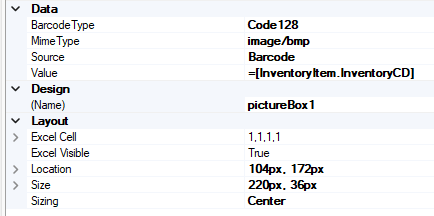
Things I’ve found that impact the usability of the barcode are the Type and the Scale.

Below are settings for a barcode I added to a report. I hope this helps.


Forum|alt.badge.img+5
  • Author
  • Captain II
  • September 4, 2024

Thanks for the response.

Unfortunately, we have been playing with all of these already and were looking for something we hadn’t tried.  I do appreciate you taking the time to respond.


Forum|alt.badge.img+5
  • Author
  • Captain II
  • Answer
  • September 8, 2024

It turns out it is the size of the value they are trying to represent as a barcode and the size of the stock they are printing on.  Simply a limitation of Report Designer.


Chris Hackett
Community Manager
Forum|alt.badge.img
  • Acumatica Community Manager
  • September 9, 2024

Thank you for sharing your solution with the community @ltussing03!
