


Answer

Assistance with Label Generation for Kit Creation in Acumatica

  • December 28, 2024
  • 2 replies
  • 71 views

adriangavino45
Freshman I
Forum|alt.badge.img

Hello!

I am reaching out to seek your expertise on addressing a customer requirement. The customer operates within the Acumatica SaaS environment and creates kits directly from the (Kit Assembly - IN307000) screen. These kits are controlled by lot number, and the process involves using the Acumatica app to handle the entire pick, pack, and ship workflow.

A key requirement is to generate labels for the kits at the time of their creation. For instance, if 20 kits are created, the system needs to generate 20 corresponding labels, one for each kit.
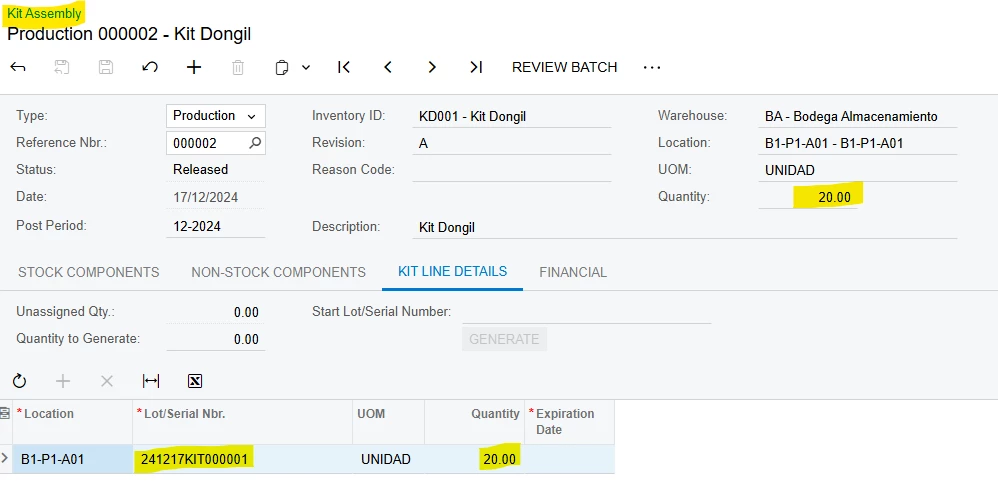


I am encountering a challenge with generating labels for a kit product because the quantity and product information are located in the document header. Specifically, I need to generate detailed labels for each kit (e.g., 20 labels for a quantity of 20 kits) based on this information.

Could you advise on the best approach to achieve this in Acumatica Report Designer? Are there specific techniques or configurations that would allow me to replicate the label generation for the quantity specified in the header?

Thank you in advance for your assistance!

Happy new year!

Best regards,

Best answer by lauraj46

Hi ​@adriangavino45 ,

To print multiple copies of a label based on the kit header quantity, you could use this trick that involves a cross join with the DateInfo table:

LinkedIn · Laura Jaffe
20+ reactions · 3 years ago
Acumatica Tips and Tricks - How to print multiple product labels based on a line …

Hope this helps!

Laura 

2 replies

lauraj46
Captain II
Forum|alt.badge.img+8
  • Captain II
  • Answer
  • December 28, 2024

Hi ​@adriangavino45 ,

To print multiple copies of a label based on the kit header quantity, you could use this trick that involves a cross join with the DateInfo table:

LinkedIn · Laura Jaffe
20+ reactions · 3 years ago
Acumatica Tips and Tricks - How to print multiple product labels based on a line …

Hope this helps!

Laura 


adriangavino45
Freshman I
Forum|alt.badge.img
  • Author
  • Freshman I
  • December 29, 2024

Hi ​@lauraj46,

I truly appreciate the content of the LinkedIn article. It was clear, concise, and effectively helped me solve the problem.

Excellent contribution!

Thank you!

Regards.
