Answer

AR Aging Report without parent or children accounts

  • April 18, 2025
  • 2 replies
  • 66 views

dominicpolicicchio03
Freshman I
Forum|alt.badge.img

Hello.

I’m trying to create a copy of or modify the AR Aging report. It needs to be run by salesperson but should not include any customers that ARE or HAVE parent accounts. That is, excluding any parent accounts and children accounts. I know I can simply add a parameter to run the report by salesperson, but I am having trouble finding a way to exclude the parent/child accounts.

I think I can remove children accounts as those customer IDs are hyphenated so I plan to filter out all customers including a “-.” However, there doesn’t appear to be any fields in the customer DAC that identify if an account is a parent such as “isparent” etc.

Does anyone have any ideas for this? Thanks in advance!


Best answer by Ankita Tayana

Hello ​@dominicpolicicchio03,

If a customer is a child account then ParentBAccountID is not null. However, there doesn’t appear to be any fields in the customer DAC that identify if an account is a parent, so for that you can create User Defined field to state “isparent” and that can be used in Report condition.
 

Hope this helps!

2 replies

Forum|alt.badge.img+5
  • Jr Varsity I
  • Answer
  • April 19, 2025

Hello ​@dominicpolicicchio03,

If a customer is a child account then ParentBAccountID is not null. However, there doesn’t appear to be any fields in the customer DAC that identify if an account is a parent, so for that you can create User Defined field to state “isparent” and that can be used in Report condition.
 

Hope this helps!


nhatnghetinh
Captain II
Forum|alt.badge.img+11
  • Captain II
  • April 20, 2025

Hi ​@dominicpolicicchio03 

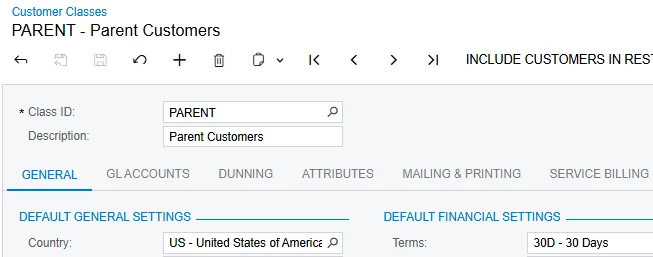
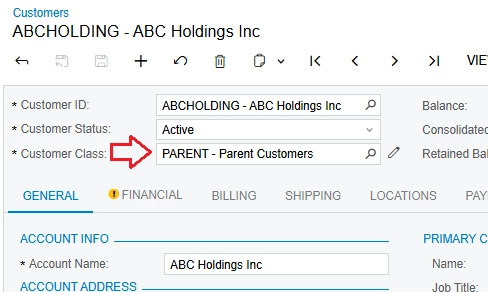
Please create Customer Class as "PARENT". Then select "PARENT" Customer Class with customers in this group.

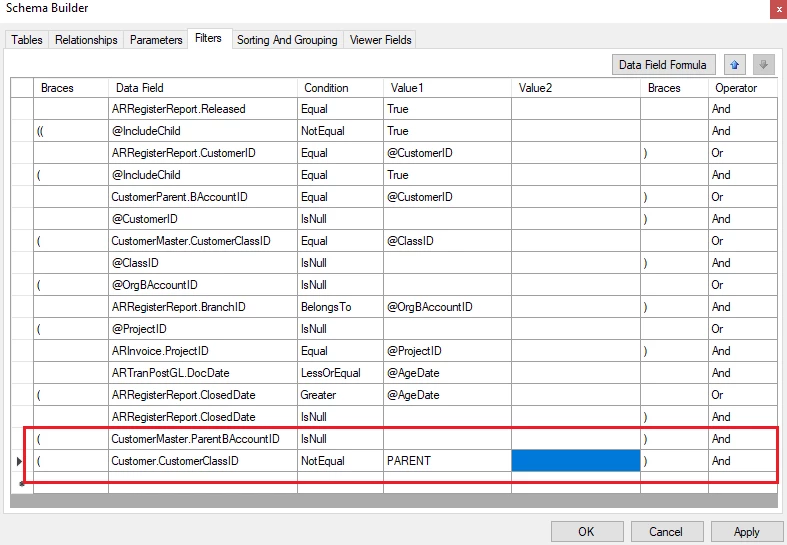
On Report Designer, join Customer (AR.Customer) DAC


Create Filter to exclude Parent Accounts & Children Accounts.


Best Regards,

NNT