

Solved

Allow users to ignore 1000 record Excel export limit from inquiry.

  • July 7, 2022
  • 4 replies
  • 1093 views
  • Translate All

meagan59
Semi-Pro I
Forum|alt.badge.img

Is there a setting or access right that can be set to allow users other than Admin to ignore the Excel export limit of 1000 records?

Best answer by vkumar

Hi @meagan59 

The export limit can be set at GI level as per my understanding, can you try increase the limit at GI level?
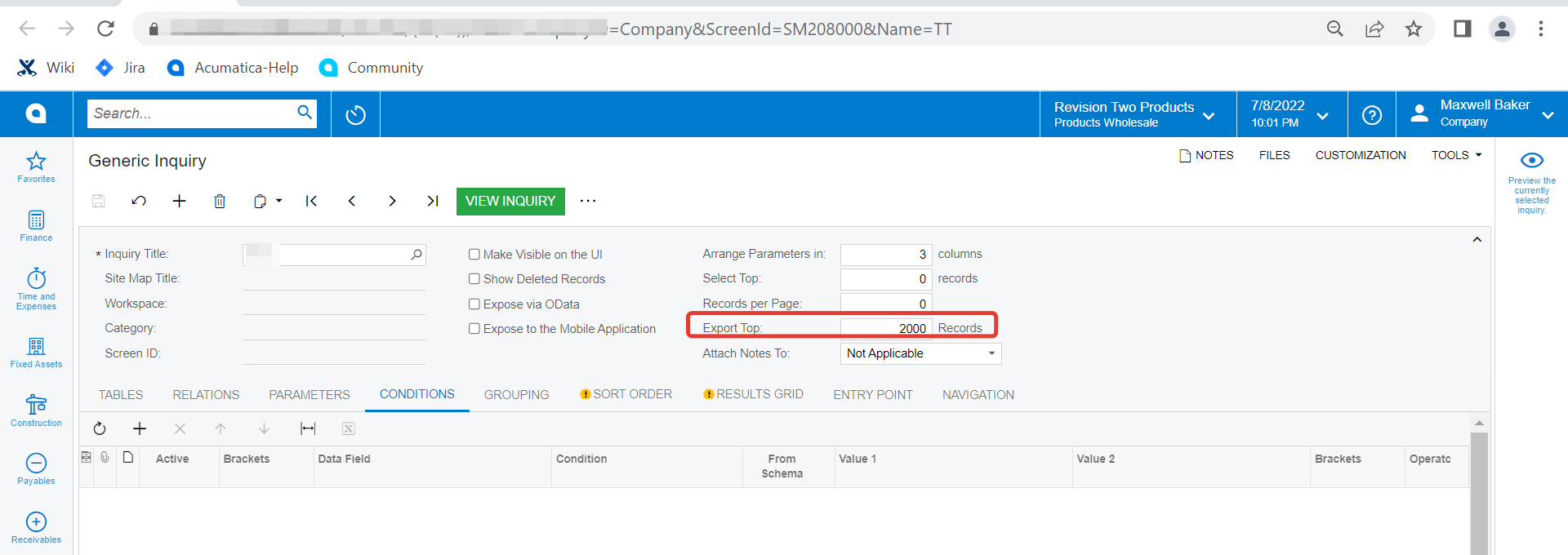
Let me know if this helps.

Regards

 

View original

4 replies

Kandy Beatty
Captain II
Forum|alt.badge.img+18

HI @meagan59 

What types of records are you trying to export? This is pretty standard Acumatica behavior because anything over 1000 records slows down the system. 

Are you saying that only users with admin rights can Ignore to export over 1000?

Translate

meagan59
Semi-Pro I
Forum|alt.badge.img

I understand that the 1000 records is limited for a reason; however, I need to allow certain users to export inquiries for required business processes.

In my experience, only users with the Admin role get the pop up box to select ‘Ignore’ the 1000 record limit. Users with standard roles just get a pop up that says the export exceeds the limit, but no options.

Translate

Forum|alt.badge.img+12
  • Acumatica Support Team
  • Answer
  • July 9, 2022

Hi @meagan59 

The export limit can be set at GI level as per my understanding, can you try increase the limit at GI level?

Let me know if this helps.

Regards


Translate

Kandy Beatty
Captain II
Forum|alt.badge.img+18

@vkumar  


Thank you! I looked for that and completely missed it! That is so helpful to know. 

Translate

