Answer

Add Table Layout in Report Designer

  • August 21, 2025
  • 5 replies
  • 74 views

Hi,

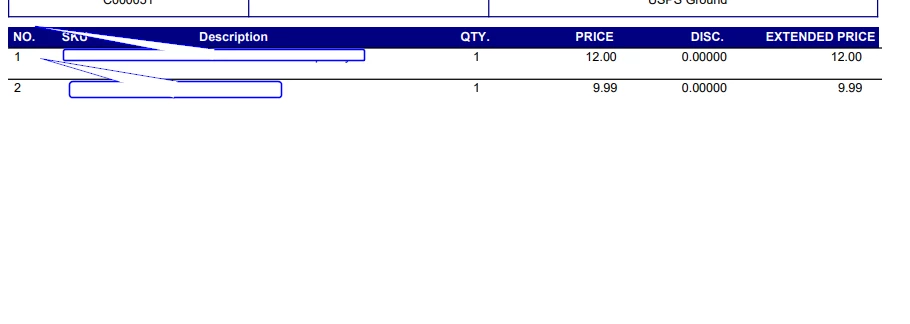
We have a customer who added many customizations to the Submittal form, one of which is that they can add Stock Items to the Submittal. On the Submittal report, they want to list each Stock Item in a table design. Our issue with the table design is that the vertical lines don’t automatically adjust when a Stock Item has a long description, which leads to gaps in between the lines. Is there a way to format the vertical lines in a way that they adjust in height automatically based on the height of the row? Or is there an alternative design feature we can use (instead of lines)?

Thank you.
Best answer by DrewNisley

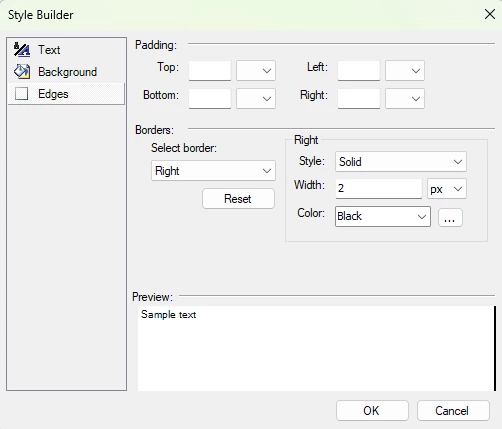
@cmartin02 It might take some trial and error, but you might be able to get away with an edge on the actual text box itself. It should match the size of the text box. Just match the same width as your other lines


5 replies

Forum|alt.badge.img
  • Varsity I
  • August 24, 2025

I am a bit aware of the report designer limitations. However, to try it one of more time may be try using a panel and put the lines inside this panel.

I am not 100 percent sure but you may try this.


Manikanta Dhulipudi
Captain II
Forum|alt.badge.img+15

@cmartin02 Due to Limitation we are able to complete the layout as shown below.


DrewNisley
Pro I
Forum|alt.badge.img+3
  • Pro I
  • Answer
  • August 25, 2025

@cmartin02 It might take some trial and error, but you might be able to get away with an edge on the actual text box itself. It should match the size of the text box. Just match the same width as your other lines


  • Author
  • Freshman I
  • September 5, 2025

Hi ​@DrewNisley, thank you for the response. Do you have a workaround for images as well?

Our customer also wants to display images in the table. The images will always be the same size but the row might still grow based on the text that’s in a different column of the row with an Image.


DrewNisley
Pro I
Forum|alt.badge.img+3
  • Pro I
  • September 8, 2025

@cmartin02 I would try using a panel and placing both the image and the textbox in the panel. Make the text box the same height as the panel and create your vertical lines using the edge of the text box and the horizontal lines using the edge of the panel. I believe the panel should grow if the text box grows.