

Answer

Add line numbers into GI

  • June 26, 2023
  • 5 replies
  • 452 views

I need to add new field “Line” into Generic Inquiry to display line numbers as 1,2,3,4… Is there anyone who did this kind of customization before?

Best answer by npace29

Hello,


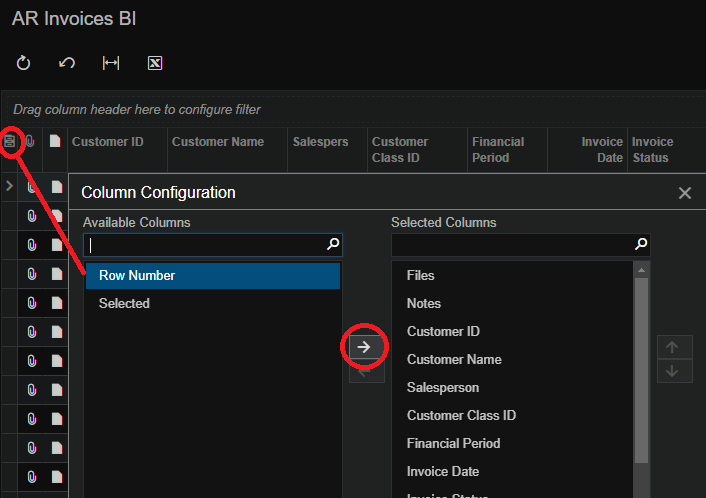
If you would like to show the row number in the generic inquiry, simply run the generic inquiry and click the ‘Column Configuration’ icon, and you should be able to find the ‘Row Number’ column available. You may then add it to the generic inquiry results.


Hope this helps


Nigel Pace

5 replies

Forum|alt.badge.img+1
  • Varsity I
  • Answer
  • June 26, 2023

Hello,


If you would like to show the row number in the generic inquiry, simply run the generic inquiry and click the ‘Column Configuration’ icon, and you should be able to find the ‘Row Number’ column available. You may then add it to the generic inquiry results.


Hope this helps


Nigel Pace


Forum|alt.badge.img+1
  • Semi-Pro II
  • May 8, 2024

Is something similar available that can be used for Dashboards?


Forum|alt.badge.img+1
  • Varsity I
  • May 8, 2024

Is something similar available that can be used for Dashboards?

How would you like to use line numbers in dashboards please? Can you provide an example perhaps?


  • Freshman II
  • March 5, 2025

The row number is not available in a widget on a dashboard


  • July 7, 2025

@npace29 Is there anyway to use the row number as the key field in a import scenario? given the GI is your data provider and there is no other key field to use to identify when to add another line.