Solved

Acumatica Report Designer Templates

  • May 12, 2026
  • 6 replies
  • 72 views

jacob14
Freshman I
Forum|alt.badge.img

I have a question about Report Designer templates.  It can be very time consuming to create a new report from scratch.  I’d like to be able to better utilize the templates that are already built inside Acumatica.  But, it’s hard for me to quickly scroll through them to get a feel for what the design and layout look like, without already being familiar with the report.  Does something exist where you can see images of the prebuilt Acumatica Report designs along with a reference to the specific report number? This would decrease the time of report design immensely.  

Best answer by Naveen Boga

@jacob14  Unfortunately, there is no official Acumatica “report gallery” that shows thumbnail previews/screenshots of all standard report layouts mapped to report IDs. That would absolutely be useful for speeding up report design work.

However, there are a few approaches that experienced Acumatica developers use to solve this problem.

Acumatica ships with hundreds of built-in RPX reports that you can open and inspect in the Acumatica Report Designer.

Typical examples:

  • AR641000 → Invoice/Memo
  • SO641000 → Sales Order
  • PO641000 → Purchase Order
  • PM624000 → Project Profitability
  • AP621500 → AP Register

Many developers copy an existing report that is visually close to what they need instead of starting from scratch.

6 replies

Naveen Boga
Captain II
Forum|alt.badge.img+20
  • Captain II
  • Answer
  • May 12, 2026

@jacob14  Unfortunately, there is no official Acumatica “report gallery” that shows thumbnail previews/screenshots of all standard report layouts mapped to report IDs. That would absolutely be useful for speeding up report design work.

However, there are a few approaches that experienced Acumatica developers use to solve this problem.

Acumatica ships with hundreds of built-in RPX reports that you can open and inspect in the Acumatica Report Designer.

Typical examples:

  • AR641000 → Invoice/Memo
  • SO641000 → Sales Order
  • PO641000 → Purchase Order
  • PM624000 → Project Profitability
  • AP621500 → AP Register

Many developers copy an existing report that is visually close to what they need instead of starting from scratch.



nhatnghetinh
Captain II
Forum|alt.badge.img+13

Hi ​@jacob14 

You can use Acumatica's existing reports as templates to create your new report. Alternatively, you can create a new Report Designer and use it as a template for easy reuse. To do this, you need basic knowledge of Acumatica Report Designer.

Take this free course from Acumatica: https://openuni.acumatica.com/courses/reporting/s150-reporting-report-designer/


Best Regards,

NNT


KrunalDoshi
Varsity III
Forum|alt.badge.img+1
  • Varsity III
  • May 12, 2026

Hi ​@jacob14,

You are right, there is no such report template exists in Acumatica which you can utilize, that will definitely save time. Although, you can always suggest something like in Acumatica Product Idea page. However, you can create one for yourselves as per your requirements.

I would suggest creating one and mainly follow below steps in order.

  1. Open Report Designer, Connect to your Acumatica instance and add necessary DAC
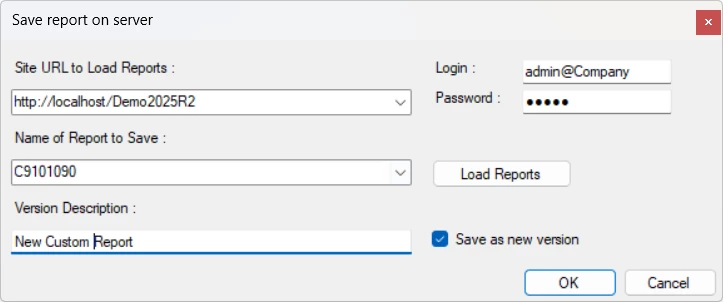
  2. Save the report to your Acumatica instance. Provide the Screen ID and make sure you do not overwrite any existing. (Refer to Site Map for any existing Screen IDs)

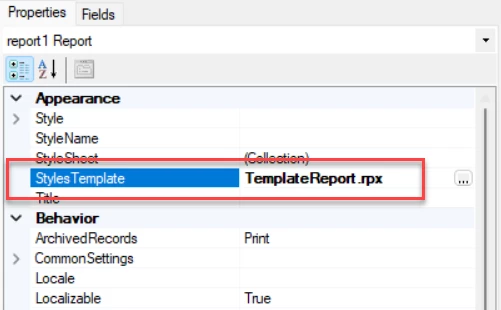
  3. Set the report StylesTemplate property to TemplateReport.rpx

  4. After that you can set all DAC relations, groups and sort for the report in Schema Builder dialog box. 

  5. Once completing all of the above steps, you can technically design your report.
  6. You can always copy paste certain things such as report logo, date/time, page number, page header, etc. and refer to any existing report.

I can understand that this is little time-consuming tasks, but I believe it is the cleanest way for creating any custom report without any issues later. Each report requires different DAC and its design.

Let me know if you have any questions.

Hope this helps!


jacob14
Freshman I
Forum|alt.badge.img
  • Author
  • Freshman I
  • May 12, 2026

@Naveen Boga ​@KrunalDoshi
Thank you for your answers they are all great, but none were the answers I was hoping for.  I already have basic to intermediate understanding of report designer.  The issue at hand is building upon the work that Acumatica has already done and not having to start from scratch.  I will submit this as a product idea.  It seems to me that this could be low hanging fruit for the Acumatica team to build a report gallery, and this could be extremely helpful for many Acumatica users.  Naveen thank you for calling out 5 report staples, I will check those out.


jacob14
Freshman I
Forum|alt.badge.img
  • Author
  • Freshman I
  • May 12, 2026

Please upvote this idea on the Product Idea page if you would also find this helpful.


Naveen Boga
Captain II
Forum|alt.badge.img+20
  • Captain II
  • May 12, 2026

@jacob14  That makes perfect sense, and I completely agree with your point. Having a visual report gallery with screenshots/previews tied to report IDs would be extremely valuable, especially when trying to leverage existing Acumatica report designs instead of starting from scratch each time.

I think this would help not only developers, but also consultants and power users who are trying to quickly identify reusable report layouts. It definitely feels like a feature that could provide a lot of value with relatively low implementation effort from the Acumatica side.

Thanks for creating the Product Idea. I could see a lot of people supporting that request.