Answer

2025R1 upgrade, now I can't log into Report Designer

  • September 17, 2025
  • 8 replies
  • 149 views

Forum|alt.badge.img

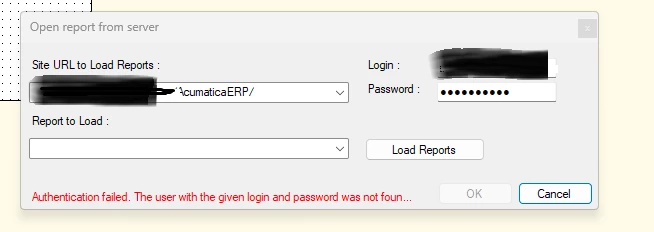
We went from 2023R2 to 2025R1 (25.101.0153).  I had a request to check a report parameter, but I am getting ‘Authentication Failed.  The user with the given login and password was not found in the system.’ when I attempt to open Report Designer.

  • Upgraded Report Designer with the 2025R1 Acumatica Tools.
  • Verified my user(s) have Report Designer Role
  • My Site URL didn’t change.
  • The user name and password did not change and work in Acumatica.
  • I switched my URL to my local sandbox with the same results.

Any guidance?

Best answer by adaughenbaugh95

I’m a silly goose.

We removed the test tenant from the server before the upgrade, and Report designer appears to not require the @tenant after the user name.

8 replies

mblassingame35
Semi-Pro II
Forum|alt.badge.img+3

Try opening the report directly in Report Designer and not through Acumatica → Edit Report.


Forum|alt.badge.img

Try opening the report directly in Report Designer and not through Acumatica → Edit Report.


That’s the process I’ve always done - Open Report Designer → Open From Server →  Enter URL, login, password, Click Load Reports and select report from dropdown.

It fails on Load Reports, or if I select the desired report.


Forum|alt.badge.img
  • Captain I
  • September 17, 2025

Hi ​@adaughenbaugh95,


This was tricky with the new version of Report Designer. What I found was it was still defaulting to open in the old version I had on my computer. I would go into your Control Panel on your computer and un-install any and all Report Designer instances you see. Then I would go into your files on your computer, usually under Local Disk> Program Files is where it auto-saves (unless you saved the Acumatica Tools in a different location), and I would delete any and all Acumatica Tools files you have. 


Then go back into the Builds for Acumatica and install Report Designer. It took me a while too, and my computer did not know which version to open so it would throw that error. Once I deleted and un-installed everything from my computer, and re-downloaded, it worked for me.


Forum|alt.badge.img

Hi ​@adaughenbaugh95,


This was tricky with the new version of Report Designer. What I found was it was still defaulting to open in the old version I had on my computer. I would go into your Control Panel on your computer and un-install any and all Report Designer instances you see. Then I would go into your files on your computer, usually under Local Disk> Program Files is where it auto-saves (unless you saved the Acumatica Tools in a different location), and I would delete any and all Acumatica Tools files you have. 


Then go back into the Builds for Acumatica and install Report Designer. It took me a while too, and my computer did not know which version to open so it would throw that error. Once I deleted and un-installed everything from my computer, and re-downloaded, it worked for me.

I’m glad I wasn’t the only one to have this problem.  I do not have a Report Designer showing in Control Panel or Add/Remove programs.  I only see Acumatica Tools 2025 R1, which I have uninstalled and reinstalled.  Still no luck.  I may try a uninstall/reboot/reinstall and cross my fingers.


Forum|alt.badge.img
  • Captain I
  • September 17, 2025

Hi ​@adaughenbaugh95 

Did you delete the Acumatica Tools files in your Program Files also?


Forum|alt.badge.img

Hi ​@adaughenbaugh95 

Did you delete the Acumatica Tools files in your Program Files also?

Yes, sorry if I didn’t make that clear.  


Forum|alt.badge.img
  • Author
  • Varsity I
  • Answer
  • September 17, 2025

I’m a silly goose.

We removed the test tenant from the server before the upgrade, and Report designer appears to not require the @tenant after the user name.


Forum|alt.badge.img
  • Captain I
  • September 17, 2025

@adaughenbaugh95 ,


Makes sense; however, it will require the @Tenant if the instance has multiple tenants. This way you can specify which tenant gets the new version.