Answer

Greetings on Payslip

  • May 21, 2025
  • 9 replies
  • 126 views


Good morning


I'm sure this will be an easy fix, but I can't seem to find it.


Our payslips currently go out addressed as below....


Dear SURNAME, First name


I would prefer it to show as 


Dear First Name, 


is this possible?


thanks

Best answer by ElkeS

me again - ​@Slandreth211 ​@CCC ​@darylbowman 

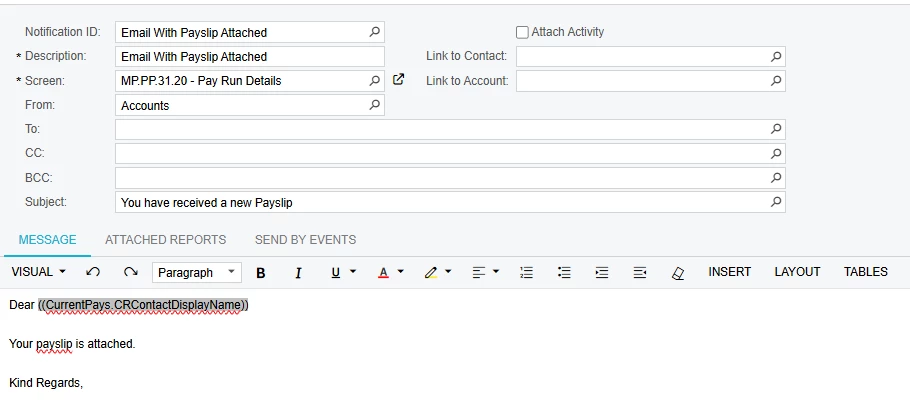
okay - quick update - I removed the .FirstName and just put it as Dear ((CurrentPays.CRContactFirstName))


and it has worked.  I just processed a payslip for myself and emailed it, and we have a winner winner.


thanks again for all your help.


Have a great day


9 replies

Forum|alt.badge.img
  • Jr Varsity III
  • May 21, 2025

Hi,


I have a similar question regarding booked leave emails but not had a response yet.

I know that the email formats are driven from the “email templates” (SM204003) screen, search “payslips”. My template states: “Dear ((CurrentPay.CRContactDisplayName))” which is surname, firstname, same as yours.

You could delete the “((CurrentPay.CRContactDisplayName))” and play around with adjusting this datafield but I’m not sure what the correct one is… :(


darylbowman
Captain II
Forum|alt.badge.img+15

@Elke - Could you upload your Email Template?

If it’s based on a Generic Inquiry, you can add an additional field that references CRContact.FirstName. If it’s based on a screen, it might be trickier.


As an aside, I built a customization that sends password protected pay stubs by email. If you should happen to be interested, you can read more about it on my LinkedIn profile.


  • Freshman II
  • May 22, 2025

Hi ​@darylbowman 

Below is the template thanks ​@CCC.  So If I remove "display name”and put in .FirstName that could fix the issue?  Thanks heaps


Forum|alt.badge.img
  • Jr Varsity I
  • May 28, 2025

@ElkeS - I would think what you have mentioned above would work, did you try it and if so did it work?


Shannon Landreth


darylbowman
Captain II
Forum|alt.badge.img+15

Sorry ​@ElkeS, I meant to reply and forgot. It seems like you would be using MYOB, and while they are similar, they must differ in payroll. Standard Acumatica has no screen MP.PP.31.20. For that reason, I can’t actually see how the screen is designed or how easy it would be to accomplish what you are trying.


Forum|alt.badge.img
  • Jr Varsity III
  • June 4, 2025

Hi ​@Elke I’d been interested to know if your tried varying the payslip email and adjusting the syntax. Any results you could share would be greatly received.


  • Freshman II
  • June 4, 2025

Hi ​@Slandreth211 ​@CCC ​@darylbowman 

My biggest apologies I have been under the pump with other stuff.  I have made the changes and I have a pay run next week.  I'm going to see if I can do a test beforehand, but so far it has let me do the change.  I will keep you all posted :-)
Thanks again for all your help, and apologies again for my delay.

Have a great day 

E


  • Freshman II
  • Answer
  • June 4, 2025

me again - ​@Slandreth211 ​@CCC ​@darylbowman 

okay - quick update - I removed the .FirstName and just put it as Dear ((CurrentPays.CRContactFirstName))


and it has worked.  I just processed a payslip for myself and emailed it, and we have a winner winner.


thanks again for all your help.


Have a great day


Forum|alt.badge.img
  • Jr Varsity III
  • June 4, 2025

Cool, thanks for the update!


C.