
Question

2026R1 unable to correct clock entries on Approve Clock Entry" screen

  • Nov 10, 2026 4:50 PM UTC
  • 5 replies
  • 26 views
  • Translate All

jacob14
Freshman I
Forum|alt.badge.img

We recently moved from 2025R1 to 2026R1 and are no longer able to correct clock entries using the AM51600 “Approve Clock Entries” screen.  It appears that in the upgrade the time fields were previous reported to the nearest minute, and in the newer release seconds are now captured and reported to the clock in and clock out times.  If and when you try to correct a clock entry time it does not allow for second entry and when hours and minutes are reported an int32 (too big/ too small) error occurs.  We use this screen everyday to correct clock entry mistakes.  The clock entries are also used for both reporting labor to production orders as well submitted for payroll.  I’m surprised that after 8 months of 2026R1 being released that this issue has not been addressed.  How are others on 2026R1 correcting clock entries?  Are we one of very few that utilize the “Approve Clock Entries” screen to correct times?  How has this gone so long without a patch?  Where are other Acumatica 2026R1 clients going to correct clock entries?  Acumatica has suggested a work around to delete incorrect clock entries and then assign the labor to the work order with a labor transaction, but this correction does not get reported to the employees clock entries and employees and managers are unable to see it.  We have submitted a ticket to Acumatica Support and currently have been told that a patch is under consideration and scheduled for mid December 2026.  I’m hoping someone has another solution or a more reasonable work around as the developers look into this issue.
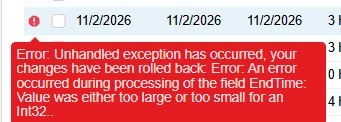

Error Given when attempting to correct a start time or end time


5 replies

Steve Milner
Varsity III
Forum|alt.badge.img+7
  • Varsity III
  • Nov 10, 2026 6:09 PM UTC

@jacob14 this is a logged issue, AC-380110, and it's fixed in 2026 R2. The R2 fixes list describes what you're seeing: edit Start Time or End Time on Approve Clock Entries (AM516000), save, get the Int32 error, and the change rolls back. The workaround printed with it is the one Support gave you: delete the entry and re-enter the labor on Labor (AM301000).

What changed between your two versions is what those two cells edit. In 2025 R1 they were bound to just the time part of the clock-in and clock-out. In 2026 R1 they're bound to the full date and time field. The R2 build (26.200.0334) puts them back on the time part and keeps the entry's date when only a time comes in.

Switching the form to the Classic UI doesn't get around it. We tried that on 26.101 and got the same Int32 error on the same edit.

On 2026 R1, the newest build on Acumatica's builds site is 26.101.0225, and AC-380110 isn't in its release notes. When you follow up on your case, that's the number to quote.

Translate

jacob14
Freshman I
Forum|alt.badge.img
  • Author
  • Freshman I
  • Nov 10, 2026 6:21 PM UTC

Thanks ​@Steve Milner.  What did your team and clients do to get around the problem?  Was Acumatica’s suggested work around good enough for you?  Or...did you move to 2026R2?

Translate

mohammadnawaz51
Varsity I
Forum|alt.badge.img+8

​@jacob14 

Delete the incorrect clock entry from Approve Clock Entries (AM516000) and manually enter the corrected labor on Labor (AM301000) using the same employee, production order, operation, labor date, labor code/shift, and completed quantity as applicable. Then process/release the labor transaction through the normal labor workflow."

From my review, this error seems to be related to a bug in 2026R1

Translate

jacob14
Freshman I
Forum|alt.badge.img
  • Author
  • Freshman I
  • Nov 10, 2026 6:42 PM UTC

​@mohammadnawaz51 thanks for the suggestion and this is what Acumatica recommends as a work around, but does not work for us as the am301000 labor transacation does not report to clock entries and is not visible to employees and managers for payroll review and reporting

Translate

Steve Milner
Varsity III
Forum|alt.badge.img+7
  • Varsity III
  • Nov 10, 2026 7:22 PM UTC

@jacob14 I haven't had this one come up with a client, so I don't have a field workaround or an R2 move to report. Our only time with it was reproducing it on 26.101 for your thread.

There's also no other stock screen to fall back on. Approve Clock Entries is the only one that opens Start Time and End Time for editing. Clock Entry (AM315000) and Multiple Clock Entry (AM316000) keep both times read-only and stamp the current time when someone clocks out, so neither can rebuild a past entry.

If you want a stopgap while the patch is pending, here's an idea we haven't tested: a customization that copies what R2 changed. R2 binds the two cells on Approve Clock Entries to the time part (StartTime_Time and EndTime_Time), and its AMDBDateAndTime attribute on AMClockTran keeps the entry's date when a time comes in without one. Changing only the screen binding may not be enough, since R2 changed both. Anything like this belongs in a sandbox first.

Translate