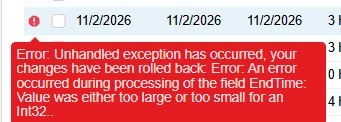


We recently moved from 2025R1 to 2026R1 and are no longer able to correct clock entries using the AM51600 “Approve Clock Entries” screen. It appears that in the upgrade the time fields were previous reported to the nearest minute, and in the newer release seconds are now captured and reported to the clock in and clock out times. If and when you try to correct a clock entry time it does not allow for second entry and when hours and minutes are reported an int32 (too big/ too small) error occurs. We use this screen everyday to correct clock entry mistakes. The clock entries are also used for both reporting labor to production orders as well submitted for payroll. I’m surprised that after 8 months of 2026R1 being released that this issue has not been addressed. How are others on 2026R1 correcting clock entries? Are we one of very few that utilize the “Approve Clock Entries” screen to correct times? How has this gone so long without a patch? Where are other Acumatica 2026R1 clients going to correct clock entries? Acumatica has suggested a work around to delete incorrect clock entries and then assign the labor to the work order with a labor transaction, but this correction does not get reported to the employees clock entries and employees and managers are unable to see it. We have submitted a ticket to Acumatica Support and currently have been told that a patch is under consideration and scheduled for mid December 2026. I’m hoping someone has another solution or a more reasonable work around as the developers look into this issue.