


Always Current tells me that I should update to 24.203.0023 from 23.211.0017 but when I do so I get an incompatibility error, what would be the jumps needed to end up in 24.203.0023?? Please help
Solved
Upgrade from 23.211.0017 to 24.203.0023
Best answer by Dipak Nilkanth
Hi
Please check below information while upgrading the instance.
Prerequisite Steps:
Before administrators install Acumatica ERP 2024 R2 or upgrade to it locally, they need to do the following:
1. Switch the Internet Information Services application pool where the Acumatica ERP 2024 R2 instance will be installed to Integrated mode. (Classic mode is not supported.)
2. Install Microsoft .NET Framework 4.8 on the server where the Acumatica ERP 2024 R2 instance will be installed.
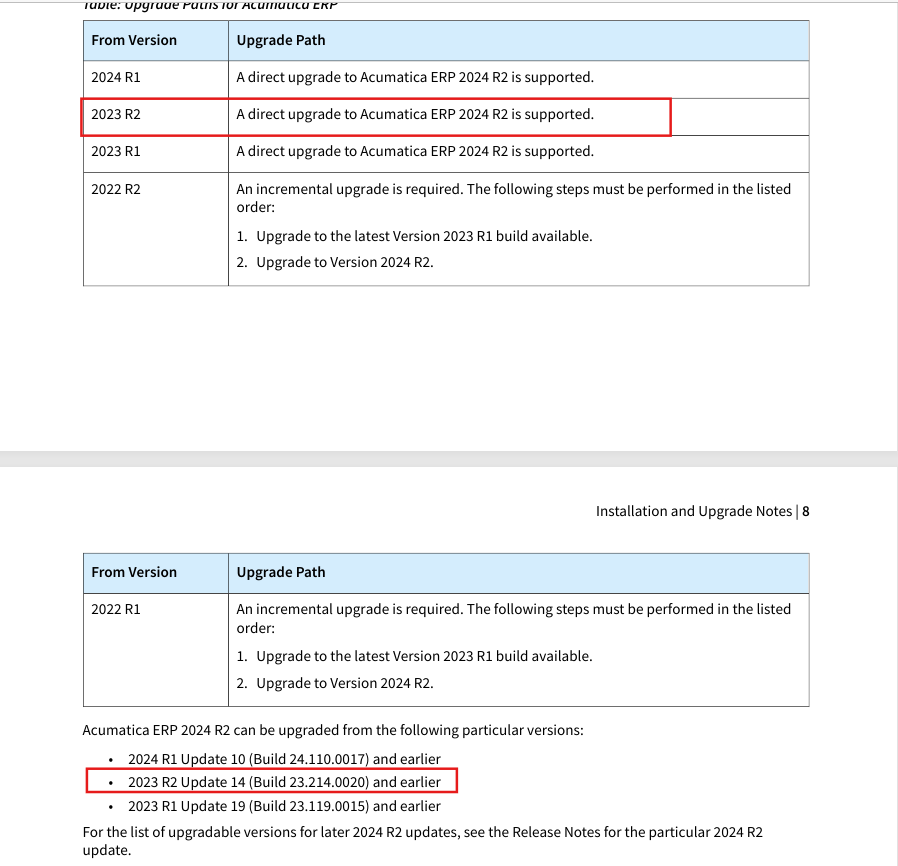
This link contains release notes for 24 R2. Check under Installation and Upgrade Note from this file.
Please confirm, if you have customizations are there, if yes , you need to upgrade those as well.
Hope, it helps!





Login to the community
No account yet? Create an account
Social Login
Login with your Acumatica accountEnter your E-mail address. We'll send you an e-mail with instructions to reset your password.