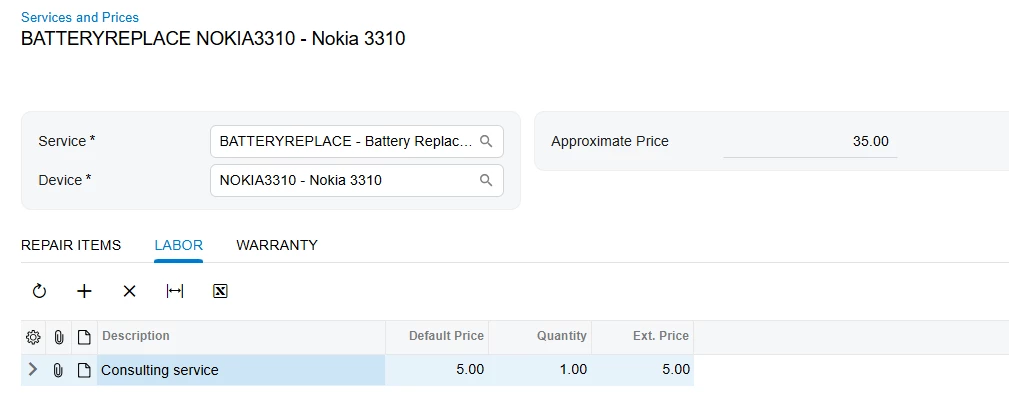
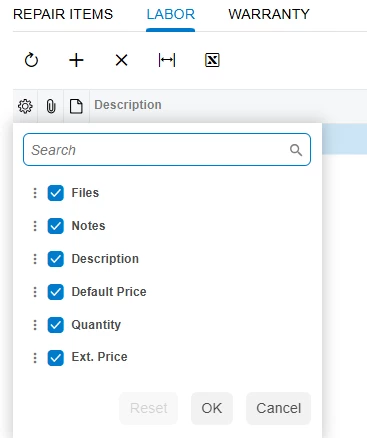
I just deployed a new Acumatica ERP Instance for T-Series Developer Courses for T220. Immediately after install, I opened the Services and Prices form. On the Labor tab, the Inventory ID column is missing. When I click the gear icon to add/hide columns, Inventory ID is not there. I have not changed anything after install.
I was having the same problem in T210. I was near the end of the course when I went to test the newly added Labor tab, and discovered that the Inventory ID was missing. I thought I'd done something wrong, so I spent a couple hours troubleshooting. I ended up copying in all files from the solution in the Help-and-Training-Examples folder for that course, recompiled and republished, but it still didn't work. So I gave up on T210 and moved on to T220. But even after a fresh install, I'm seeing the same problem.
I'm using 2026 R1, version 26.100.0175. Any help or advice would be appreciated!