

Please provide feedback on the Modern UI if you have issues with it so that Acumatica can focus on improvements to it. Acumatica AI will pick up your feedback for them to focus on improving it prior to the 26R2 release when the classic UI goes away.
- Community
- Discussion Forums
- Other Developer Topics
- Modern UI Issues
Modern UI Issues
- June 10, 2026
- 121 replies
- 4223 views
- Translate All


 +14
+14- Captain II
David Eichner, CPA - If I helped you, please *Like* my post/reply. If I provided an answer to your question, please mark it as *Best Answer*.
- Like
- Share
121 replies

 +6
+6- Varsity I
- September 11, 2026
25R2. You cannot move a condition in a GI using the up and down arrows in the Modern UI. I had to switch to Classic. I did not test in 26R1 or 26R2.
Translate


- Jr Varsity III
- September 11, 2026
Because I could not move a condition in 25R2, I temporarily changed the GI to modern UI to place the new condition, but then I could not choose “Does not equal” so I had to change back to classic UI to do that.
Translate
 +12
+12- Captain II
- September 11, 2026
We can’t re-arrange navigation as well, so there is no way to re-arrange side panels without deleting and recreating. I thought we were able to do this in previous versions.
Translate
 +8
+8- Captain II
- September 11, 2026
Correct me if I’m wrong, but here are two more quite major related issues that haven’t been mentioned here before.
- When a redirect is set up to open as a new window,
Mode = PXBaseRedirectException.WindowMode.NewWindowthe popup is too small for the expanded layout of the modern UI and the user very frequently has to resize the window to see fields without scrolling. According to what Claude found in url-opener-engine.js in the
client-controlspackage, the window size is hard coded in the modern UI and there is no way to set it programmatically. -
This is closely related to the first issue and makes it far worse.
Let’s say we have a grid, and a column with a link to some record, and the redirect is again configured with the NewWindow mode. In the classic UI, you could click to open a record, then move the popup to a second screen, resize it etc. to fit your work space and workflow. Then you can scroll through the grid and click on other links on that same column and the original popup will stay put with the record updating to match what the user clicked. Almost like a detached side panel.
On the modern UI, no such luck. Every time you click on another link in that column, the previous popup is closed and a new one is rendered smack dab on top of your main window, back in the default size. No possible way to move it off to the side and seamlessly click through records. Claude also found the source of this in the same files.
“Both issues trace to one file url-opener-engine.js in the
client-controlspackage (installed from client-controls.tgz).”
Anyone else notice this?
It’s extremely frustrating for users.
Translate
Michael Shirk, Pine View Buildings, LLC - If a member helped you, please *Like* their post. If a member provided an answer to your question, please mark it as *Best Answer*.

- Freshman I
- September 16, 2026
From everything I was told leading up to the upgrade to 25R2 and the Modern UI was that speed would be considerably improved. That is not the case and is actually slower than before. We have switched several screens back to the Classic UI, for instance the Customer Profile screen. There were tabs on the Customer Profile that took 5+ minutes to load (Locations and Mailing & Printing). Mailing & Printing even showed wrong information while in the Modern UI.
Another issue was Stock Item Profiles list, the quick search function didn’t work and we switched back to the Classic UI.
We have many Generic Inquiries that the user custom column configuration reverts back to standard when the user leaves the screen.
Performance is our biggest issue so far, very poor. But we thought it was slow before also, it just got worse which we were surprised was possible.
We upgraded to 26R1 mid July. We also tried modern ui but the speed was a major issue. We had meetings with Acumatica about it and they suggested we go back to classic UI. R&D have been looking at this for a month now
Translate
- Freshman I
- September 16, 2026
I think the big one is the removal of tabs on GI filters. This change was not good.
Also,
In Modern UI, the Add Receipt Line popup covers the entire bill and prevents users from viewing bill information while selecting receipt lines. In Classic UI, users could more easily reference the underlying document. Please provide a side panel, resizable dialog with saved dimensions, or allow the bill to remain visible while the receipt selection window is open particularly with the PO number field( which is description)
Translate
+12- Captain II
- September 17, 2026
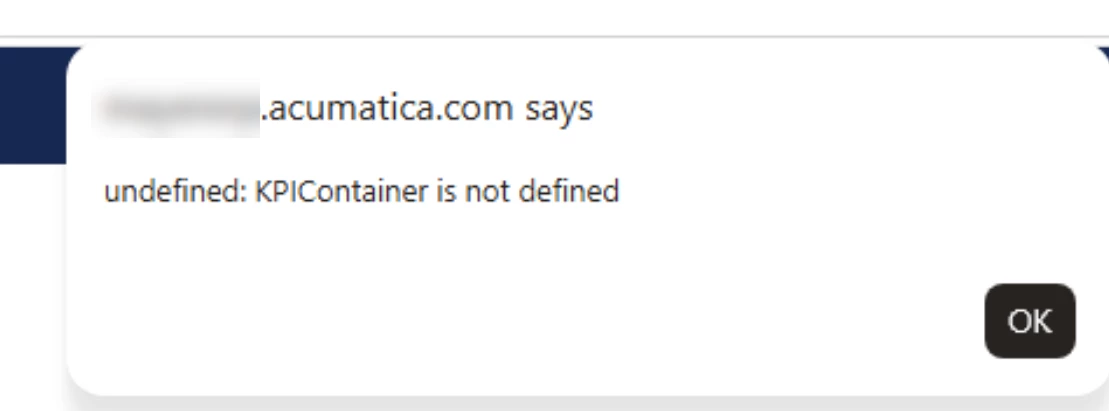
3 or 4 of our customers are getting this error in 2026 R1. It’s intermittent but very noticeable.
Error "Undefined: KPI Container is not defined" | Community
Translate
+12- Captain II
- September 21, 2026
It’s been mentioned that publishing customizations takes a lot more time now, with maybe some improvement in 2026R1, but it still takes longer than it did in classic. It feels like twice as much time.
I want to add that workflow customizations often do not get published on the first publish. It often takes a 2nd publish after the first publish to get workflow customizations to appear. Not only is it easy to forget to publish a 2nd time, which can cause confusion and concern when side panels, report links, etc. go missing after a publish, but this also means that publishing now takes 4x as much time as it did back in 2024.
Translate
- Freshman I
- September 21, 2026
3 or 4 of our customers are getting this error in 2026 R1. It’s intermittent but very noticeable.
Error "Undefined: KPI Container is not defined" | Community
We get this in 25R1 also.
Translate

- Freshman II
- September 22, 2026
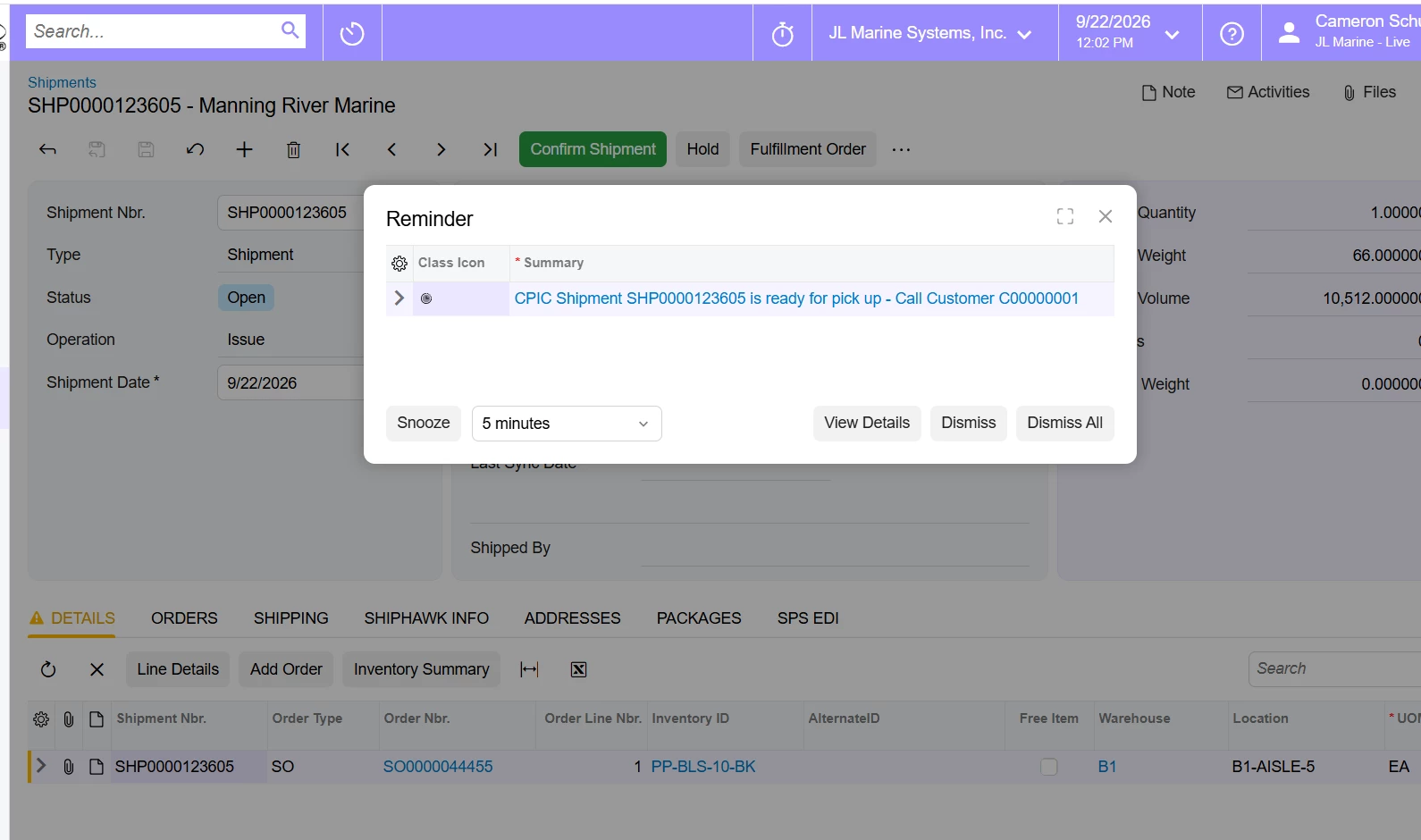
We have noticed that when we create a shipment and dismiss a reminder, it takes us back to the sales order. In previous versions it would not do this. In this case we click create shipment from an order, the shipment is created/loaded, our particular reminder comes up for that shipment, and once dismissed we are booted back to the sales order.
It is worth nothing that if you just hit the X to close the pop up out, it will keep you on the shipment as expected.
Translate
+12- Captain II
- September 23, 2026
In 2026 R1, in addition to the KPI error mention above, I’m receiving….
- “You have been logged out errors” which occurs most commonly when opening up side panels and working with generic inquiries. This can happen within minutes of logging in. This one seems to occur on any screen.
- Random errors on the generic inquires specific to a field such as “SOOrder.LocationID is not added to the inquiry” when it has been joined properly in the inquiry and has in fact been added to the inquiry
- Generic inquiries linked to GIs throw all sorts of errors. Here is one after running a manual BE action on a GI…
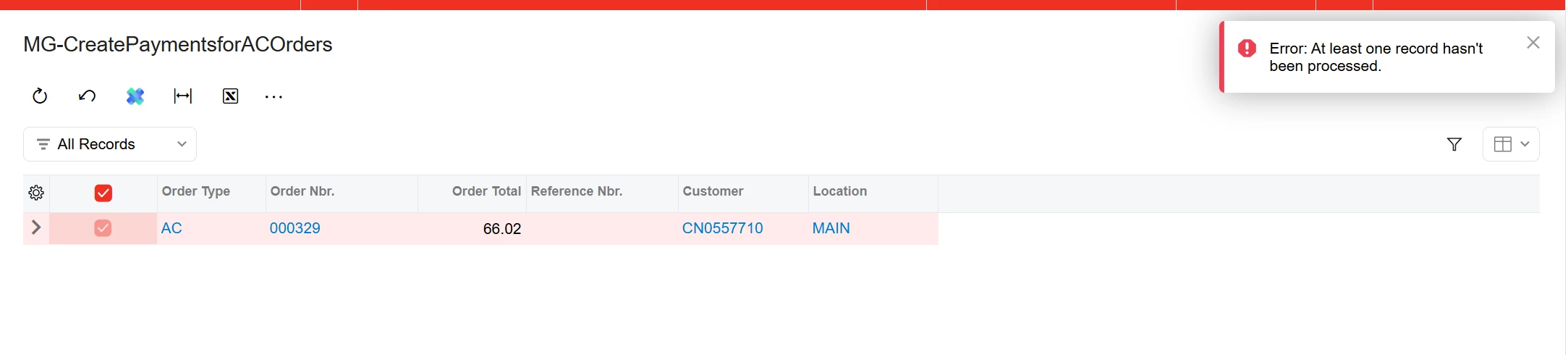
Here is one on that occurs only when selecting the select all action. This only occurs when selecting the select all button. It does not occur when selecting individual lines.
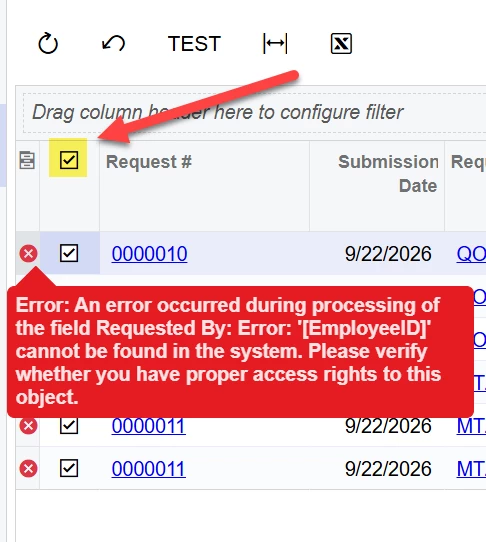
All of these errors with the exception of the last one are resolved by refreshing the screen
Translate
+6- Varsity I
- September 23, 2026
25.201.0213.3 Column width setting is ignored in a GI in Modern UI.Column width set to 50 px. The affected columns are from a subquery
Classic
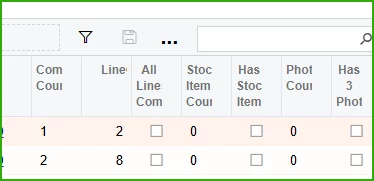
Modern

Translate
+12- Captain II
- October 5, 2026
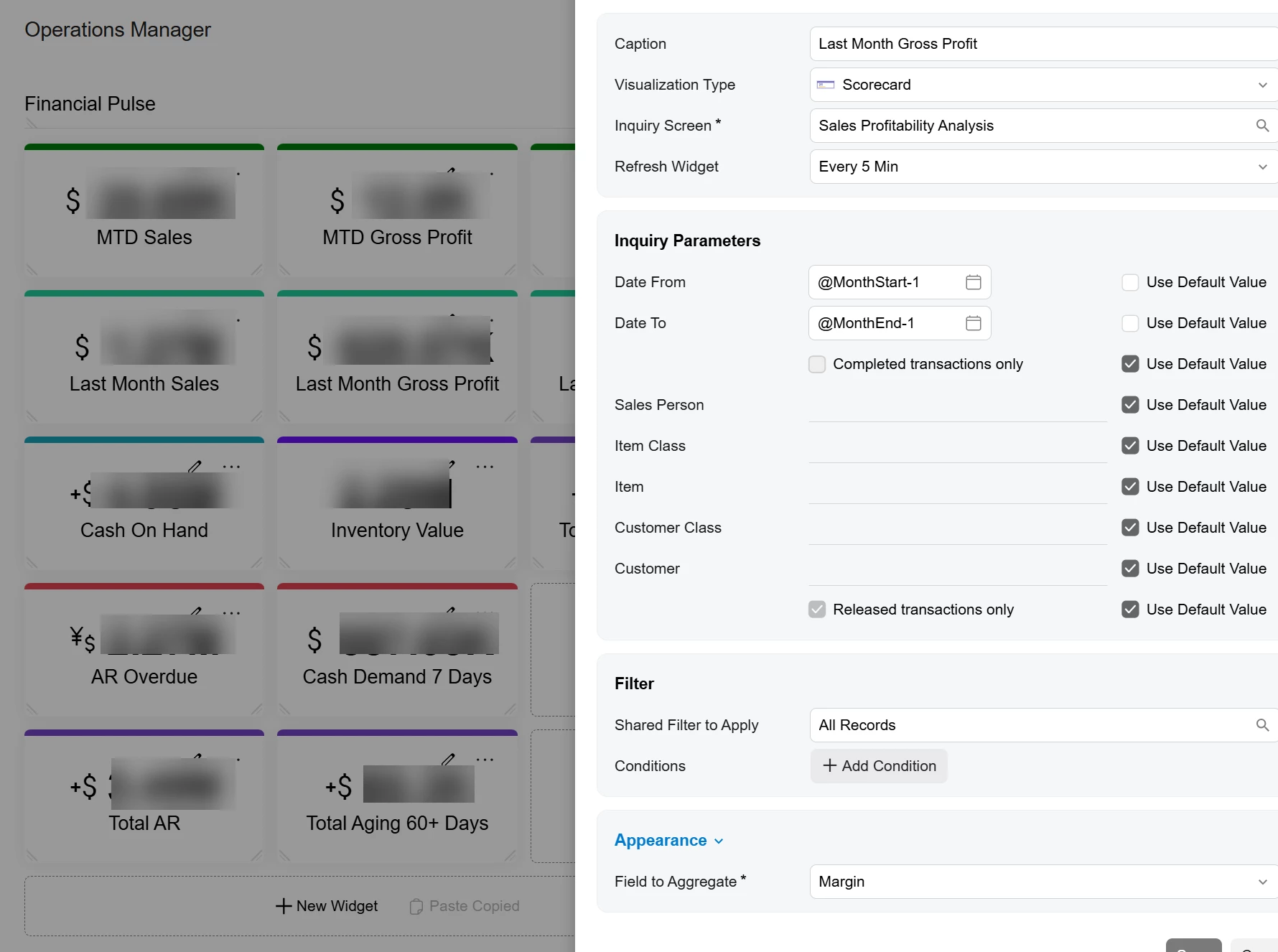
in 2026 R1, when building out new conditions on a dashboard widget, the ability to edit conditions will eventually disappear. I can’t tell you how frustrating this.
I just wanted to add to this...
The ability to change KPI color behavior will also disappear after the dashboard gets to a certain size.
Translate
+12- Captain II
- October 5, 2026
in 2026 R1, when building out new conditions on a dashboard widget, the ability to edit conditions will eventually disappear. I can’t tell you how frustrating this.
I just wanted to add to this...
The ability to change KPI color behavior will also disappear after the dashboard gets to a certain size.
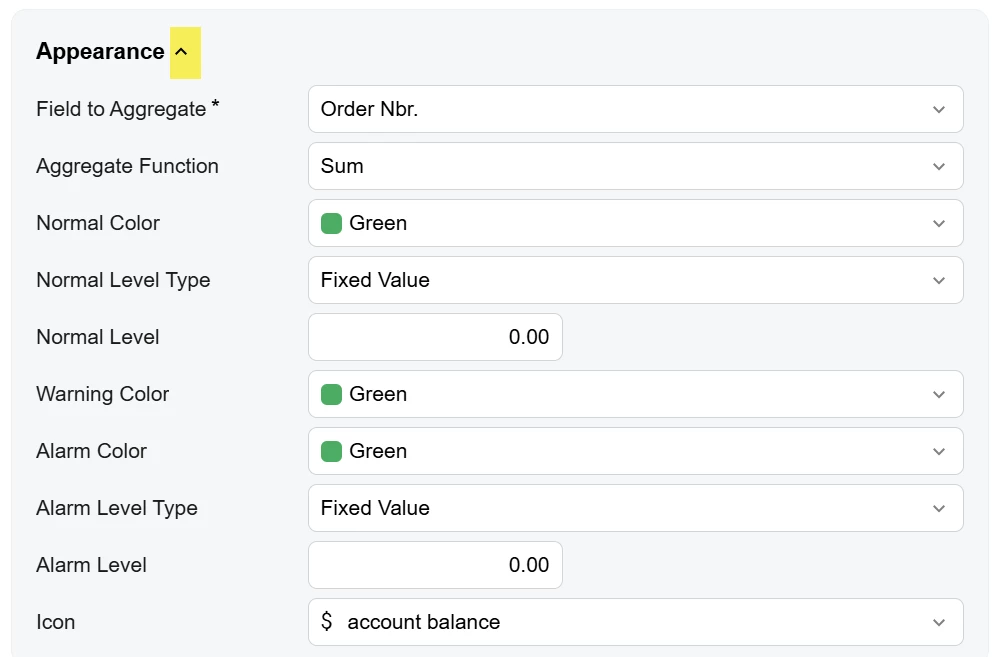
Sorry, I figured this one out. This one was a non-intuitive UI change.
If hidden, shouldn’t this hide all fields instead of just a handful of fields? I think that caused some of the confusion. Also, I didn’t hide the fields, so why do they get hidden?
Maybe make the arrow always visible or change the icon to an eyeball/eyeball with slash so you know elements are hidden?
Translate


- Jr Varsity I
- October 6, 2026
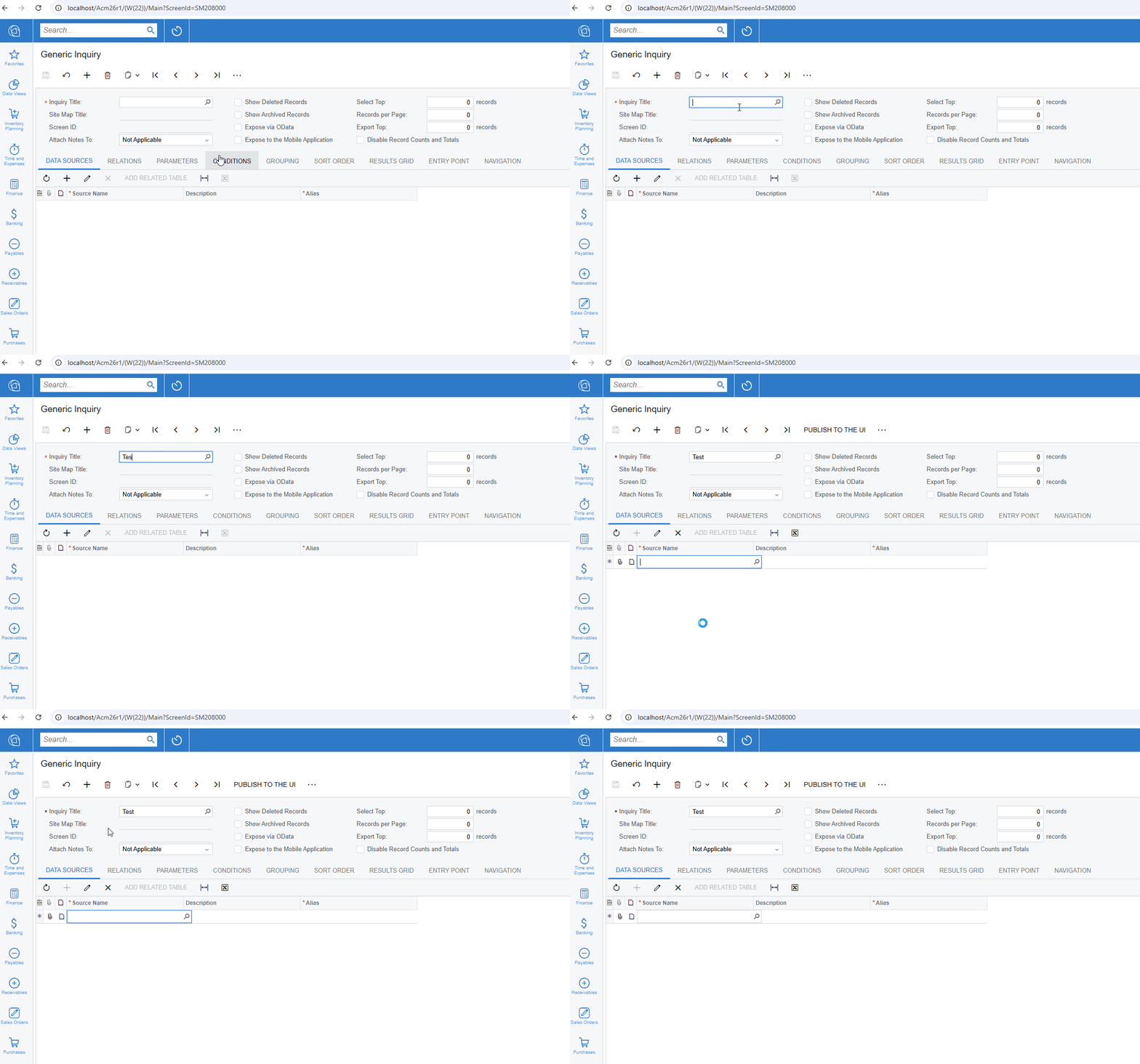
The generic Inquiry screen (SM208000) does not commit the inquiry name if clicking directly into detail table. It can be very frustrating. It worked fine in Classic UI.
Steps to reproduce - enter an Inquiry Title > Click into Data Sources
Build 26.200.0334 - Latest 26r2
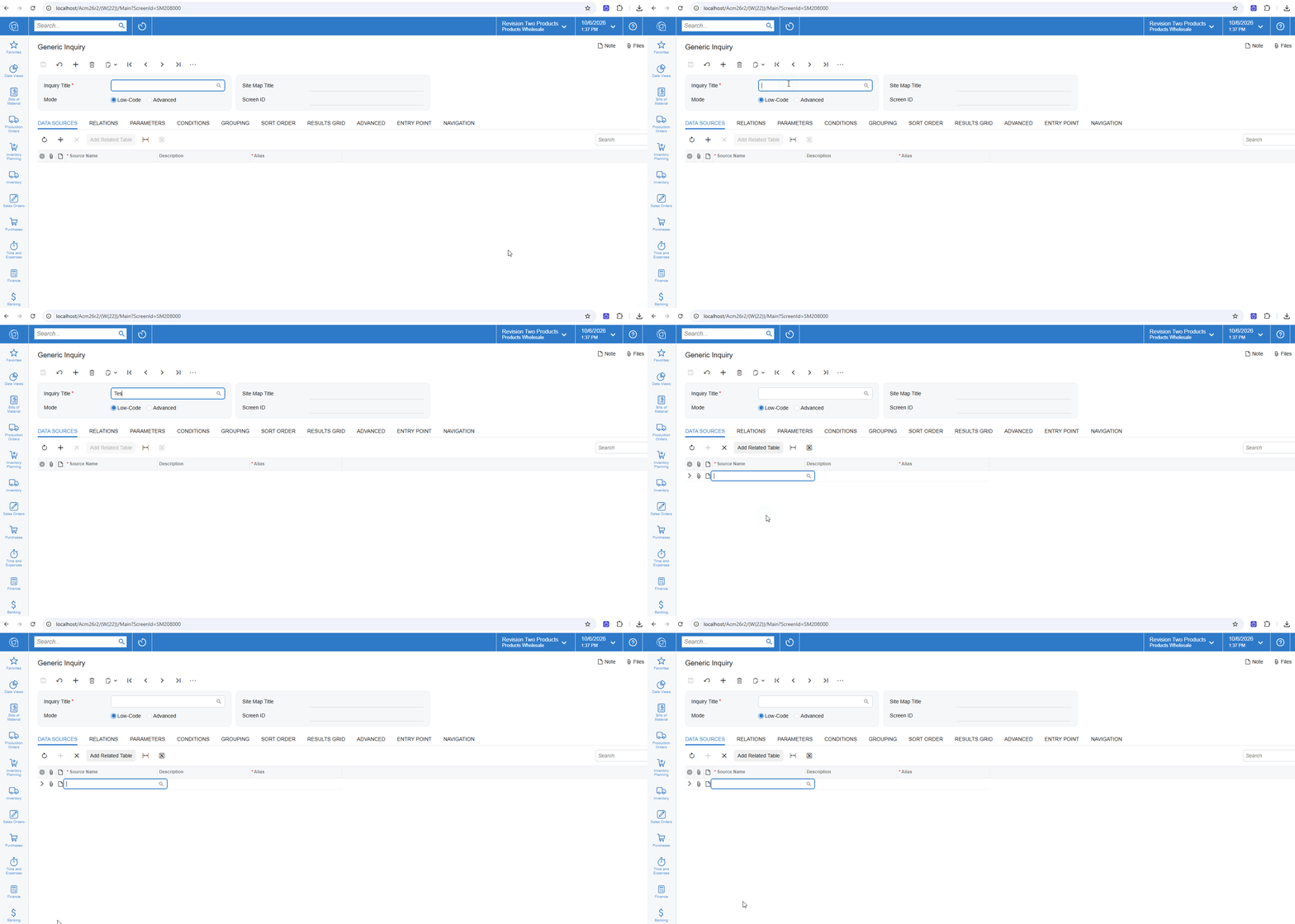
Build 26.100.0175 - Classic 26r1
Translate
- Jr Varsity I
- October 7, 2026
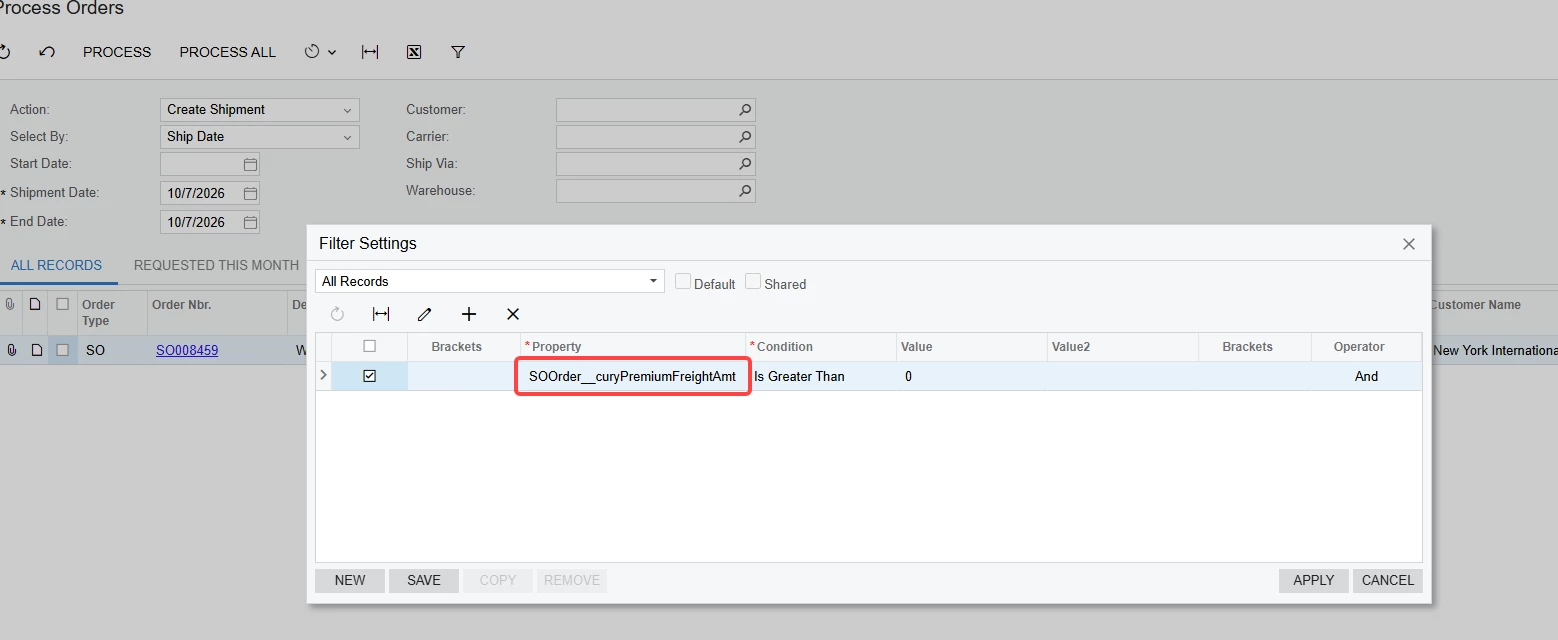
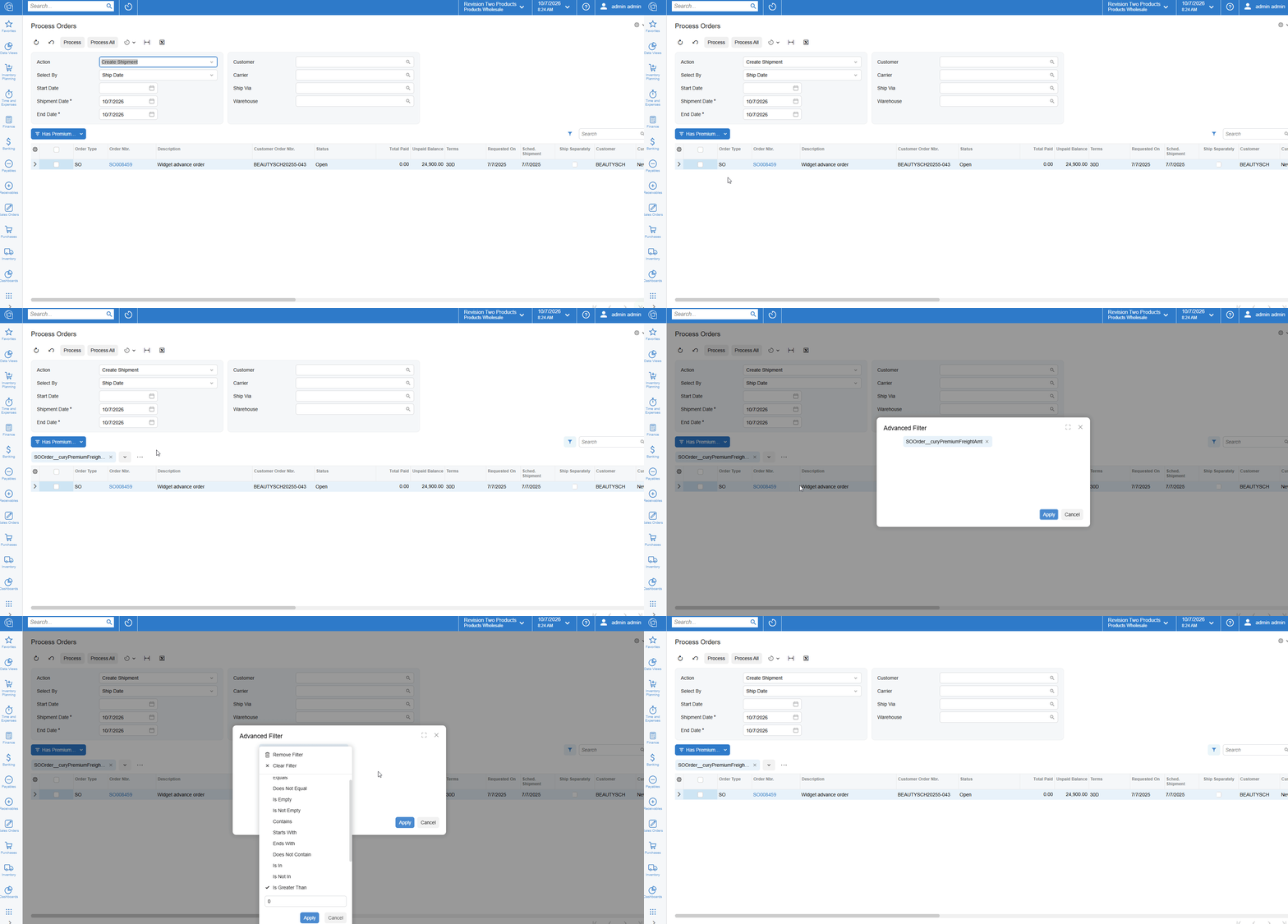
Modern UI “Advanced Filter” removes an advanced feature available in Classic UI. While the advance filter design might be more intuitive, the lost feature -whether an intentional design or not- will require more customizations.
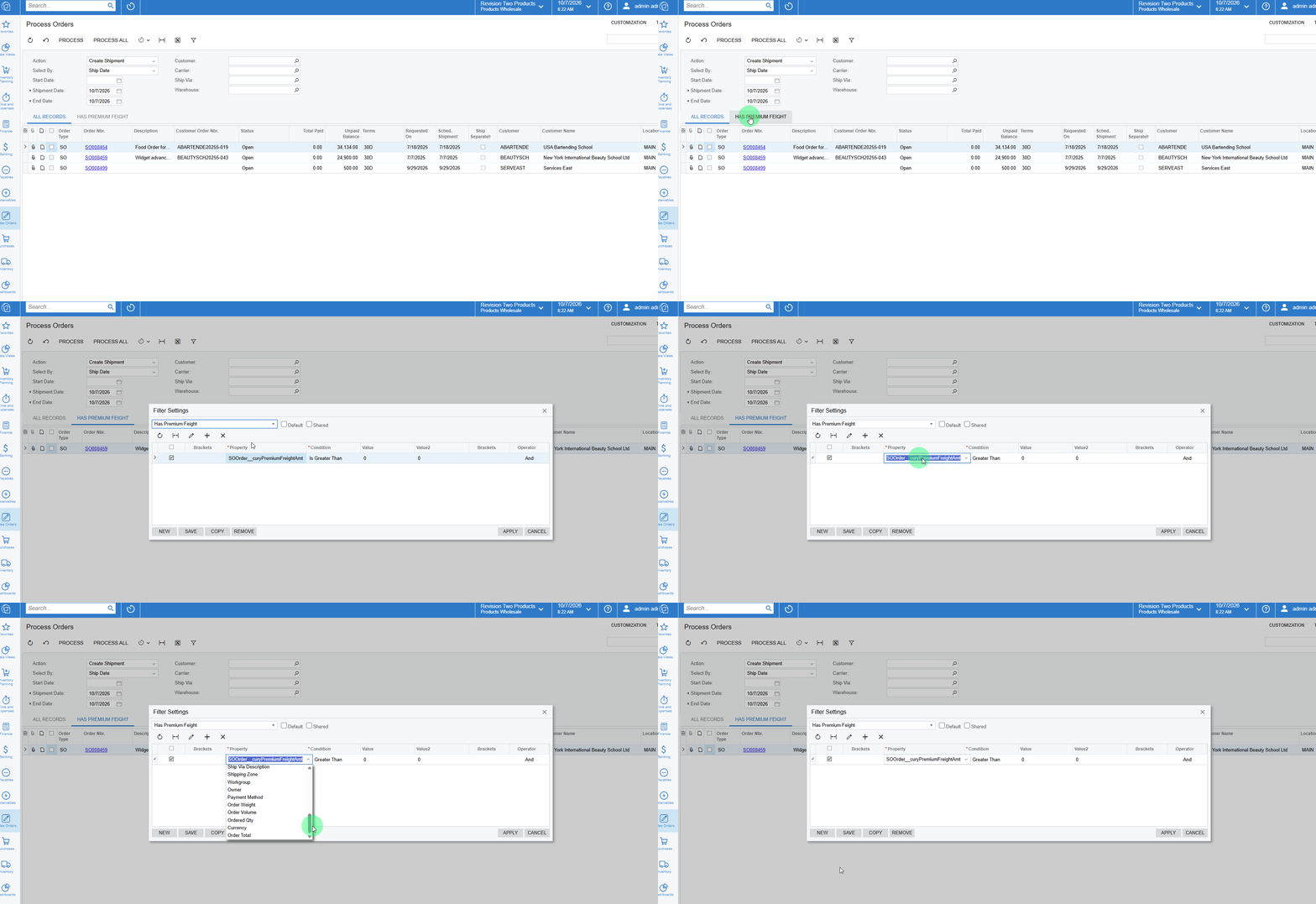
In Classic UI a user can add columns not exposed to the UI by entering the field manually. Modern UI blocks any manual text input. To create a filter for a hidden column, the column will require a customization exposing it to the UI. Currently, the only workaround is to switch to the Classic UI, create the filter, and then switch back.
For example, to filter the Process Orders (SO501000) screen to only show orders with that have Premium Freight Price greater than zero, we could do the below in Classic UI.
However in modern UI
Translate
+12- Captain II
- October 7, 2026
Modern UI “Advanced Filter” removes an advanced feature available in Classic UI. While the advance filter design might be more intuitive, the lost feature -whether an intentional design or not- will require more customizations.
In Classic UI a user can add columns not exposed to the UI by entering the field manually. Modern UI blocks any manual text input. To create a filter for a hidden column, the column will require a customization exposing it to the UI. Currently, the only workaround is to switch to the Classic UI, create the filter, and then switch back.
For example, to filter the Process Orders (SO501000) screen to only show orders with that have Premium Freight Price greater than zero, we could do the below in Classic UI.
Saying the new advanced filters is more intuitive is kind. Personally, it makes me want to pull my hair out.
Maybe you already know this, but you should still be able to edit the filters directly through the “filters” screen.
Steps:
- I create the filter on the GI/screen with no conditions or maybe part of the condition
- Navigate to CS209010 (Filters) and lookup the filter
- Add the conditions there
I don’t think they did any user acceptance testing with filters. Really frustrating as Filters were one of the best parts about Acumatica.
Translate
- Jr Varsity I
- October 8, 2026
However, I think that it still doesn't solve “non-shared” filters that can be created on GIs and dashboards etc.
Translate
- Jr Varsity I
- October 8, 2026
Build 26.200.0334
The Modern UI back button on screens does not return to the Generic Inquiry page, but rather to the last page in the browser history. (In general, MUI seems to have many URL issues.
Below are a couple of examples:
Login Page
When the login page redirects the user directly to a document, the back button returns to the login page rather than going to the entry GI.
Steps to reproduce:
-
Open a sales order.
-
Copy the URL.
-
Sign out of Acumatica (or let the session expire).
-
Sign back in (redirected to the sales order).
-
Press Back (redirected to the sign-in page).
Copy/Paste URL
When copy/pasting a URL directly the back button goes the previous page.
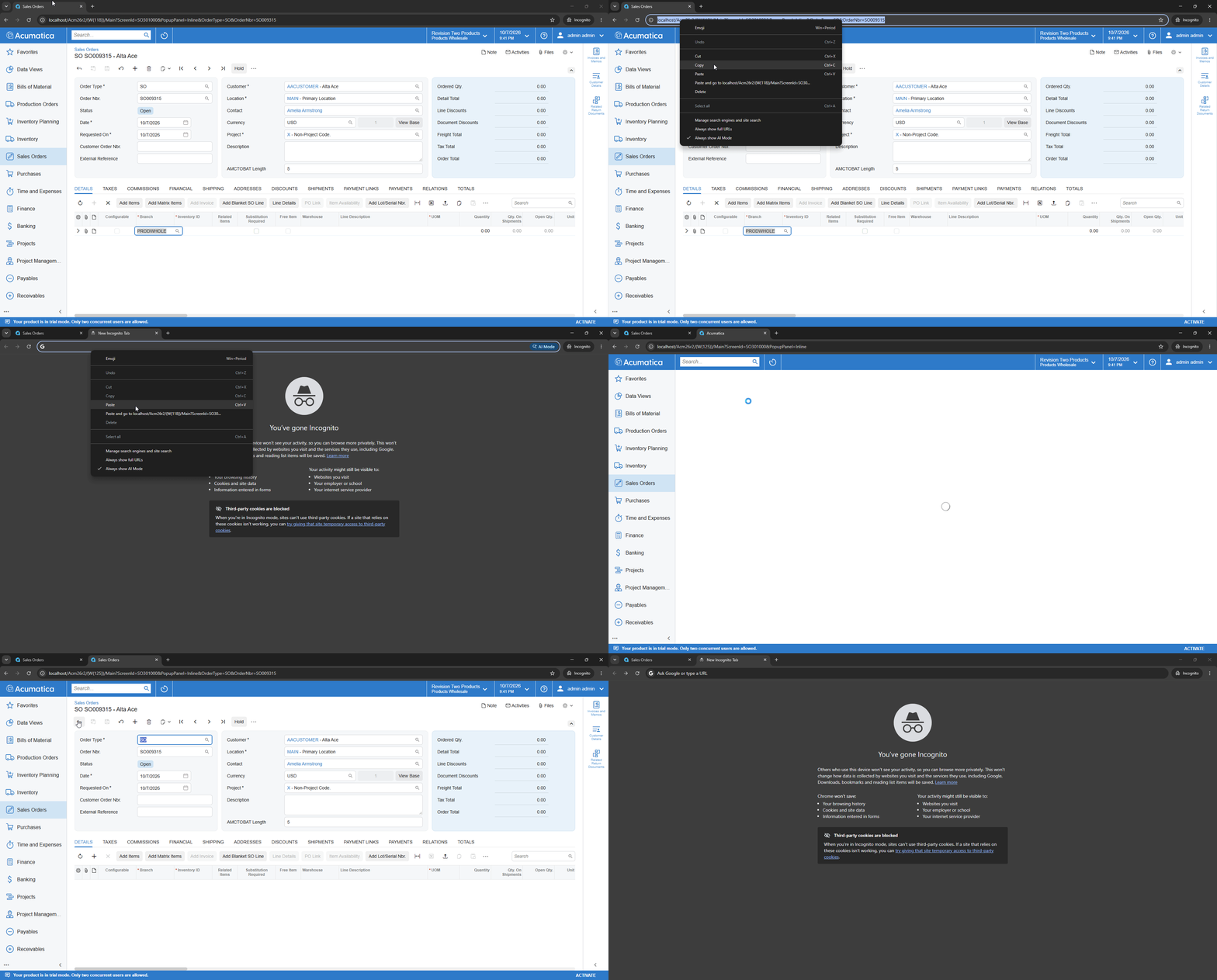
I also tried this with a link from a document or email, and the button simply does not work because there is no history in the tab.
Translate
- Jr Varsity I
- October 8, 2026
Build 26.200.0334
Pasting into the Formula Editor generates HTML, which breaks the formula.
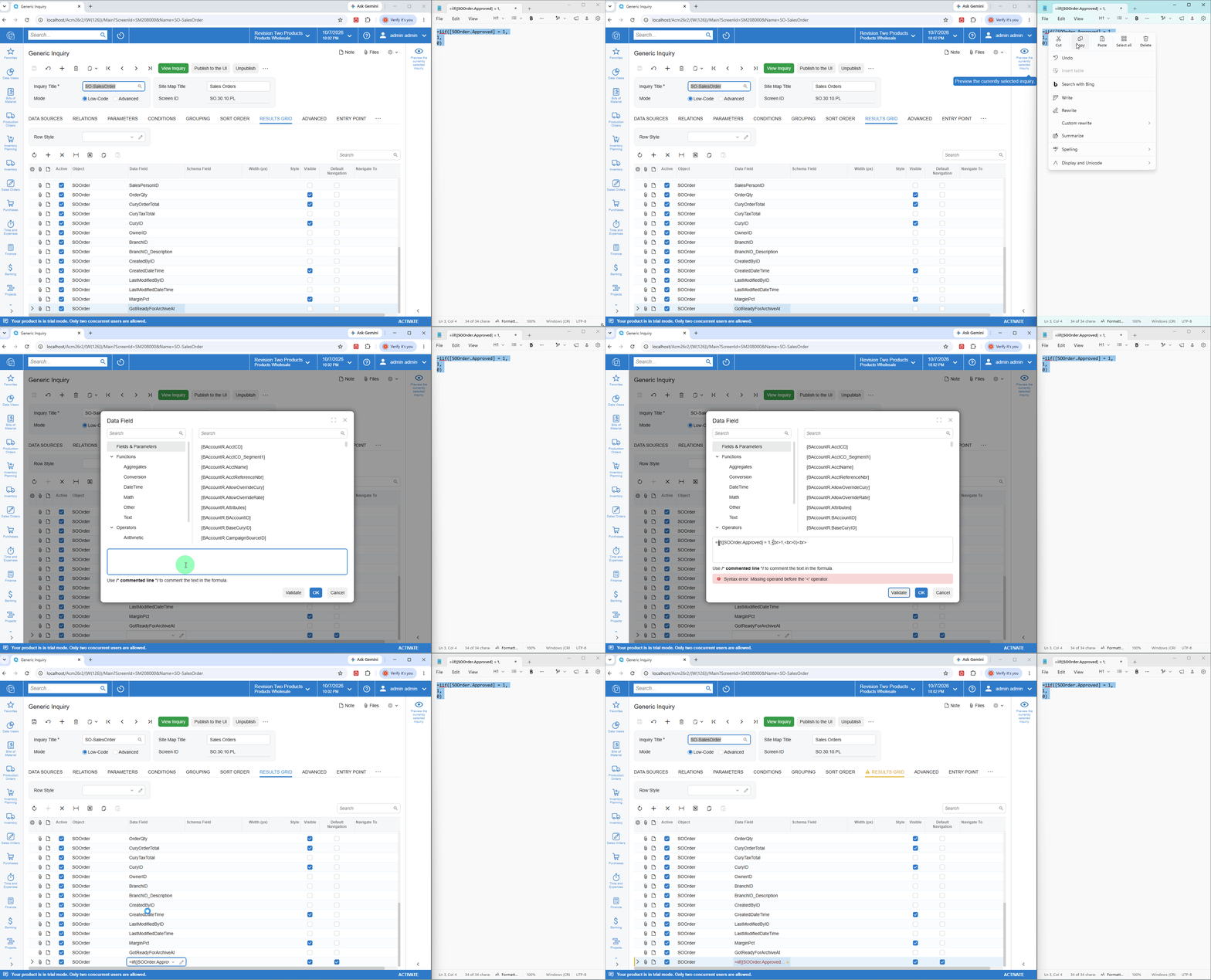
Adding to
Translate
+8- Captain II
- October 14, 2026
Correct me if I’m wrong, but here are two more quite major related issues that haven’t been mentioned here before.
- When a redirect is set up to open as a new window,
Mode = PXBaseRedirectException.WindowMode.NewWindowthe popup is too small for the expanded layout of the modern UI and the user very frequently has to resize the window to see fields without scrolling. According to what Claude found in url-opener-engine.js in the
client-controlspackage, the window size is hard coded in the modern UI and there is no way to set it programmatically. -
This is closely related to the first issue and makes it far worse.
Let’s say we have a grid, and a column with a link to some record, and the redirect is again configured with the NewWindow mode. In the classic UI, you could click to open a record, then move the popup to a second screen, resize it etc. to fit your work space and workflow. Then you can scroll through the grid and click on other links on that same column and the original popup will stay put with the record updating to match what the user clicked. Almost like a detached side panel.
On the modern UI, no such luck. Every time you click on another link in that column, the previous popup is closed and a new one is rendered smack dab on top of your main window, back in the default size. No possible way to move it off to the side and seamlessly click through records. Claude also found the source of this in the same files.
“Both issues trace to one file url-opener-engine.js in the
client-controlspackage (installed from client-controls.tgz).”
Anyone else notice this?
It’s extremely frustrating for users.
On 26R2, the size of the popup window now gets saved so it reopens the same size the next time. However, the popup still closes and reopens at the default position on top of the main window.
So it’s only slightly better. The user still has to drag the window every time, but now they don’t have to also resize it.
Since we're self hosted, I was able to work with Claude and create a patch to restore the lost functionality and make the popup windows stay open as the user clicks between detail line links.
Translate
Michael Shirk, Pine View Buildings, LLC - If a member helped you, please *Like* their post. If a member provided an answer to your question, please mark it as *Best Answer*.
Enter your E-mail address. We'll send you an e-mail with instructions to reset your password.
About Acumatica ERP system
Acumatica Cloud ERP provides the best business management solution for transforming your company to thrive in the new digital economy. Built on a future-proof platform with open architecture for rapid integrations, scalability, and ease of use, Acumatica delivers unparalleled value to small and midmarket organizations. Connected Business. Delivered.
© 2008 — 2024 Acumatica, Inc. All rights reserved