

Please provide feedback on the Modern UI if you have issues with it so that Acumatica can focus on improvements to it. Acumatica AI will pick up your feedback for them to focus on improving it prior to the 26R2 release when the classic UI goes away.
- Community
- Discussion Forums
- Other Developer Topics
- Modern UI Issues
Modern UI Issues
- Jun 10, 2026 5:03 PM UTC
- 137 replies
- 4852 views
- Translate All


 +14
+14- Captain II
David Eichner, CPA - If I helped you, please *Like* my post/reply. If I provided an answer to your question, please mark it as *Best Answer*.
- Like
- Share
137 replies
 +8
+8- Captain II
- Jun 18, 2026 12:16 PM UTC
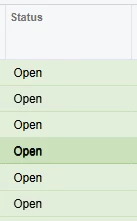
When the standard css classes ( “green40”, “red40”, etc. ) for highlighting grid rows are used in a GI, selecting the row changes the color enough to see which row is selected. In the classic UI, this also worked when the class was applied to a custom grid.
In the modern UI, this no longer works. Selecting a highlighted row in a custom grid, doesn’t show any visual indicator on the row styling. Makes it impossible to see which row is currently selected.
Translate
Michael Shirk, Pine View Buildings, LLC - If a member helped you, please *Like* their post. If a member provided an answer to your question, please mark it as *Best Answer*.

- Varsity II
- Jun 18, 2026 5:27 PM UTC
Here are some of the issues that we have encountered on the modern UI. We are on 2025 R2.
- Bank Deposit screen doesn’t work on Modern UI.
- When access the Activities field on the AR Invoice screen, It randomly errors out on some but not every invoice. They did install a hotfix it that sort of works. We still get and error message but then if we arrow forward and back to the invoice it then works.
- Project under Construction runs much slower than using the Classic UI.
- Removal of Tabs on the GI filters make it less user friendly. Many Complaints from my users that its not as friendly and harder to navigate.
- Issues with hidden parameters. I used to frequently copy and paste existing GIs to create new ones but I have run into issues doing this even when the table and joins are the same the new GI doesn’t return any results even before changes are made. Issue seems to be these hidden parameters.
Translate



- Jr Varsity III
- Jun 18, 2026 7:51 PM UTC
2025R2 have encountered these issues, have opened cases or discovered known issues, many are fixed in 26R1 or 26R2:
- Pivot table issues already mentioned
- Approvals open incorrect links
- Time entry cannot just type in time and tab slows entry considerably
- Shared configuration does not work
- Project Quotes-Unable to create and review quotes from opportunity
- Unable to rearrange/modify columns in forms
- Projects GI-opening a project with many activities will not load
- ARM Report permissions
- Hyperlinks do not return correct data-process bank transactions, Project Tasks
- Various GI issues
- Translation Dictionaries-run Collect Strings for changed fields to appear in Modern UI
Translate


- Jr Varsity II
- Jun 19, 2026 3:06 PM UTC
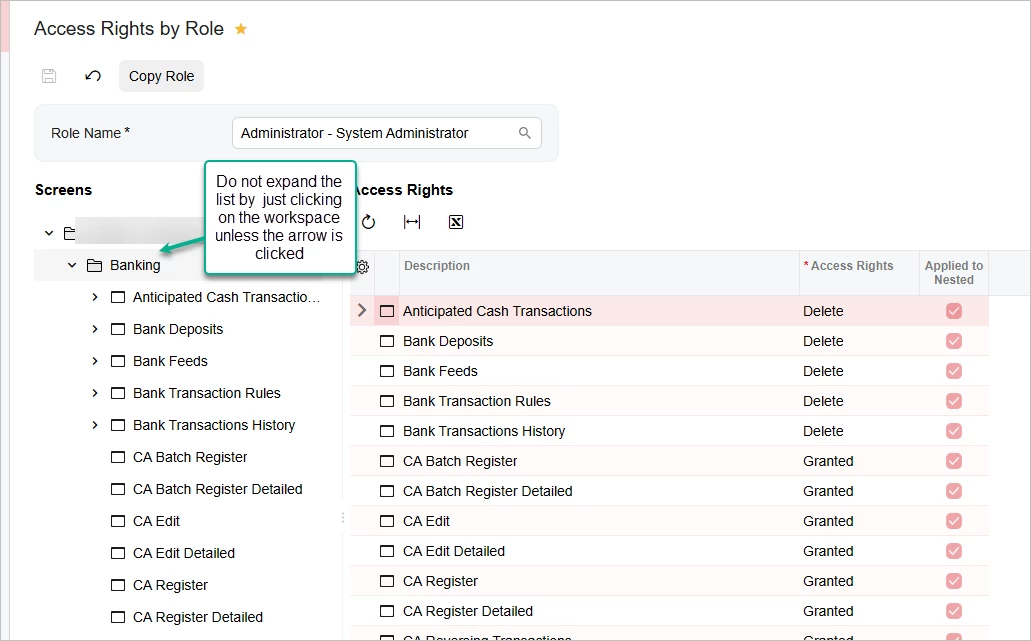
The Access Rights by Role screen should not automatically expand the list of screens under the workspace when clicking on the workspace name. In Classic UI it stays closed unless you click on the arrow. In Modern UI it expands by just clicking the word.
You almost never need to expand the list in the left pane since you set all rights in the Access Rights pane.
This happens in all builds of 2025 R2 and Build 26.100.0175.2
Translate


- Freshman I
- Jun 22, 2026 12:26 PM UTC
From everything I was told leading up to the upgrade to 25R2 and the Modern UI was that speed would be considerably improved. That is not the case and is actually slower than before. We have switched several screens back to the Classic UI, for instance the Customer Profile screen. There were tabs on the Customer Profile that took 5+ minutes to load (Locations and Mailing & Printing). Mailing & Printing even showed wrong information while in the Modern UI.
Another issue was Stock Item Profiles list, the quick search function didn’t work and we switched back to the Classic UI.
We have many Generic Inquiries that the user custom column configuration reverts back to standard when the user leaves the screen.
Performance is our biggest issue so far, very poor. But we thought it was slow before also, it just got worse which we were surprised was possible.
Translate
- Freshman I
- Jun 22, 2026 3:08 PM UTC
Just went live to 2025R2 this month. So far the biggest issue has been the export of GI’s to excel and it ignoring filters. Particularly the Sales Profitability Analysis, we love this GI and the export ignores the current filters and takes the default params on the GI.
Translate


- Freshman II
- Jun 22, 2026 8:02 PM UTC
No more right click action in grid rows?? This is so stupid! We used these actions a lot and if I cant tuck them in grids popup it will cause immense clutter on the screen.
Acumatica really is missing the mark with the modern ui. It seems like so mech emphasis has been put on the look and feel of things that some of the core functionality has bee completely overlooked. The modern ui fields use up a lot more space on a screen making the overall screen less compact and not to mention development is just confusing and difficult compared to the classic ui. Might be I was just very familiar with editing aspx.
And the fact that the classic ui is being cut off in 26 R1 with the amount of bugs being discovered in the modern ui is very disappointing to say the least.
Am I completely missing something or is anybody else running into these types of issues?
Translate
+8- Captain II
- Jun 23, 2026 12:55 PM UTC
The primary focus seems to be AI, AI, and more AI. Creates more marketing buzz…..
Granted, the modern UI implementation is a huge project, and I would expect things to go back a bit before we start going forward again. I really haven’t seen much practical business benefit from the MUI, but I’m hoping that once they’re no longer maintaining two frontend code bases, they’ll be able to make more progress.
Translate
Michael Shirk, Pine View Buildings, LLC - If a member helped you, please *Like* their post. If a member provided an answer to your question, please mark it as *Best Answer*.
 +12
+12- Captain II
- Jun 23, 2026 1:34 PM UTC
I really haven’t seen much practical business benefit from the MUI, but I’m hoping that once they’re no longer maintaining two frontend code bases, they’ll be able to make more progress.
The one thing that was added with modern UI that adds a little value (the screen editor) does not seem to solve much. It’s great to be able to move fields from the UDF tab to the header or another tab but falls short in a lot of ways. For example, not being able to make a field required makes the screen editor feel “incomplete.”
I agree that we have lost a lot for almost no benefit which makes all of this very frustrating… and expensive. More time/effort to do the same task means more expensive.
Translate

- Jr Varsity II
- Jun 23, 2026 6:55 PM UTC
The convert to modern UI option for customization projects generates broken or unnecessary files 100% of the time in 25R2.
Patch 4 for 25R2 deleted the development folder for modern UI files with no warning and did not reinstate it. I can clone it again from our repository, but I don’t understand the decision-making process behind this.
I also wanted to add a simple label for a custom section in the header of a form, but that was impossible to do unless I restructured the rest of the header. It was trivial to add in classic UI without a restructuring of unrelated content.
Translate

- Freshman II
- Jun 23, 2026 6:58 PM UTC
Big Modern UI issue here:
25R2 Modern Dashboards do NOT reliably pass parameters on drilldown. | Community
Translate
- Freshman I
- Jun 23, 2026 11:24 PM UTC
Many of the item noted are also communicated to us from our clients:
- Removal of Tabs on the GI filters make it less user friendly. Many Complaints from my users that its not as friendly and harder to navigate.
- Speed is slower
- Screens are less compact for data
Those are the key items that are consistently noted.
Translate
- Jr Varsity III
- Jun 24, 2026 4:59 PM UTC
We have been using modern UI on a dozen plus screens for the past few months without too many issues. This week we made the decision to change all of our screens to the modern UI and now we are seeing more issues. Here are the ones that I am hearing about from our users this week:
- Side panels do not always refresh/update with data for the current record that is selected. In many cases selecting a new record results in the side panel getting cleared and being blank. Closing the side panel and reopening refreshes the side panel with data for the currently selected record.
- Hyperlinks in side panels work inconsistently. If there are multiple pages on side panel, they seem to work OK on the first page, but are unresponsive on subsequent pages.
- Fields that were previously hyperlinked are not hyperlinked on some screens. This is hit or miss, but the one that was brought to my attention this morning was the Mfg Batch # located on the Manufacturing tab/menu of the “Issues Screen” (IN30200).
Translate

- Freshman I
- Jun 24, 2026 5:07 PM UTC
From My AR person:
1.) Is this going to get faster? There's currently about a 5 second lag between each payment I enter.
2.) When running through pages, if I click into a customer, payment, invoice, then exit - does it have to revert back to page 1?
Translate
- Freshman I
- Jun 24, 2026 6:05 PM UTC
On a Customer Profile, the Mailing & Printing tab, the system isn’t sending invoices to the 2nd address we have defined. It is only sending to the primary billing email address. Worked fine in 2024R2 but not in 2025R2.
Translate

- Freshman I
- Jun 25, 2026 5:37 PM UTC
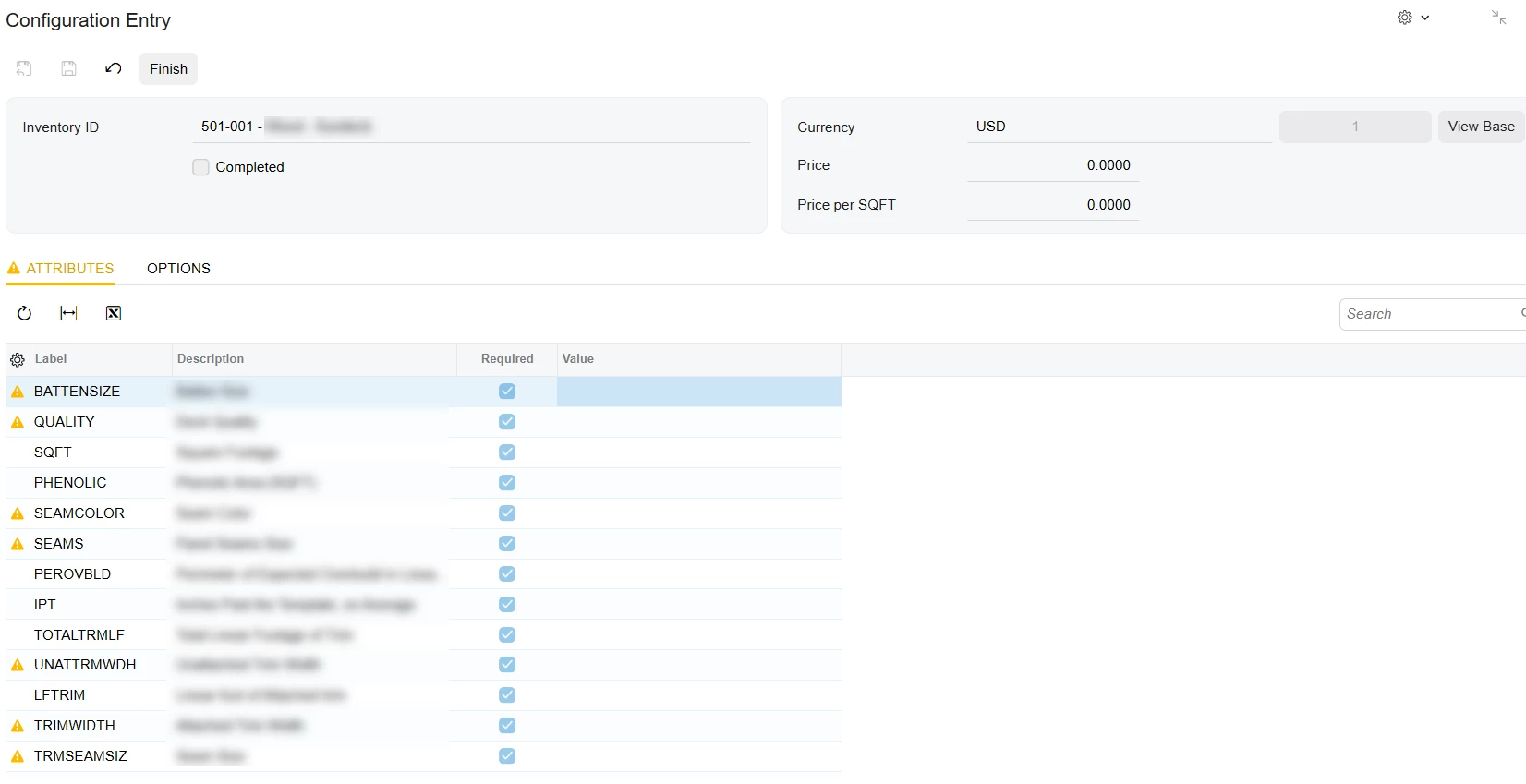
The configuration entry screen has an issue only while using the modern UI. When you go begin a configuration and make it full screen you can see all the attributes
However, as soon as you enter the first attribute value and tab off of the value field the screen cuts off about half way down and you can no longer see the bottom half of the screen.
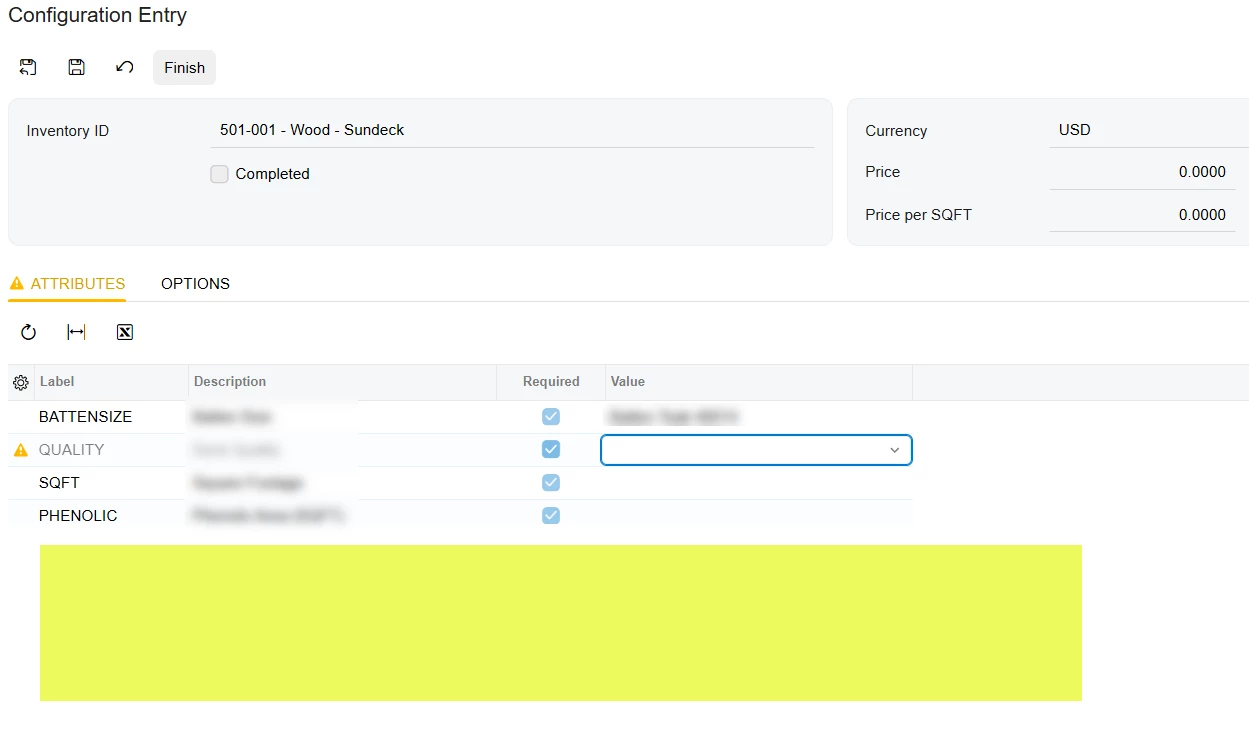
I already have a case open with Acumatica for this, but happy to share it here as well.
Translate


- Varsity II
- Jun 26, 2026 9:05 PM UTC
Column sets no longer validate correctly if you use report parameters to build descriptions. @StartPeriod and @StartBranch both fail validation and further updates to the text formula do not stick. I needed to change Column Sets back to the Classic UI in order to build reports.
Translate
 +17
+17- Jun 30, 2026 2:31 PM UTC
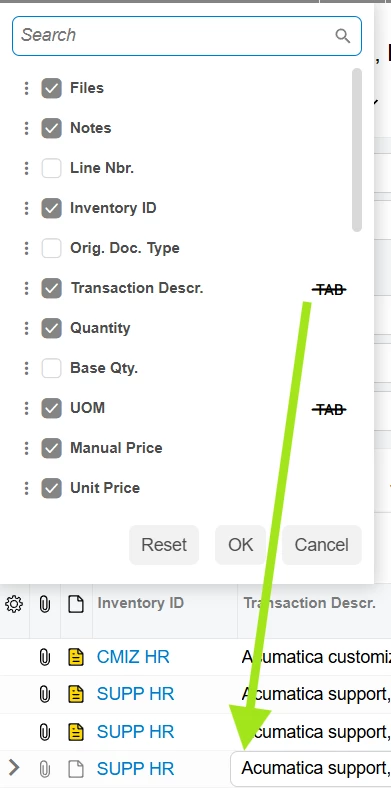
Tab-stricken grid columns completely disregard the config:
Translate
- Freshman I
- Jul 2, 2026 8:33 PM UTC
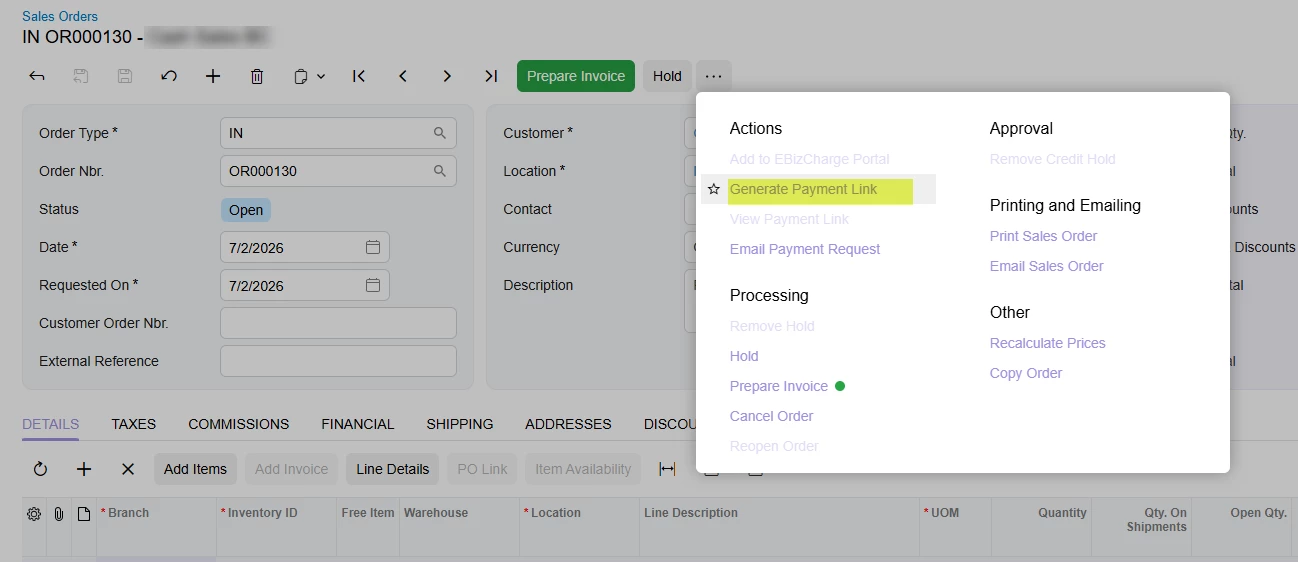
Cannot generate payment link (EBiz) on sales order screen when using the modern UI. When you click “Generate Payment Link” nothing happens. When you switch back to the classic UI it works fine. Build 25.201.0213.4
Translate
+12- Captain II
- Jul 2, 2026 8:54 PM UTC
Cannot generate payment link (EBiz) on sales order screen when using the modern UI. When you click “Generate Payment Link” nothing happens. When you switch back to the classic UI it works fine.
I don’t think Ebiz is modern UI ready yet. I believe the package still requires classic. They have been having a hard time from my understanding.
Translate

 +5
+5- Semi-Pro II
- Jul 8, 2026 2:28 AM UTC
User reported issues with AddSibling:
Translate
- Jr Varsity III
- Jul 10, 2026 5:47 PM UTC
Just went live to 2025R2 this month. So far the biggest issue has been the export of GI’s to excel and it ignoring filters. Particularly the Sales Profitability Analysis, we love this GI and the export ignores the current filters and takes the default params on the GI.
Related to this, we cannot find a way in the Modern UI to set the default filter set on a Pivot. I see a deprecation notice on SM208010, but that screen is the only way I have found to repair this:
“The Pivot Tables (SM208010) form will be deprecated in the Modern UI. To create and view a pivot table in the Modern UI, use the View List drop-down menu of the inquiry form that will serve as the data source for the table.”
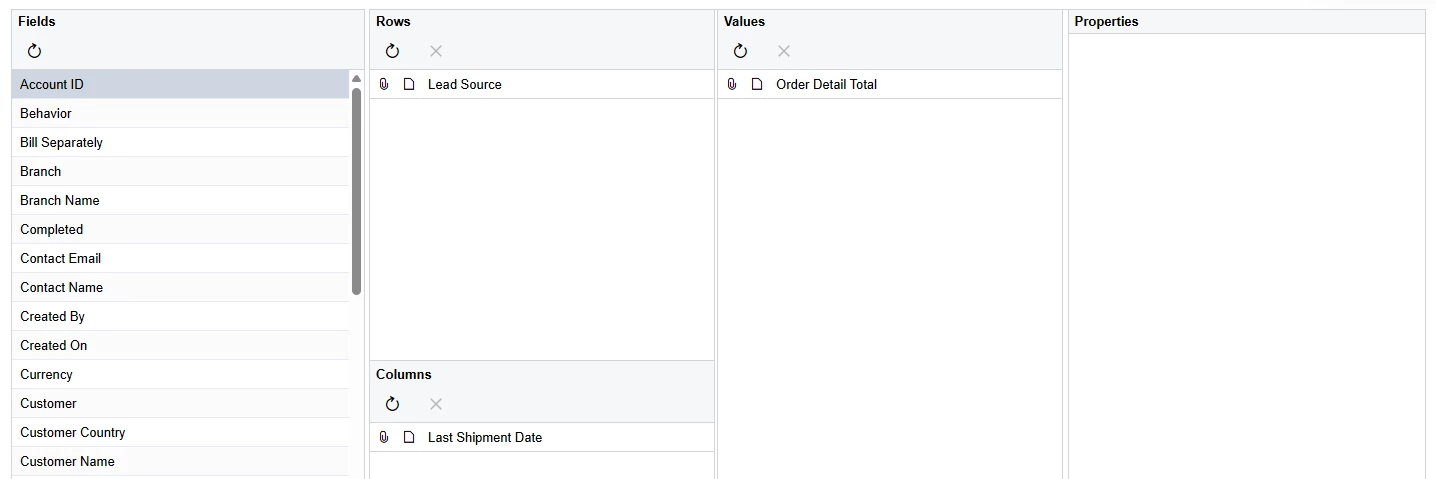
The ‘+ Add View’ version of pivot table creation available in Modern UI does not allow you to specify filters:
All the pivots we create now default to All Results (I used SM208010 to correct ‘PPC’):
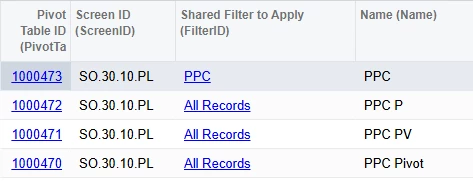
This has confused and frustrated users who were successfully using these tools under the Classic UI. The added confusion of the downloaded Excel sheet not matching the filters they are looking at, or the filter set they expected based on selections during creation of the pivot is absolutely buggy.
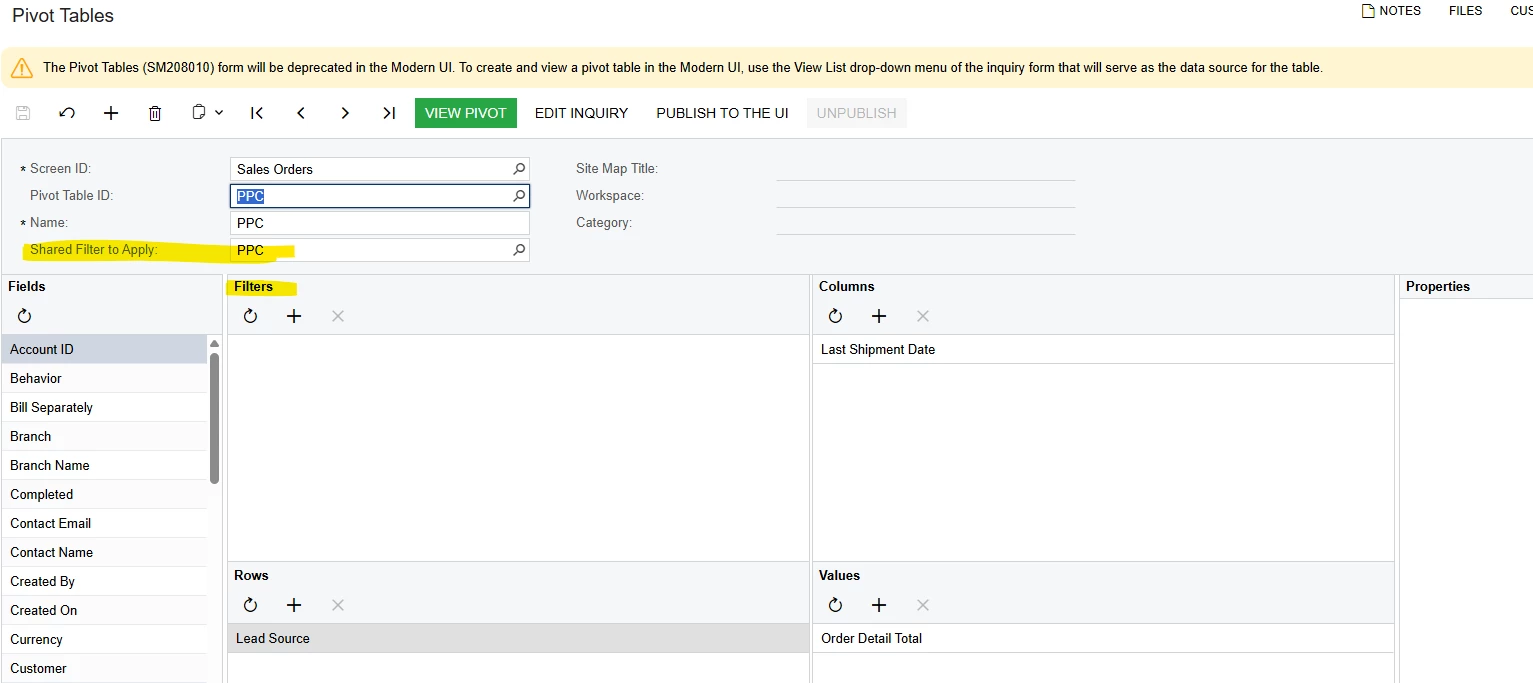
Our current version is 25.200.0248.7.
Oh, and an additional note - how can I ever delete these “extra” copies of the pivot that this user managed to create that for some reason do not show up in the Views for reasons unknown, but are still present enough to prevent new ones being created (they can be deleted in SM208010):
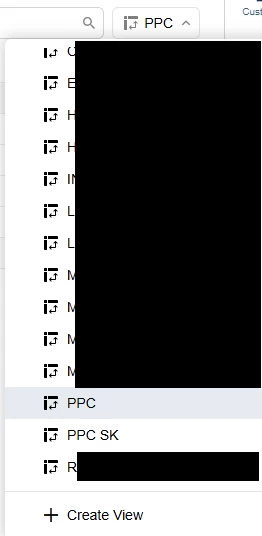
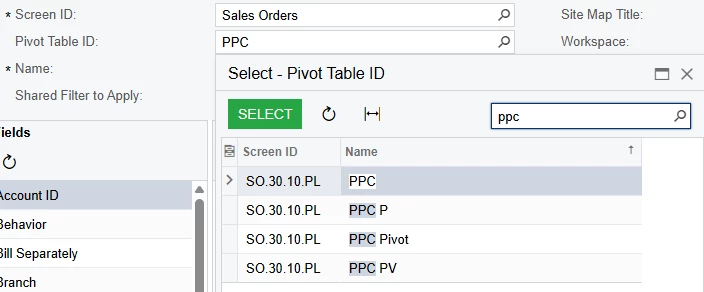
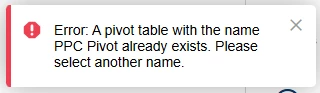
Translate

- Freshman I
- Jul 10, 2026 9:27 PM UTC
I have not seen anybody complain about the dashboard filters yet. Does anybody find the change “helpful?”
I have a feeling they are going to add this everywhere, and I am a little worried. It looks cool, but it’s hard to know what to do. Adding brackets is not intuitive at all.
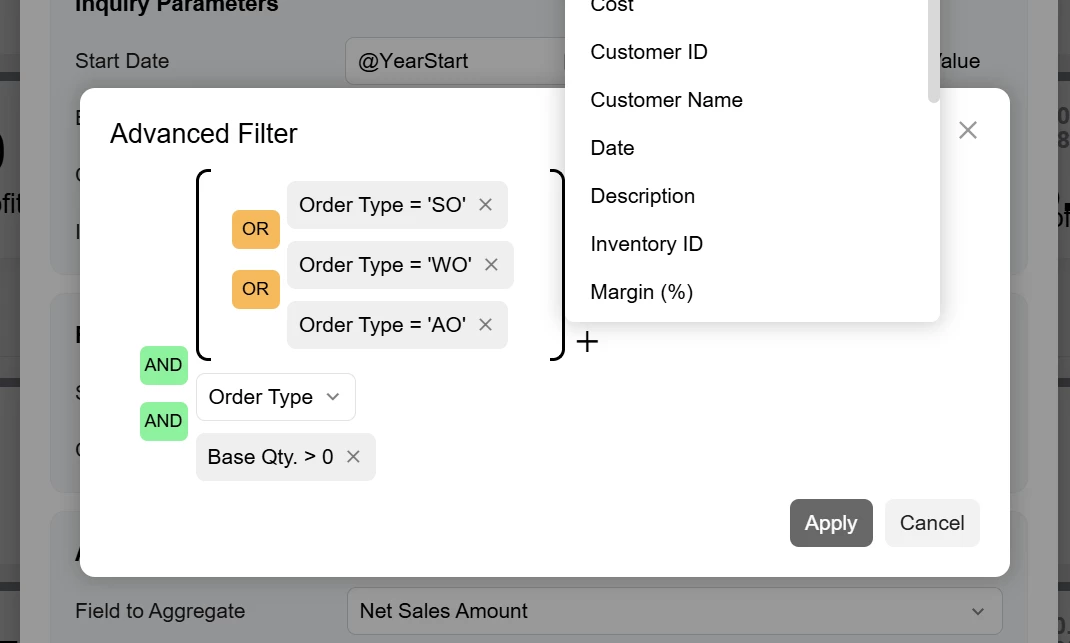
Agreed, there is also an issue with some of the classic dashboard conversions. For example, we had a widget filter WHERE Status <> Closed. The tile showed the correct results but when clicking the tile to navigate to the GI, zero showed. The DRILLDOWN filter was forcing the ‘IS IN’ condition with all the other statuses, rather than keeping ‘Status <> Closed’. When I check back on the filter itself in the dashboard tile, I see the ‘Does Not Equal’ option no longer exists for that Status field like it does in the Classic. I anticipate there being more of these that will be hard to catch/notice.
Translate
Enter your E-mail address. We'll send you an e-mail with instructions to reset your password.
About Acumatica ERP system
Acumatica Cloud ERP provides the best business management solution for transforming your company to thrive in the new digital economy. Built on a future-proof platform with open architecture for rapid integrations, scalability, and ease of use, Acumatica delivers unparalleled value to small and midmarket organizations. Connected Business. Delivered.
© 2008 — 2024 Acumatica, Inc. All rights reserved