Hello all,
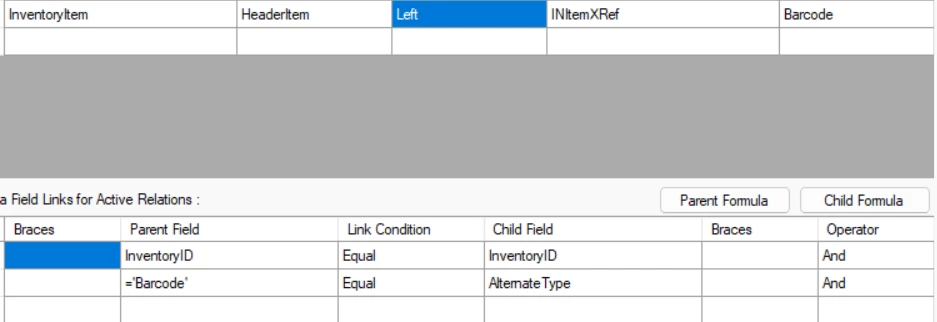
I want to display the Barcode alternate Type from the Cross Ref tab in the Stock items (IN202500) screen. But unable to do so. i want to hard code in the join to only display the data for Barcode.
Thanks.
Hello all,
I want to display the Barcode alternate Type from the Cross Ref tab in the Stock items (IN202500) screen. But unable to do so. i want to hard code in the join to only display the data for Barcode.
Thanks.
Best answer by Dipak Nilkanth
Hi
Could you please confirm where you want to achieve this? Are you looking to hardcode it on the Stock Items screen as AlternateType = Barcode, or are you trying to display the barcode data in a report?
If you want to set it on the Stock Items screen, you can use Low Code / No Code customization and configure the default value through the Customization Editor.
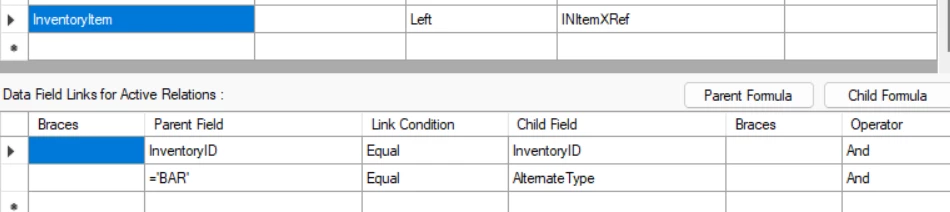
If your requirement is for a report, I’m not completely sure, but based on my review of the code and database, the barcode value is stored as “BAR” in the backend. You can try using this value as well.
Enter your E-mail address. We'll send you an e-mail with instructions to reset your password.