Question

What is the purpose of Keys under Production Configurator

  • April 30, 2026
  • 5 replies
  • 61 views

Forum|alt.badge.img

Hello all,

I am curious to understand the purpose of Keys under Production Configurator. Maybe with an example?

Thanks in advance.

5 replies

Forum|alt.badge.img+2

@Harry 

Purpose of the configuration key: 

1. Unique Identification - It distinguishes one configured product from another, even when they share the same base inventory item. For example, two custom windows with different sizes, colors, or hardware will each generate a distinct key, making every configuration traceable and unambiguous.

2. Repeat Orders - The configuration key can be referenced as a template to quickly recreate the same custom item for repeat orders, using all previously defined parameters. This saves significant time when a customer reorders or needs a slight variation of a prior configuration then no manual re-entry required.

Example

Imagine you manufacture custom windows. Your configurator has these features and options:

Feature Option Selected
Frame Material ALU (Aluminum)
Glass Type DBL (Double Pane)
Width (attribute) 36
Height (attribute) 48
Color WHT (White)


You could define the Configuration Key formula as a concatenation of these selections:[FrameMaterial] & "-" & [GlassType] & "-" & CStr([Width]) & "x" & CStr([Height]) & "-" & [Color]

This would generate a key like: ALU-DBL-36x48-WHT

When the same customer reorders or a similar order comes in - the sales rep simply looks up the existing configuration key. The system automatically pre-fills all attributes and options, and if adjustments are needed, the rep can modify just the relevant fields. Any changes will generate a new unique configuration key, saving significant time compared to configuring the product from scratch.


Forum|alt.badge.img
  • Author
  • Semi-Pro II
  • April 30, 2026

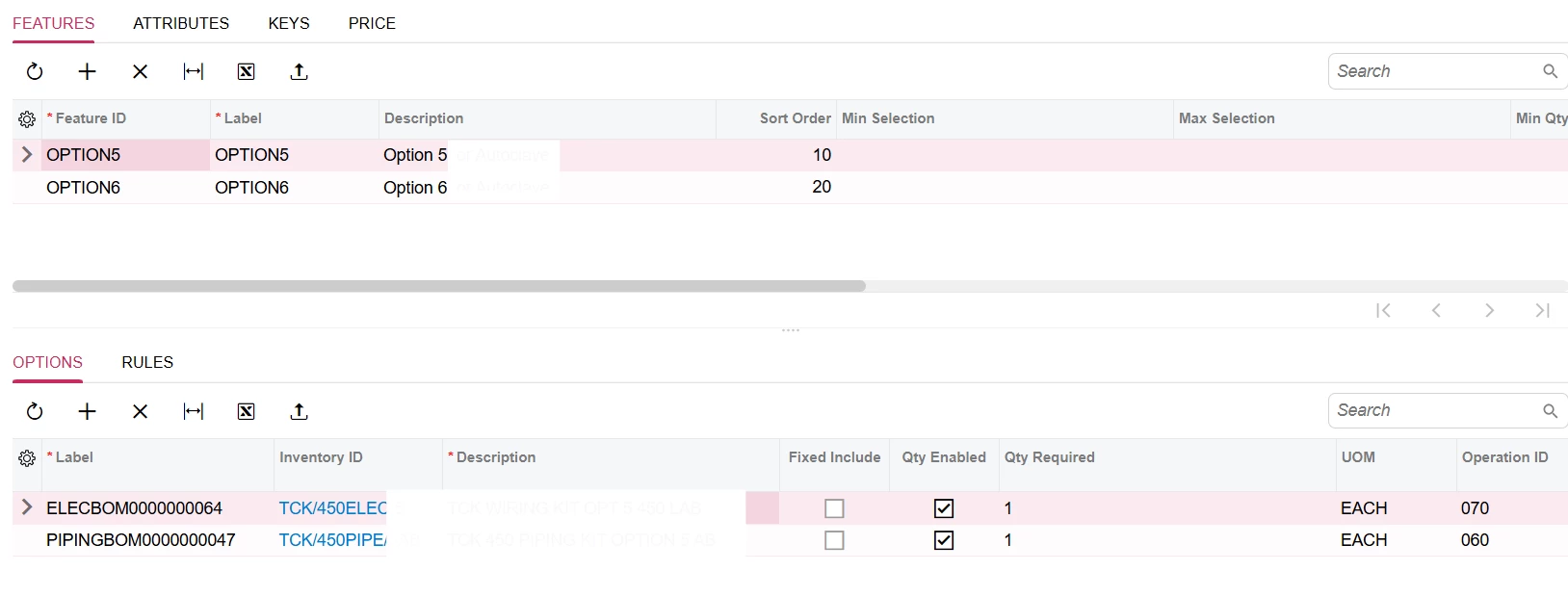
Hi ​@PragatiMalviya64 , Thank you so much for your prompt response. How can I create a key?

Taking this as an example:


I have no Attributes defined. So how can I generate key? I am unable to find any steps.


Thanks again.


dgodsill97
Varsity I
Forum|alt.badge.img+6
  • Varsity I
  • April 30, 2026

Keys are constructed, as the example above shows, from attribute values.  The Key can be a numbering sequence or a formula.:If you use a formula, you use the Formula Editor to construct the keys.  You have 3 fields to work with n the Keys The Formula.Numbering Sequence  (this is the visible configuration Key), key description, and Tran Description.  You can see both the Formula.Numbering Sequence and Key Description to look up a configuration.  The Tran description overrides the stock item description in CRM Opportunities and Quotes, and Sales Order lines and is what the customer  will see on their documents.

Look at the help for Configuration Maintenance: https://help.acumatica.com/Help?ScreenId=ShowWiki&pageid=d035ebab-8408-4d8b-8948-11139426db15


Forum|alt.badge.img
  • Author
  • Semi-Pro II
  • April 30, 2026

Keys are constructed, as the example above shows, from attribute values.  The Key can be a numbering sequence or a formula.:If you use a formula, you use the Formula Editor to construct the keys.  You have 3 fields to work with n the Keys The Formula (this is Key), key description, and Tran Description.  You can see both the Key and Key Description to look up a configuration.  The Tran description overrides the stock item description in CRM Opportunities and Quotes, and Sales Order lines and is what the customer  will see..

Look at the help for Configuration Maintenance: https://help.acumatica.com/Help?ScreenId=ShowWiki&pageid=d035ebab-8408-4d8b-8948-11139426db15

Hi ​@dgodsill97 , so based on the screenshot shared if I want to generate a key ID = Option5-Wiring-10mtr
then how can I set this up?
I am getting confused on setting this up. I understood the concept but unable to setup in Acumatica.


dgodsill97
Varsity I
Forum|alt.badge.img+6
  • Varsity I
  • April 30, 2026

You can only use Attributes to construct keys and/or trans description.  If you want to print the options selected on custom facing documents please see the help article.https://help.acumatica.com/Help?ScreenId=ShowWiki&pageid=86def8d0-857d-4975-9eee-f2e49e44f8cc   It is also possible to print the Attributes, a bit trickier because you need to access the Attribute definition table to get the Attribute value description.

I you need to have option 5 and option 5 is not part of the build (aka production order) and is a separate line item on the sales/opportunity, make it a Supplemental Item. https://help.acumatica.com/Help?ScreenId=ShowWiki&pageid=55081ac9-c9d8-4943-875d-6fd713fea90a