Question

Update inventory when Shipment Confirmed on Sales Order

  • May 1, 2026
  • 10 replies
  • 61 views

We are currently on version 2025 R2.  We are having an issue where Inventory is released when a Sales order is Invoiced.  However, we need that to happen when Shipment is confirmed.  We have verified that the check box “Automatically Update IN Documents” in Sales Order Preferences is Checked.  We have also looked at the workflow in the customization of the sales order screen but haven’t gotten anything within there to work.  Has anyone had this issue before?

10 replies

bwhite49
Captain II
Forum|alt.badge.img+12
  • Captain II
  • May 1, 2026

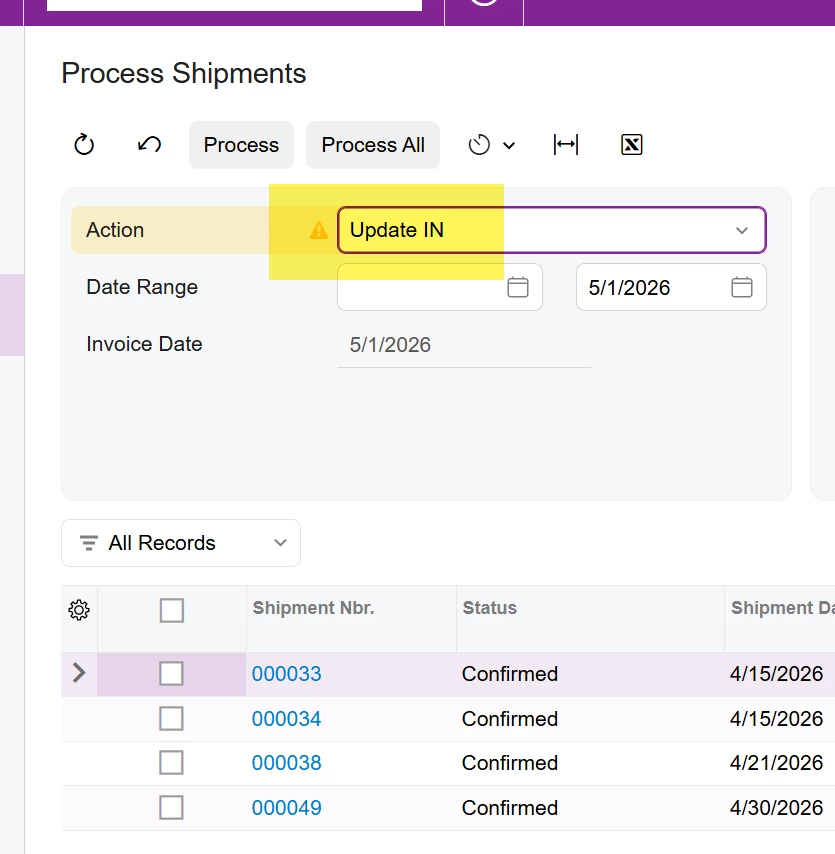
You can add a schedule to the “process shipments” screen to run the update IN action. On the scheduler you would add a condition where status = confirmed.

Just be aware that one you start releasing inventory transactions, you will no longer be able to correct the shipment. This is why most companies relieve inventory on invoice release rather than shipment confirmation. 


  • Author
  • Freshman I
  • May 1, 2026

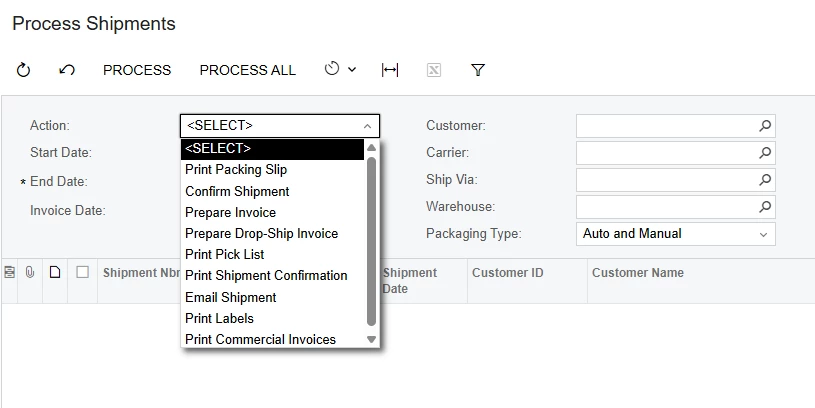
I dont see an option in the scheduler within the process shipment where is says anything about UpdateIN.


bwhite49
Captain II
Forum|alt.badge.img+12
  • Captain II
  • May 1, 2026

Should look like this ...

I guess you don’t need to add the confirmed condition as only confirmed shipments show in the list anyway.


  • Author
  • Freshman I
  • May 1, 2026


What version are you on?  That is not an option in my drop down.


bwhite49
Captain II
Forum|alt.badge.img+12
  • Captain II
  • May 1, 2026

Interesting. It might be disabled by access rights?

That action has been stock in every version I have worked with, but it is also the most common action to hide from users via access rights.


mohammadnawaz51
Jr Varsity II
Forum|alt.badge.img+6

@jknapp221 It is something an Access right issue, can you confirm from the admin access?


  • Author
  • Freshman I
  • May 1, 2026

I am logged in with Administrator rights.  Could Access rights to something like that be affected when upgrading to another version?


bwhite49
Captain II
Forum|alt.badge.img+12
  • Captain II
  • May 1, 2026

Make sure you have minimal roles.

1)Admin

2)Dashboard designer

3)Customizer

4)Odata

Don’t have things assigned like SO Clerk or IN Shipper. 


  • Author
  • Freshman I
  • May 1, 2026

I am one of the Admins… I’m in the appropriate groups.  Wouldn’t put myself in those low level ones.


bwhite49
Captain II
Forum|alt.badge.img+12
  • Captain II
  • May 1, 2026

OK, I would reach out to your VAR to investigate why the action is missing for you. It could be access rights or a customization hiding it.