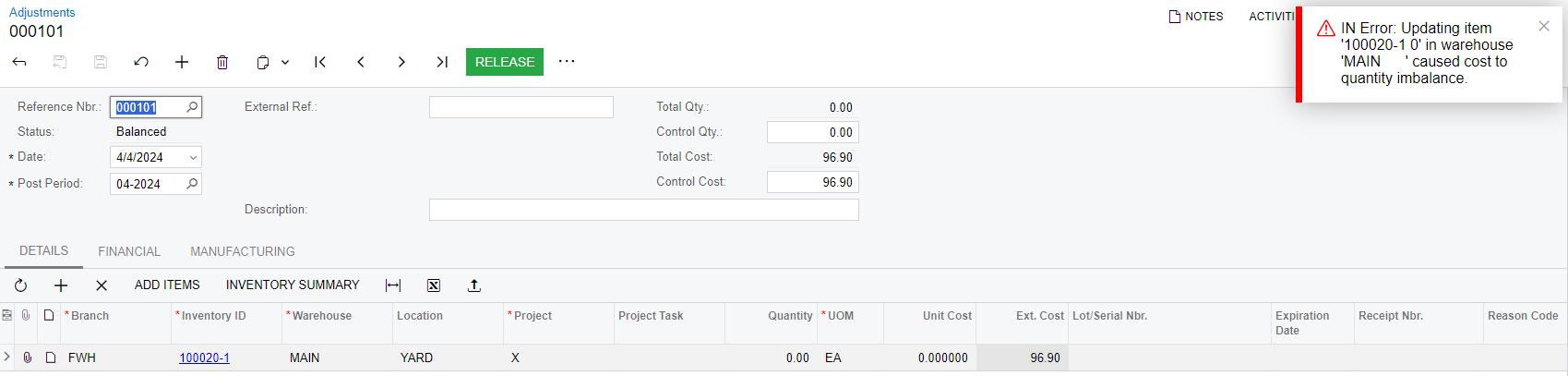
I am trying to update the average cost for stock items that were migrated into Acumatica without an average cost. To do this, I did a quantity adjustment with Ext Cost what I want the average cost to be and the quantity zero. I am getting the following error.
I tried doing this again with a quantity of 1 which worked, but then when I did the adjustment for a quantity of -1 to make our actualy on hand inventory accurate the average cost went back to zero.
How do I update the average cost for a stock item without changing the quantity on hand?
Best answer by andrestamour43
@josborn - a receipt with a cost and no quantity would leave a value on the shelf with no goods to back the value.
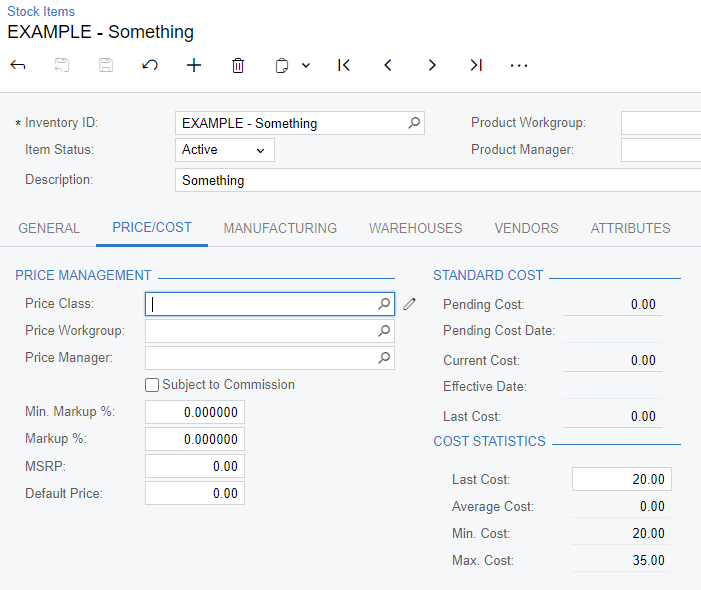
The Average Cost statistic on the stock item is displaying the average cost of the inventory currently on hand. If you have 0 inventory on hand the average cost will be zero.
Example of item with 0 on hand inventory
For future adjustments/ receipts when the average cost is 0.00, then the system will use the last cost. You can manually update the last cost without having to do an adjustment.
I don’t see an error above. Can you type in the text of your error or paste a screen shot?
I think the items must be adjusted out at their current cost of $0 and then received in with their correct average cost (with inventory migration mode on - Update GL not checked in IN Preferences).
@josborn - a receipt with a cost and no quantity would leave a value on the shelf with no goods to back the value.
The Average Cost statistic on the stock item is displaying the average cost of the inventory currently on hand. If you have 0 inventory on hand the average cost will be zero.
Example of item with 0 on hand inventory
For future adjustments/ receipts when the average cost is 0.00, then the system will use the last cost. You can manually update the last cost without having to do an adjustment.