Subassembly item, “item A” is included in materials for various Manufacturing Formulas.
For “item A” we create independent batch tickets.
However, every time a Super Batch using a Formula that includes “item A” is generated, a sub batch is also generated for “item A”.
Is there any way to discontinue the creation of sub batches for certain subassembly items?
Best answer by avishnoi06
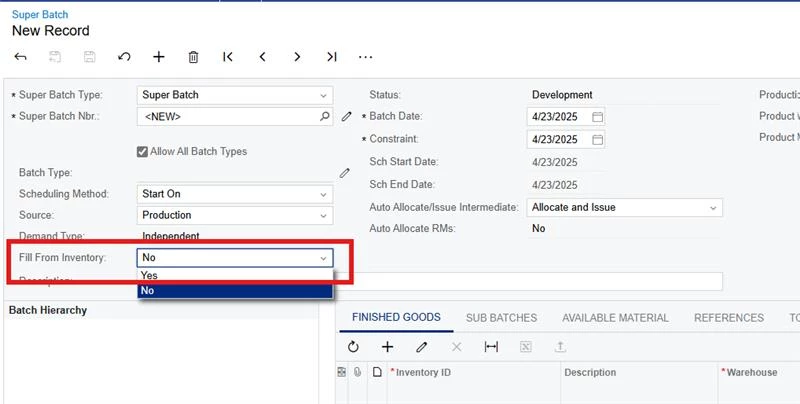
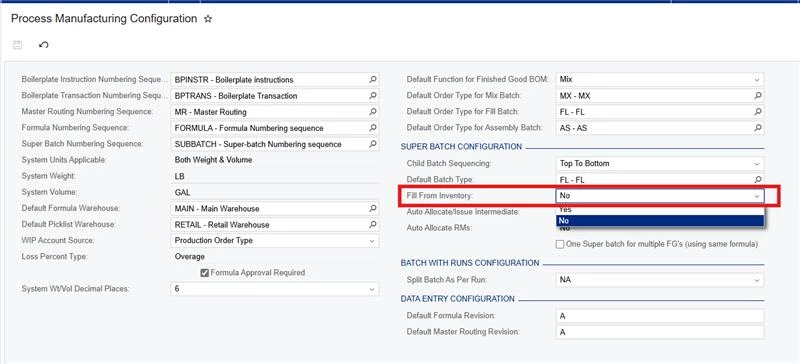
Hi @MMckenzie, Are you creating the Super Batches manually or through MRP function ? in both ways PMS has functionality to use the stock that is available in the inventory and will not create any sub batches for such Subassemblies. the option is “Fill from Inventory”. we would like to demonstrate you this option and discuss further the useability of other options that are available in the standard system. We will soon reach out to you and schedule a meeting.
Hi @MMckenzie, Are you creating the Super Batches manually or through MRP function ? in both ways PMS has functionality to use the stock that is available in the inventory and will not create any sub batches for such Subassemblies. the option is “Fill from Inventory”. we would like to demonstrate you this option and discuss further the useability of other options that are available in the standard system. We will soon reach out to you and schedule a meeting.
Selecting “Fill form Inventory” does not generate sub batches for the subassembly item we do not wish to produce, but also any other subassembly we wish to actually produce.