Solved

Troubleshooting Production Order actual quantity not claiming required quantity for order

  • May 11, 2026
  • 10 replies
  • 93 views

Material and move completed from Operation 10 to operation 20, not all required claimed

Hi, 

we are experiencing issue where the required material quantity is not being claimed in the operation. Currently, the material and moves are done manually from the office. 

What are some of the reasons/ways to troubleshoot this? 

Thank you, 

Best answer by nclark

This is resolved. The issue was warehouse setup was not checked for “Include in Qty. Available” & recalculate inventory resolved the issue. 

10 replies

Debbie Baldwin
Community Manager
Forum|alt.badge.img+2
  • Acumatica Product Manager
  • May 11, 2026

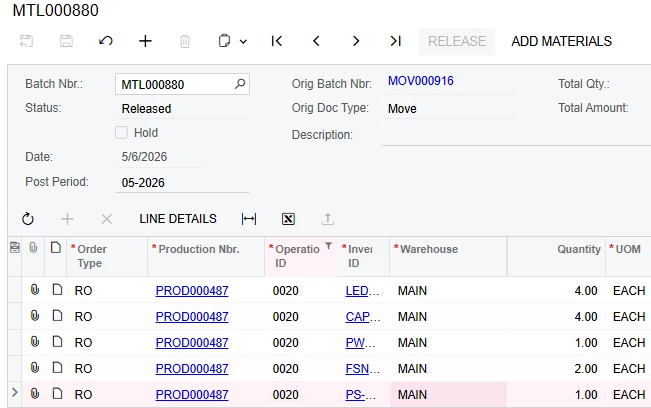
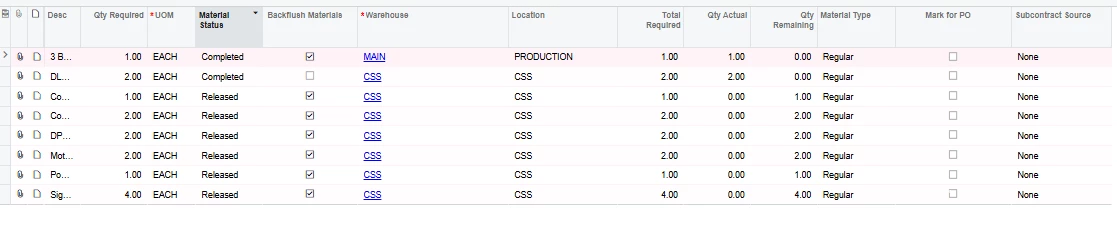
@nclark - from this view it doesn’t look like anyone issued the materials? 


  • Author
  • Freshman II
  • May 11, 2026
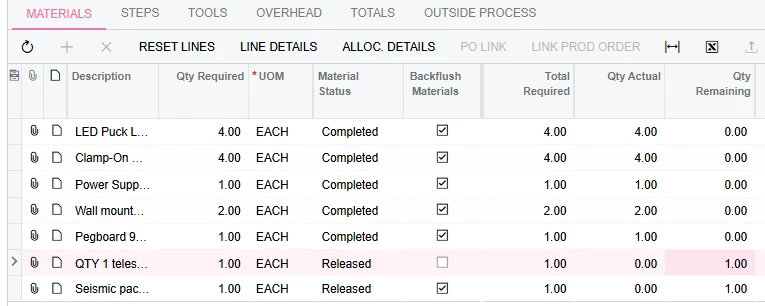
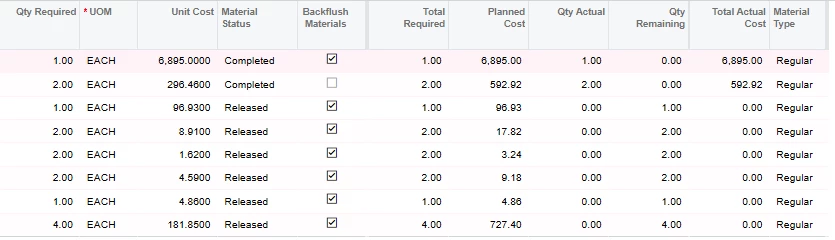
879 is the manual material transaction for the lifters; 880 is the one for the majority of the remaining items on the operation. 


All lines except the lifers are backflushed. The first two lines are manually issued due to the serialization. If I look at the events of the production order, it shows the material transaction created from it. 

From the S&OP of what was left behind from my previous scheduler, Material instance was used for lifters for serialization. In the past, it has automatically made the remaining moves with the completion of operation 10 with the transfer. Recently it has been not claiming everything (around Late Feb).  

The previous scheduler would release the production order, issue the lifters manually in the material, transfer the completed WIP item in the production order from Op10->20 with a move, and close the job accordingly. 

It has been really inconsistent as to which lines it is impacting. Mainly being components.

MRP is not active yet in our system. we will be implementing hopefully by the end of the year. 


dgodsill97
Varsity I
Forum|alt.badge.img+6
  • Varsity I
  • May 11, 2026

Do the materials have on hand and what is the value for the order type data entry setting for  Under Issue Backflush Material?  What is on the Material transaction created by the Move for Operation 20?


  • Author
  • Freshman II
  • May 11, 2026

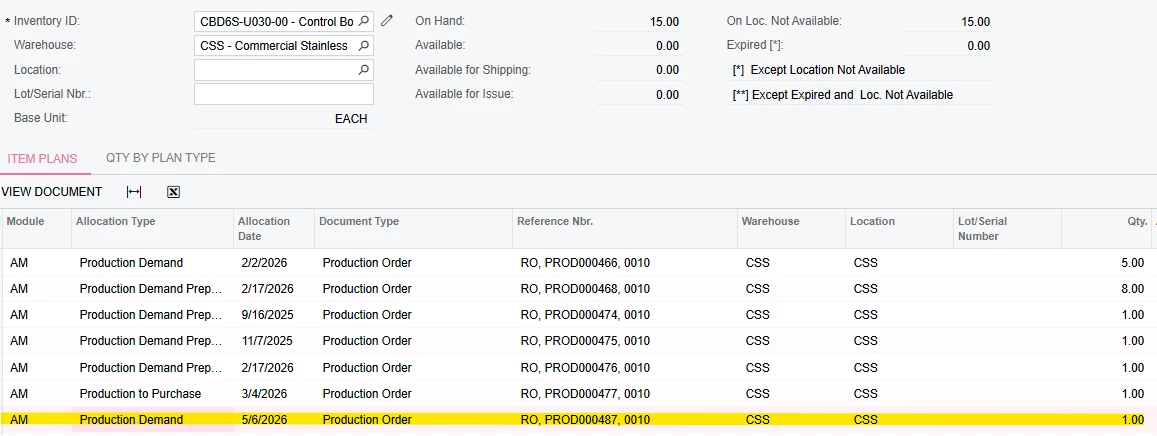
The materials are ample available on hand. 

If I pull up the Inventory allocation details for one the items that was not consumed. It shows Production Demand for it. 

All orders are currently being generated as RO. 

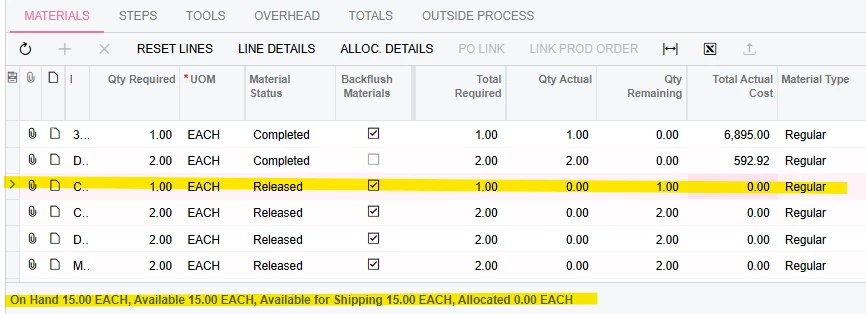
Similar issue to Op10, only partial has been issued even if there is ample amount on hand to support the demand. 

exclude the highlighted line, that is also manually material transacted for serialization. I forgot to do it in this test example. 


dgodsill97
Varsity I
Forum|alt.badge.img+6
  • Varsity I
  • May 12, 2026

Is the available inventory in the warehouse and bin location specified on the production order details? 


  • Author
  • Freshman II
  • May 12, 2026

Yes it does. 


dgodsill97
Varsity I
Forum|alt.badge.img+6
  • Varsity I
  • May 12, 2026

You showed inventory available in warehouse CSS but the material that was issued was from warehouse MAIN.  What warehouse and location are on the Production Order Details?


  • Author
  • Freshman II
  • May 12, 2026
Op 10. 
Op20

For context: CSS is a subfab location. We send up some stock items to be consumed and transferred over. I.e) Lifters, and kitted items that are partially consumed at CSS and Production (Main facility location). While I know this can greatly be improved, I want to understand why this is happening and still retain status quo while we implement MRP.  


dgodsill97
Varsity I
Forum|alt.badge.img+6
  • Varsity I
  • May 12, 2026

When you specify a location on the production order details, that is the only location from which the inventory can be backflushed.  Both the warehouse and location are defaulted from the bill of material Materials tab.  If a warehouse is not specified, then the warehouse for the materials is set to the warehouse of the production order header.  If a location is not specified, then material will be consumed from the default issue location on the Item Warehouse Details and if insufficient, then it will find locations with on hand using the location pick priority within the warehouse.

MRP plans by warehouse and not by location within a warehouse.  Similar to the creation of the production order, MRP will use the warehouse specified on the BOM material line and if empty, the BOM header warehouse. In a situation where material must be moved to another warehouse for production, you can define a replenishment policy of transfer with source warehouse on the Item Warehouse Details and MRP will generate transfer planned order for both the supply and demand.  For example, MAIN is the storage warehouse but materials need to be move to CSS, then for the Item Warehouse Details for CSS, transfer would be the replenishment source and the source warehouse MAIN.


  • Author
  • Freshman II
  • Answer
  • May 18, 2026

This is resolved. The issue was warehouse setup was not checked for “Include in Qty. Available” & recalculate inventory resolved the issue.