Time Entry in Modern UI is interpreted as minutes

  • October 7, 2025
  • 7 replies
  • 75 views

dgodsill97
Varsity I
Forum|alt.badge.img+3

I found that when importing Production Order Labor in the modern UI in 25R2, the values 0130 is interpreted as minutes and the time is converted to 02:10. This also happens any where when time spent is entered like time cards, activities, etc. For example, 
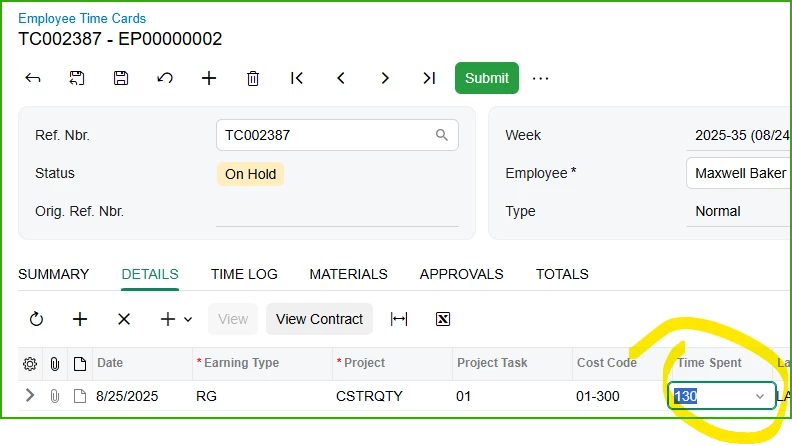
and tab or enter you get.

I have not tested the bill of material imports but I assume the same behavior.  

7 replies

Debbie Baldwin
Acumatica Moderator
Forum|alt.badge.img+2
  • Acumatica Product Manager
  • October 15, 2025

@dgodsill97 - did you log a support case? (so it can get fixed) . Thanks


dgodsill97
Varsity I
Forum|alt.badge.img+3
  • Author
  • Varsity I
  • October 27, 2025

Case 471577


kyoung14
Varsity I
Forum|alt.badge.img
  • Varsity I
  • October 27, 2025

I saw this in 25R1 but hadn’t tried in 25R2 yet - I was hoping they’d fixed.  Not sure what the source of your data is but I suspect if you included the colon (:) in the string you are passing to the screen it “might” work for you.  Although maybe it isn’t easy for you to insert that in the value?  I know manually typing the colon seems to work.  By no means a fix but maybe a short-term workaround?


dgodsill97
Varsity I
Forum|alt.badge.img+3
  • Author
  • Varsity I
  • October 28, 2025

The only screens where time entry works correctly is in Bills of Material, Estimates, and Production Order Details where the time column formats are determined by the BOM Preferences.  And I just tested the BOM Import where the times are 0100, 0030, etc, and it imported the times correctly,


Any other form where time needs to be entered does not insert the colon.  Most users will use the numeric keypad to enter time.  So if you enter 0100 you get 01:40 because it interprets the entry as minutes.


dgodsill97
Varsity I
Forum|alt.badge.img+3
  • Author
  • Varsity I
  • October 28, 2025

The support case in entered has been escalated to development.


kyoung14
Varsity I
Forum|alt.badge.img
  • Varsity I
  • October 28, 2025

I was just referring to the Timecard Entry screen.  Glad to hear the other screens are ok.  Hopefully this is one of things they can fix with a patch.


dgodsill97
Varsity I
Forum|alt.badge.img+3
  • Author
  • Varsity I
  • October 29, 2025

Response from Acumatica development:

L3 has informed me this is intended behavior in modern ui. This gives the user the flexibility to enter a number of minutes, or to manually input the colon to make it hours and minutes.

They recommend the user input a colon if they want hours and minutes. Alternatively you can use the classic ui for now.