

Question

Sales Order Inventory Allocation

  • Nov 10, 2026 6:52 PM UTC
  • 2 replies
  • 17 views
  • Translate All

Forum|alt.badge.img

Hello,

We’ve been attempting to set up Acuamtica to not allocate inventory on sales orders before shipments are created. We currently have our sales order type (SO) set up as the following:
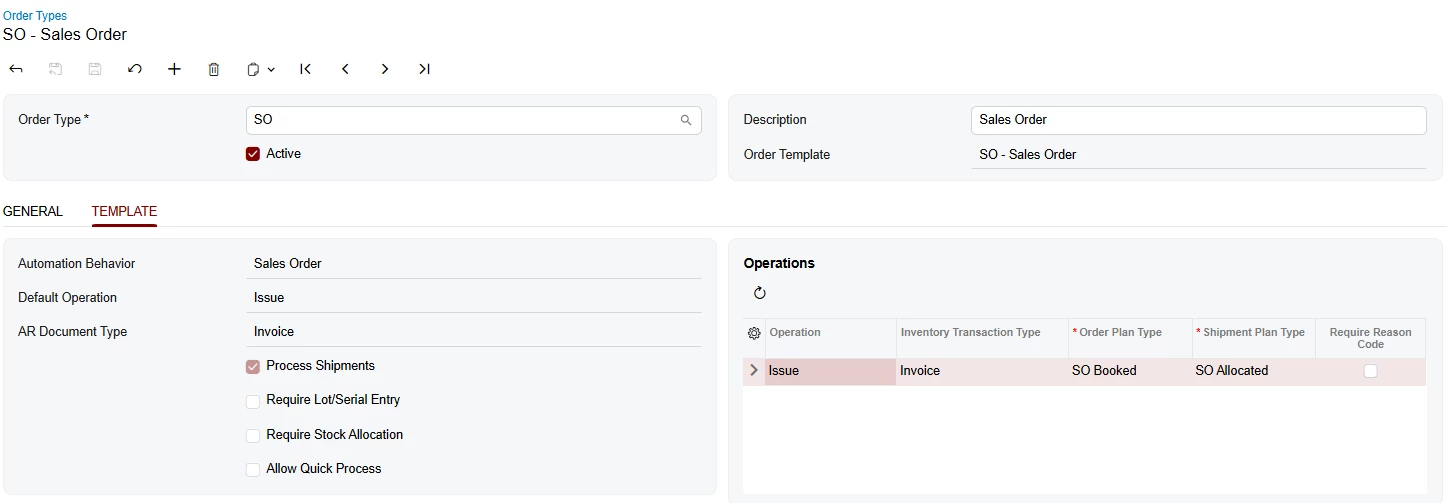
our availability calculation rules are setup as follows:
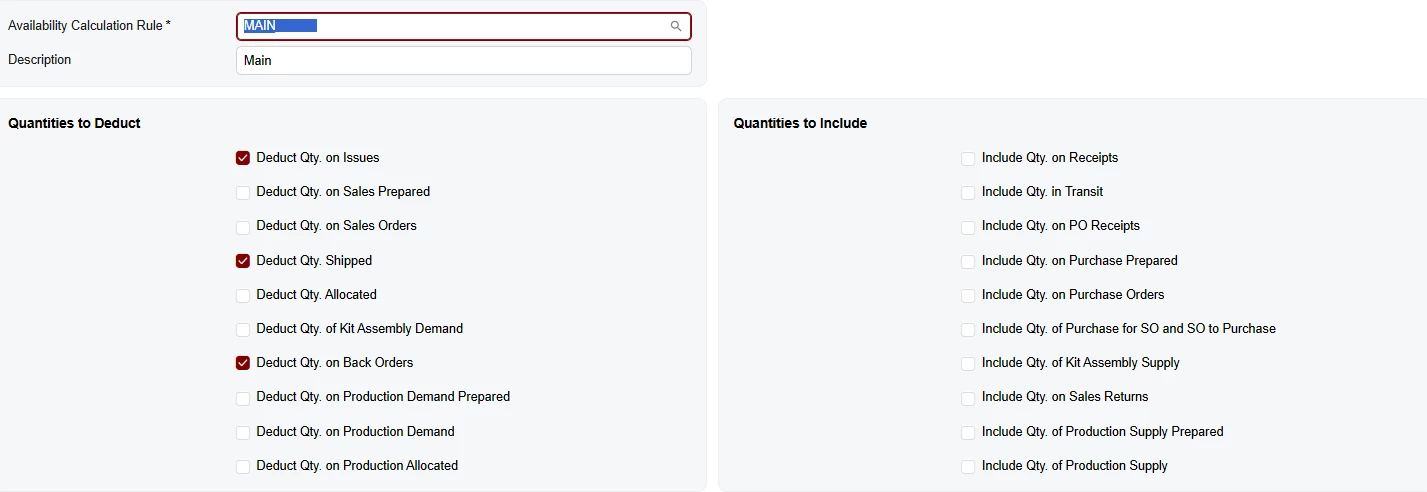
However, we’re still receiving feedback that inventory is sales order specific. Is there anywhere else we should check other than ensuring we’re not allocating at the sales order line level? We’re also not using the MTO scenario (linking production orders).

2 replies

Steve Milner
Varsity III
Forum|alt.badge.img+7
  • Varsity III
  • Nov 10, 2026 7:18 PM UTC

@bosborne Yes. Line-level allocation isn't the only way stock gets tied to an order. These allocate it on the sales order before any shipment exists, with nobody ticking Allocated:

- Receiving a purchase order or transfer that's linked to an SO line. The receipt allocates that quantity to the order.
- Picking a lot or serial number on an SO line.
- The Allocate action on Manage Sales Allocations (SO501010).
- Lines created by Order Orchestration.

Your availability calculation rule doesn't change any of that. It only drives the Available quantity. Create Shipment checks Available for Shipment, which always subtracts allocated stock, including lines on shipments that aren't confirmed yet. MAIN doesn't deduct Qty. Allocated, so an item can show stock as Available that's already allocated to another order or sitting on its shipment.

The rule is assigned per item class on Item Classes (IN201000), and an item can't override it. Make sure every class points to MAIN.

For an item your users flag, open Inventory Allocation Details (IN402000). The Item Plans tab shows which documents are holding it and under which plan type.

Translate

Forum|alt.badge.img
  • Author
  • Freshman I
  • Nov 10, 2026 8:49 PM UTC

@bosborne Yes. Line-level allocation isn't the only way stock gets tied to an order. These allocate it on the sales order before any shipment exists, with nobody ticking Allocated:

- Receiving a purchase order or transfer that's linked to an SO line. The receipt allocates that quantity to the order.
- Picking a lot or serial number on an SO line.
- The Allocate action on Manage Sales Allocations (SO501010).
- Lines created by Order Orchestration.

Your availability calculation rule doesn't change any of that. It only drives the Available quantity. Create Shipment checks Available for Shipment, which always subtracts allocated stock, including lines on shipments that aren't confirmed yet. MAIN doesn't deduct Qty. Allocated, so an item can show stock as Available that's already allocated to another order or sitting on its shipment.

The rule is assigned per item class on Item Classes (IN201000), and an item can't override it. Make sure every class points to MAIN.

For an item your users flag, open Inventory Allocation Details (IN402000). The Item Plans tab shows which documents are holding it and under which plan type.

Thanks Steve, this was helpful.

Translate