



Production Order Warehouse Change Bug - Including 26R2 GA release

  • October 2, 2026
  • 3 replies
  • 75 views
  • Translate All

MichaelShirk
Captain II
Forum|alt.badge.img+8

The below has been submitted to our support partner.

Issue: 

A PXLockViolation error is thrown when attempting to save a change to the production order warehouse for a production order with a linked sales order, when the "Yes" option is selected in the popup dialogue to also change the warehouse on the line of the related sales order.

This error is present when no customizations are published and the sales demo data is loaded, so it is very simple to reproduce. 


Confirmed Affected Versions:

26.100.0175.2 

26.100.0175.5 

26.200.0334  


Steps to Reproduce: 

  1. Create a production order from a sales order, or link an existing sales order and production order.

  2. Ensure the Production order is in the Planned status. 

  3. Change the production order warehouse. 

  4. In the popup dialogue box that asks, "Do you want to update the warehouse in the <1> line of the <SO> <SO009312> sales order?" click "Yes". 

  5. Attempt to save the production order. 

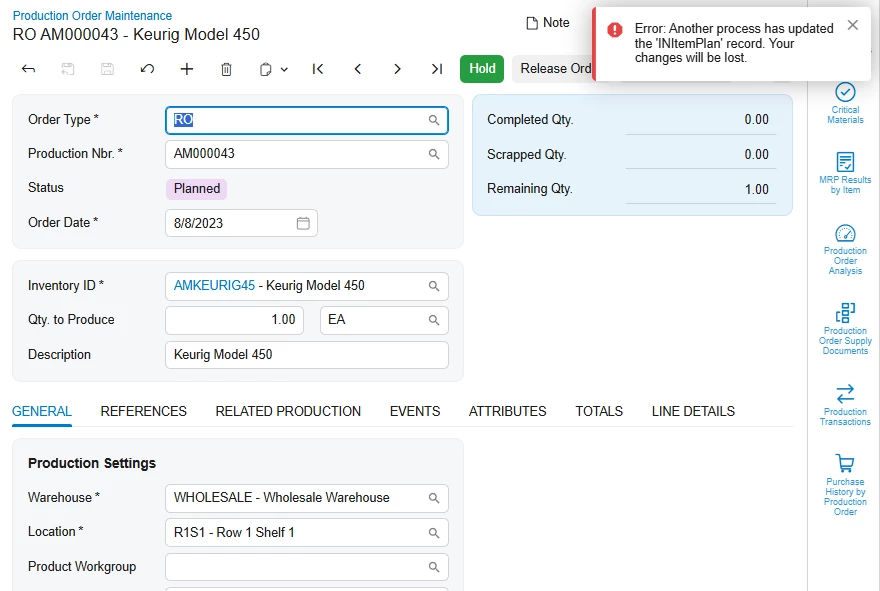
The error message "Error: Another process has updated the 'INItemPlan' record. Your changes will be lost." is thrown and the warehouse value cannot be changed. 
 

3 replies

angierowley75
Acumatica Moderator
Forum|alt.badge.img+3

Do you have an Acumatica Case number - want to make sure if this is not yet resolved that it is routed to the proper team and receives appropriate attention.

Translate

MichaelShirk
Captain II
Forum|alt.badge.img+8

​@angierowley75 I do not. 


Update:
I was just doing more testing, and it appears to only or primarily affect production orders for lot/serial tracked items.

Translate

MichaelShirk
Captain II
Forum|alt.badge.img+8

Here’s the fix I’ve implemented until Acumatica releases a patch for it.  

Use at your own risk. We’ll be using it on 26.200.0334  


using PX.Common;
using PX.Data;
using PX.Objects.AM;
using PX.Objects.CS;
using PX.Objects.IN;

namespace PVBMFGCustomizations.Extensions.AM
{
// Workaround for an Acumatica defect (introduced in 26.101, still present in 26.200.0334). Changing the warehouse on
// a production order linked to a sales line, answering Yes to "Do you want to update the warehouse in the ... sales
// order?" and saving fails with "Another process has updated the 'INItemPlan' record" for a serial-numbered item with
// a preassigned serial number.
//
// ProdMaint.Persist saves twice inside one transaction. Between the two saves, PersistSalesOrderLine saves the sales
// order through its own SOOrderEntry. Changing SOLine.SiteID rebuilds the sales line's demand plan, and
// SOLineSplitPlanAM.SyncDemandPlanOnPlanInserted writes the new DemandPlanID onto this production order's supply
// INItemPlan rows. ProdMaint's cached copies of those rows keep the timestamp from the first save. For a preassigned
// serial, the second save re-updates the split (LineSplittingExtension.EnsureSingleSplit) and writes its stale plan,
// which fails the timestamp check.
//
// ProdMaint.ResetUpdateFilters runs once per save, after the sales order save and before the second save, so the
// cached plans are brought in line with the database there. Remove this extension once Acumatica fixes the defect.
public class SWProdMaintSalesLinePlanSyncExt : PXGraphExtension<ProdMaint>
{
public static bool IsActive() => PXAccess.FeatureInstalled<FeaturesSet.manufacturing>();

#region Overrides
public delegate void ResetUpdateFiltersDelegate();

/// Overrides <seealso cref="ProdMaint.ResetUpdateFilters"/>
[PXOverride]
public void ResetUpdateFilters(ResetUpdateFiltersDelegate base_ResetUpdateFilters)
{
// The base method clears this flag, so it is still set here only when this save handed the warehouse change
// to PersistSalesOrderLine.
if (Base.SalesLineUpdateFilter.Current?.UpdateSiteID == true)
{
SyncSupplyPlansAfterSalesLineUpdate(Base.ProdMaintRecords.Current);
}

base_ResetUpdateFilters();
}
#endregion

#region Methods
/// <summary>
/// Copies the sales order save's changes to this production order's supply plans into the cached copies, so the
/// second save of <see cref="ProdMaint.Persist()"/> does not write them with an outdated timestamp.
/// </summary>
protected virtual void SyncSupplyPlansAfterSalesLineUpdate(AMProdItem prodItem)
{
if (string.IsNullOrWhiteSpace(prodItem?.ProdOrdID)
|| string.IsNullOrWhiteSpace(prodItem.OrdNbr)
|| prodItem.OrdLineRef == null)
{
return;
}

var planCache = Base.Caches<INItemPlan>();
foreach (AMProdItemSplit split in Base.splits.Select())
{
// A negative PlanID is a plan that is not in the database yet.
if (split.PlanID == null || split.PlanID < 0)
{
continue;
}

var cachedPlan = planCache.Locate(new INItemPlan { PlanID = split.PlanID });
if (cachedPlan == null)
{
continue;
}

var status = planCache.GetStatus(cachedPlan);
if (status.IsIn(PXEntryStatus.Inserted, PXEntryStatus.InsertedDeleted))
{
continue;
}

using (PXDataRecord storedPlan = PXDatabase.SelectSingle<INItemPlan>(
new PXDataField<INItemPlan.demandPlanID>(),
new PXDataField<INItemPlan.Tstamp>(),
new PXDataFieldValue<INItemPlan.planID>(PXDbType.BigInt, split.PlanID)))
{
var storedTimeStamp = storedPlan?.GetTimeStamp(1);
if (storedTimeStamp == null
|| (cachedPlan.tstamp != null && Base.SqlDialect.CompareTimestamps(storedTimeStamp, cachedPlan.tstamp) <= 0))
{
continue;
}

// Take the sales order's DemandPlanID unless this graph has changed the field itself.
var originalPlan = status == PXEntryStatus.Notchanged ? cachedPlan : planCache.GetOriginal(cachedPlan);
if (originalPlan?.DemandPlanID == cachedPlan.DemandPlanID)
{
cachedPlan.DemandPlanID = storedPlan.GetInt64(0);
}
cachedPlan.tstamp = storedTimeStamp;
}
}

// INItemPlan updates are checked against the older of the record and graph timestamps. The graph timestamp was
// taken after the first save, before the sales order save, so take it again the way PXGraph does after its own
// writes.
Base.SelectTimeStamp();
}
#endregion
}
}


Translate

