




Upgrades to Acumatica 26R2 for customers using MRP or DRP
What changed
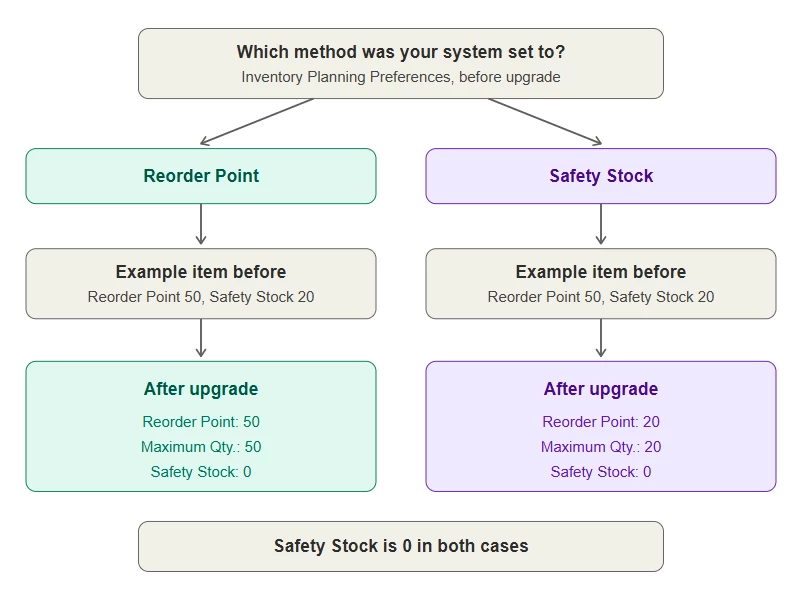
Acumatica 26R2 introduced new stocking methods for inventory planning and removed the single system-wide Stocking Method setting. When you upgrade, each item is converted automatically to Min/Max stocking method and will set stocking values based on the system-wide setting you used before.
You may see Safety Stock showing 0 on many items after the upgrade. This is expected. Only the value from your active method is carried forward, so if you had values in both fields, the other one won’t appear after the conversion.
Why this is a good thing
The conversion is designed to preserve your existing planning results without reconfiguring items. Each item still replenishes at the same level and up to the same level, because Maximum Qty. equals Reorder Point.
The change also separates settings that used to be treated as equivalent. Each quantity now has its own role:
- Reorder Point triggers a supply recommendation.
- Maximum Qty. is the level the Min./Max. method replenishes up to.
- Safety Stock is the buffer that protects against unexpected demand or supply delays. With the Show Reorder Point Warnings option on Inventory Planning Preferences, it can also set the point at which Expedite exceptions appear.
Safety Stock = 0 simply means you haven’t yet set a separate buffer. You can add one whenever you’re ready.
What you should do
- Before upgrading: Record both the Reorder Point and Safety Stock values for key items.
- After upgrading: Confirm Reorder Point and Maximum Qty. match your previous active value. Safety Stock = 0 is expected.
- When ready: Set Safety Stock where you want critical-shortage alerts, and raise Maximum Qty. where you want fewer, larger orders. The upgrade sets every item to Min./Max. to simulate 26R1 and before functionality. Consider whether Fixed Reorder Qty. suits some items better, such as items you buy in a negotiated vendor quantity, manufacture in a standard batch, or transfer in a consistent quantity.
Learn more
See Manufacturing: Distinct Stocking Methods for MRP and DRP in the Acumatica ERP 2026 R2 Release Notes. For questions about your configuration, contact your Acumatica partner or support representative.