Solved

New Stock Item or Non-Stock Item bringing in incorrect Description

  • Nov 12, 2024 10:15 PM UTC
  • 9 replies
  • 262 views
  • Translate All

Forum|alt.badge.img

Anyone see this before - For New Items - 

<NEW> tag plus a totally different item Description
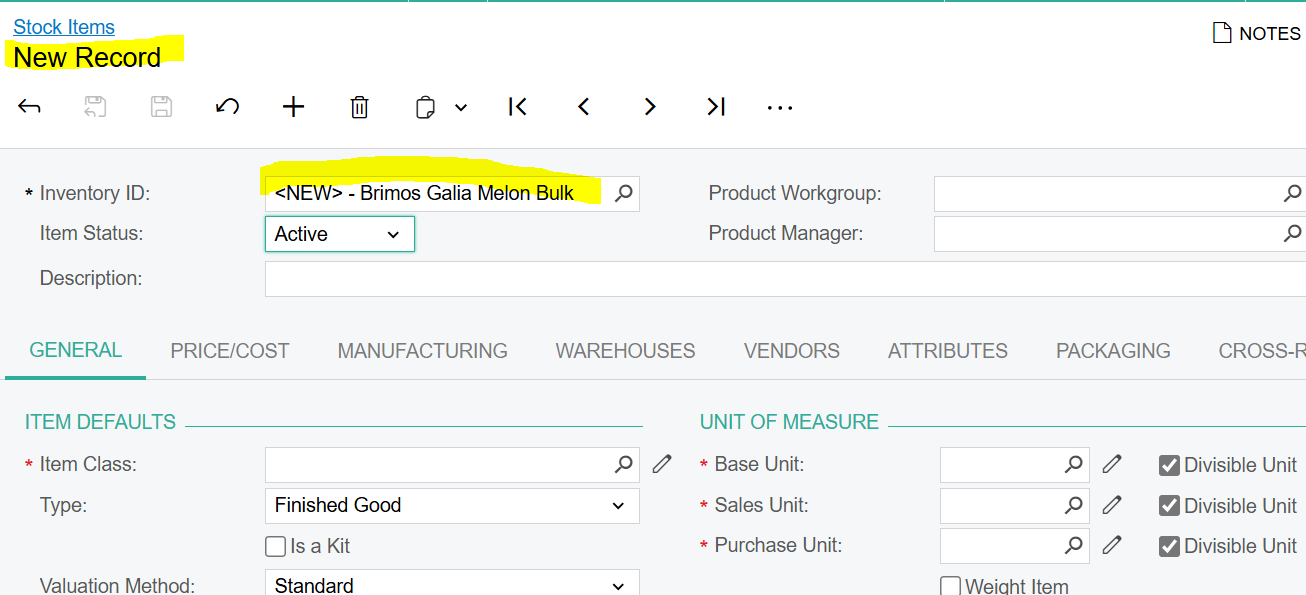
 

Nor New - I have not even put in a Description yet …..

Best answer by mianniello80

Hello ​@sshaw55 


I just had this issue with a current client. The steps to resolve are below.
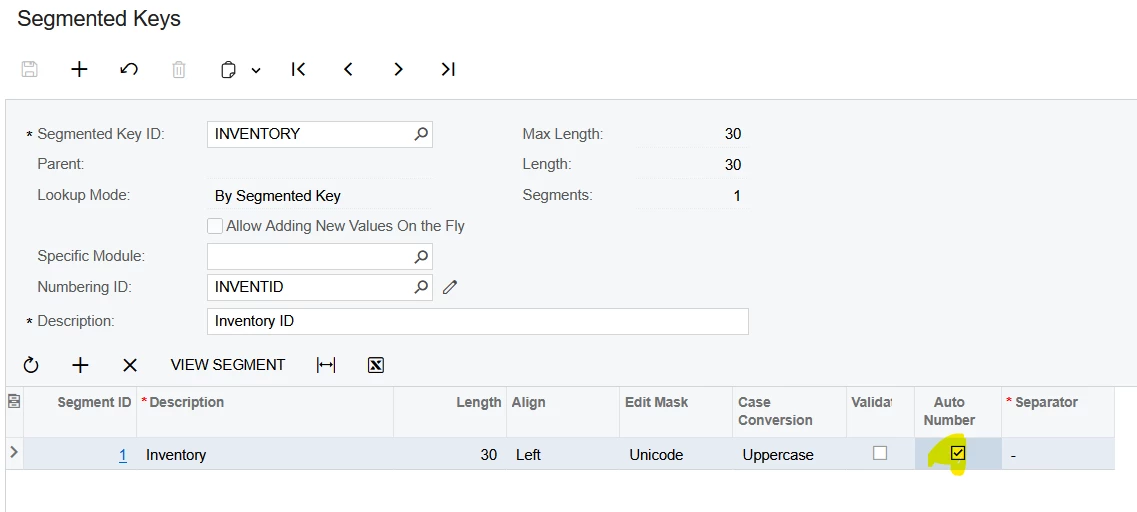
  1. On the Segmented Keys for Inventory - Turn off Auto Numbering
  2. Create a New Stock Item → Manually input  the ID as <NEW> fill out required information, then save.
  3. On the newly created <NEW> Stock Item → Use the Change ID action and change the ID (something like DELETE for example) and save.
  4. Delete this Stock Item
  5. Turn on the Auto Numbering Checkbox agai.
    1. Create new stock item, the description displaying issue is resolved.


View original

9 replies

josborn02
Varsity III
Forum|alt.badge.img+3
  • Varsity III
  • Nov 12, 2024 10:19 PM UTC

I have seen some similar odd behavior in the Stock Items screen.  I’d log out and back in, clear your chache, etc. and try again.  If it persists I’d submit a ticket with Acumatica.

Translate

Forum|alt.badge.img
  • Author
  • Freshman II
  • Nov 12, 2024 10:25 PM UTC

Thank you - it is a persistent issue - and happening for me as well as client (who reported it) - so totally different computers

Translate

angierowley75
Acumatica Moderator
Forum|alt.badge.img+3
  • Acumatica Moderator
  • Nov 13, 2024 12:18 AM UTC

I would recommend working with Acumatica support so they can investigate the issue, as this is not expected behavior.

Translate

Forum|alt.badge.img
  • Author
  • Freshman II
  • Nov 13, 2024 12:51 AM UTC

Thank you!  I thought I was losing it - but had never seen that myself!

Translate

Chris Hackett
Community Manager
Forum|alt.badge.img
  • Acumatica Community Manager
  • Jan 22, 2025 12:48 AM UTC

Hi ​@sshaw55 were you able to find a solution? Thank you!

Translate

Forum|alt.badge.img
  • Author
  • Freshman II
  • Jan 28, 2025 4:09 PM UTC

No solution :(

Translate

Forum|alt.badge.img+1

Are you using automatic numbering?  What it seems like to me is at one time someone added the <NEW> Item ID into the database and that’s why it’s coming up.  

What happens if you hit delete on that?

Translate

mianniello80
Varsity II
Forum|alt.badge.img
  • Varsity II
  • Answer
  • Apr 10, 2025 2:50 PM UTC

Hello ​@sshaw55 


I just had this issue with a current client. The steps to resolve are below.

  1. On the Segmented Keys for Inventory - Turn off Auto Numbering
  2. Create a New Stock Item → Manually input  the ID as <NEW> fill out required information, then save.
  3. On the newly created <NEW> Stock Item → Use the Change ID action and change the ID (something like DELETE for example) and save.
  4. Delete this Stock Item
  5. Turn on the Auto Numbering Checkbox agai.
    1. Create new stock item, the description displaying issue is resolved.


Translate

Chris Hackett
Community Manager
Forum|alt.badge.img
  • Acumatica Community Manager
  • Apr 10, 2025 5:27 PM UTC

Thank you for sharing your solution with the community ​@mianniello80!

Translate