

Question

Multi-Level BOM compare not exploding to material level

  • April 16, 2026
  • 2 replies
  • 42 views

Forum|alt.badge.img

Hi all,

I have a question regarding the BOM Compare screen in Multi- Level BOM.

when I compare two revisions of the same Bill of Materials, the compare does not explode down to the lower material level to show the detailed component changes. Because of this, I’m not able to clearly identify the exact changes at the lower level unless I manually go and perform the BOM compare on the Lower-Level BOM itself.
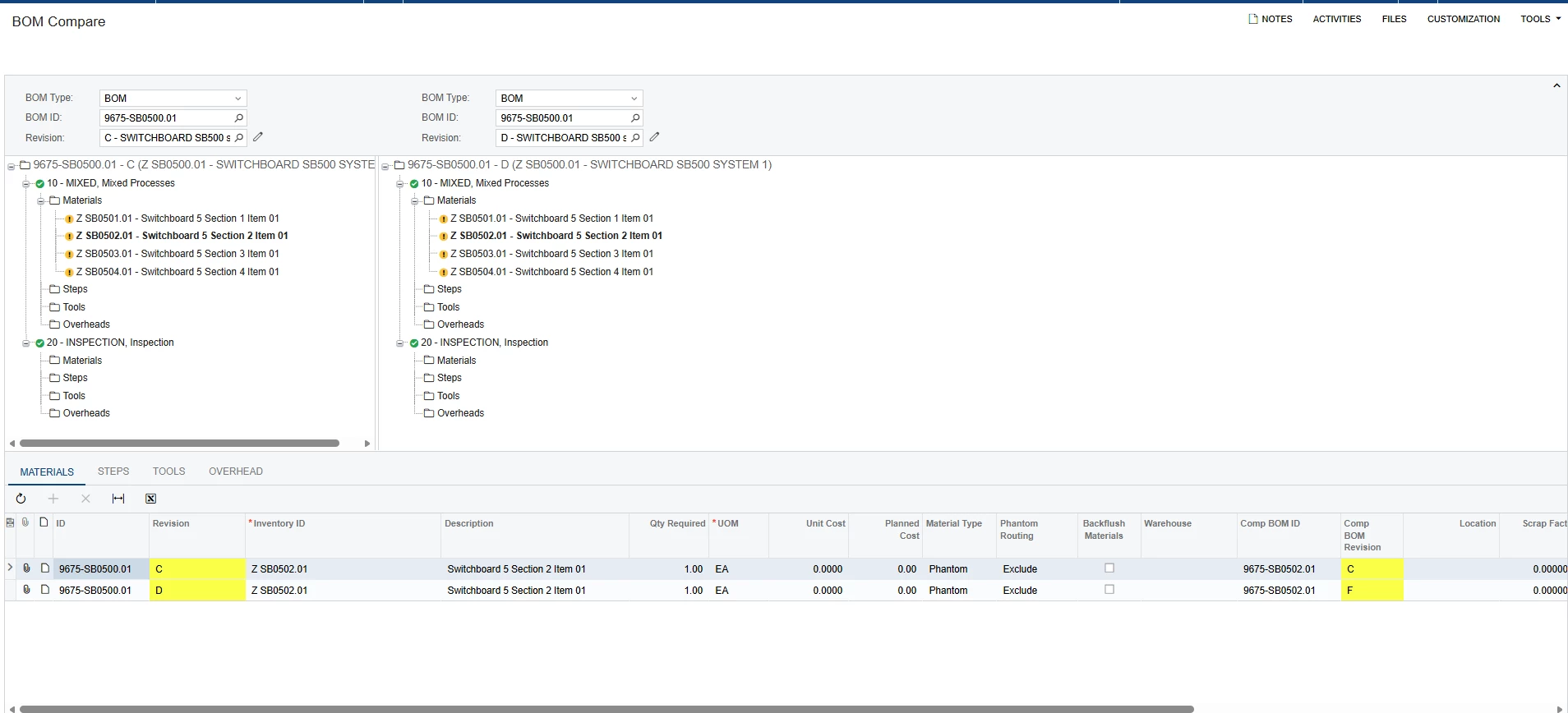
Is this the intended behavior of the screen, or is there any setting, configuration, or process that needs to be enabled so that it can explode fully and show the lower-level material changes directly? 

 

2 replies

  • Acumatica Employee
  • April 16, 2026

Hi Prasad,

This is actually expected behavior. The BOM Compare screen is designed to compare two revisions of a single BOM at the level you run it on. It will show you that a Comp BOM Revision changed (e.g., the sub-assembly moved from Rev C to Rev F), but it won't drill into that sub-assembly to show what changed inside it.

To see the lower-level detail, you'd just run a second BOM Compare on the sub-assembly itself using those two revision values. Repeat for any additional nested levels as needed.

I believe there's no setting to enable full multi-level explosion on this screen natively, so the manual step-down approach is the way to go for now.

I consider submitting it as a Community Idea — it could be a valuable enhancement for a lot of manufacturers.

Thanks,

Dishant


Forum|alt.badge.img
  • Author
  • Freshman I
  • April 22, 2026

@dishantpatel86 Thank you for the response and input.

I wanted to check whether any Acumatica user has created a Generic Inquiry or a report to address this requirement. If yes, could you please guide on how to create it? that would be very helpful.


Thanks,

Prasad Naidu