Answer

Mass Change screen erroneously updates UOMs in BOMs

  • February 17, 2025
  • 4 replies
  • 100 views

Forum|alt.badge.img+1

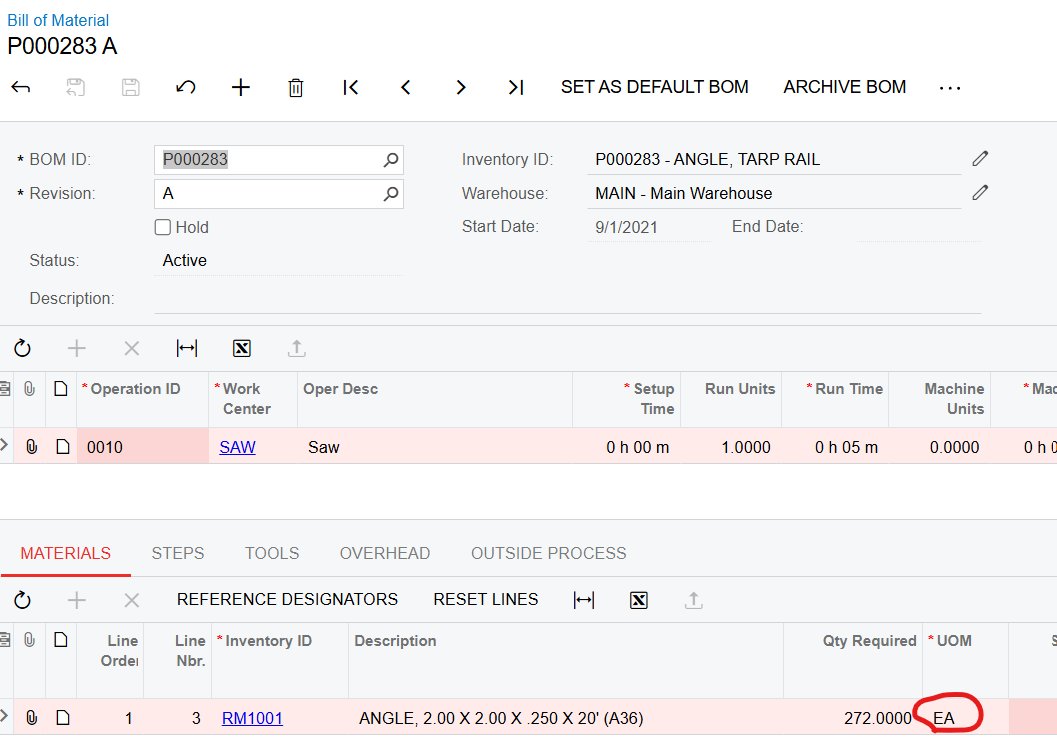
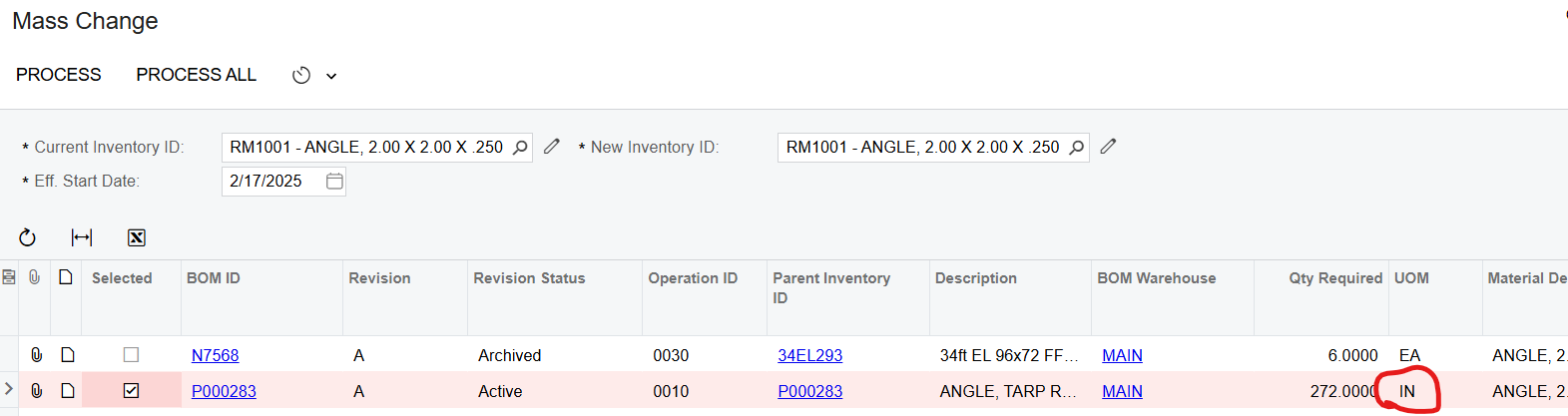
We have found that the Mass Change form erroneously converts the UOMs in the BOM to the base UOM instead of leaving it as it was.  This is catastrophic for us who use UOM conversions on our Raw Materials that are defined as a 20’ EA on the Stock Item, but in the BOM we consume IN (inches).  In the below example the BOM was erroneously changed to consume 272.00 EA (272 20’ pieces) instead of 272.00 IN (inches).

Anyone else out there that has experienced this?
 

Best answer by angierowley75

The Mass Change is just performing the same function that would happen if you were to manually change the Item on the Bill of Material.  If you put a BOM on hold and change the inventory ID of one of the materials, you will see it reassigns the UOM and cost.

I would encourage you to log a Community Idea to see if other users would like to see the behavior enhanced in a future release.

4 replies

angierowley75
Acumatica Moderator
Forum|alt.badge.img+3
  • Acumatica Moderator
  • Answer
  • February 17, 2025

The Mass Change is just performing the same function that would happen if you were to manually change the Item on the Bill of Material.  If you put a BOM on hold and change the inventory ID of one of the materials, you will see it reassigns the UOM and cost.

I would encourage you to log a Community Idea to see if other users would like to see the behavior enhanced in a future release.


  • Freshman I
  • July 27, 2025

We are going through our implementation and discovered that we had done our conversion from SQFT to SQIN backwards. In order to correct the conversion the Item had to be removed from every BOM it was on. So I created a temporary Item and used Mass Change remove the “real” item from all BOMs, made my UOM conversion correction at the Stock Item level, and then did another mass change to put the “real” item back in place of the temporary item. After doing this I ran into the same exact issue. 90% of this items usage is in SQIN but the base is SQFT. There’s now 100s of BOMs that needed corrected and I have multiple Items with the same UOM issue that need fixed as well. I stumbled across this thread trying to find some help to correct this with an Import Scenario.


It definitely seems like a short fall to have a Find/Replace tool that modifies more than just the change of the Item number itself. You would think if the system is going to force a change to the base UOM while using the Mass Change tool that it would at least convert the Qty Required for you to keep the BOM accurate. 


angierowley75
Acumatica Moderator
Forum|alt.badge.img+3
  • Acumatica Moderator
  • July 27, 2025

The product team would be open to improving this in a future version.  Creating a Community Idea helps us gauge the interest level of the broad customer base and weigh it against competing priorities.


bencrooks
Freshman I
Forum|alt.badge.img
  • Freshman I
  • July 30, 2025

We just had a near miss safety issue because the mass change tool does not do conversions, or at least allow you to select the NEW Inventory Items UOM on the BOM. By default it just uses the Base.

Has an idea been created yet? Im SHOCKED nobody else has created one yet.