

Solved

Labor Transaction Time - 24 Hour Clock vs 12 Hour

  • September 15, 2026
  • 7 replies
  • 68 views

Forum|alt.badge.img

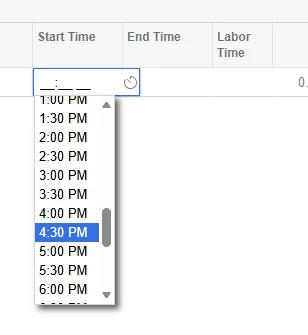
Is anyone on 26R1, who uses the 24 hour clock vs the 12 hour clock, finding an issue with it not allowing a labor transaction to be under the 24 hour clock vs the 12. I have checked all the local system settings and profile, along with the AM101000 screen setting but its not working as it did in 24R2.


My assumption is they are forcing this change or a bug.


Best answer by valentynbeznosiuk

@JReppard 

There's a hardcoded attribute on those fields that forces the system to ignore locale settings, so the only way around it is to override that attribute.

7 replies

valentynbeznosiuk
Jr Varsity II
Forum|alt.badge.img+4

Hi ​@JReppard 

Could you please provide more details on the use case and describe exactly how the behavior differs for you?


Forum|alt.badge.img
  • Author
  • Varsity I
  • September 15, 2026

@valentynbeznosiuk 


Yes in the 24R2 on entering a labor transaction you could enter a start / stop time based on military time. When we moved to 26R1 it is now a standard 12 hour clock.  However, from I know, I thought changing the local setting / preference would adjust this, however based on the time picker dropdown(see image from before) itself displays AM/PM values, suggesting the Operation Time Format setting is not being honored.


Configuration Verified:

  • User Locale
    • Short Time = HH:mm
    • Long Time = HH:mm:ss
  • System Locale
    • Short Time = HH:mm
    • Long Time = HH:mm:ss
  • Manufacturing Preferences (AM101000)
    • Operation Time Format = 00:00

Additional Findings: The AMMTran.StartTime field is configured with:

[AMDBTime(UseTimeZone = false, UseOperationTimeFormat = true)]


which appears to indicate the control should use the Manufacturing Operation Time Format.

Expected Result:

13:00

13:30

14:00


Actual Result:

1:00:00 PM

1:30:00 PM

2:00:00 PM


Forum|alt.badge.img+3

@JReppard I believe this might be a product change. I reviewed the release notes, and it appears that Acumatica made some changes in 26R1 related to tracking exact time. This could potentially be the reason for the time format changing to a 12-hour format.

The 26R1 release notes mention this on page 247, but the information is not clear enough to confirm whether this change is related to the time format.

We may need to create a case with Acumatica and ask their support team to validate whether this is an intentional product change or a bug.

Please let me know if you have any questions.


valentynbeznosiuk
Jr Varsity II
Forum|alt.badge.img+4

@JReppard 

There's a hardcoded attribute on those fields that forces the system to ignore locale settings, so the only way around it is to override that attribute.


Forum|alt.badge.img
  • Author
  • Varsity I
  • September 16, 2026

@valentynbeznosiuk 

Thank you for the explanation. I assume it needs a customization as well. 


  • Acumatica Employee
  • September 18, 2026

Hi ​@JReppard 

Adding a little to what ​@valentynbeznosiuk  and ​@ranjithduraisamy72  already said, since they've pointed you in the right direction.

The change lines up with the 26R1 update that added seconds to Manufacturing time tracking. To show seconds, the Start Time / End Time fields on the clock entry and labor screens use a fixed time format, and with that fixed format those fields display in 12-hour (AM/PM) rather than following the regional 24-hour setting they used in 24R2.

Because the format is fixed at the field level, forcing the 24-hour clock currently requires a customization to override it.

If the 24-hour display matters for your process, I'd suggest opening a support case so the team can confirm whether this format behavior is intended and advise on next steps.


valentynbeznosiuk
Jr Varsity II
Forum|alt.badge.img+4

@LSamarajeewa07 It's a very good point.

@JReppard I want to add to the customization suggestion that, given this change, you need to consider how it will behave with the other fields that now support seconds. I assume the system should be able to calculate time correctly, but this needs to be validated.


