

Question

Labor Transaction Time - 24 Hour Clock vs 12 Hour

  • September 15, 2026
  • 2 replies
  • 19 views

Forum|alt.badge.img

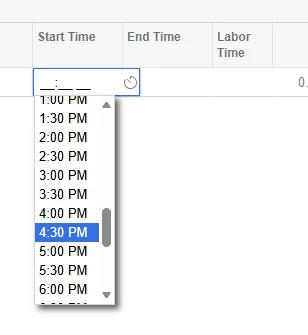
Is anyone on 26R1, who uses the 24 hour clock vs the 12 hour clock, finding an issue with it not allowing a labor transaction to be under the 24 hour clock vs the 12. I have checked all the local system settings and profile, along with the AM101000 screen setting but its not working as it did in 24R2.


My assumption is they are forcing this change or a bug.


2 replies

valentynbeznosiuk
Jr Varsity II
Forum|alt.badge.img+4

Hi ​@JReppard 

Could you please provide more details on the use case and describe exactly how the behavior differs for you?


Forum|alt.badge.img
  • Author
  • Varsity I
  • September 15, 2026

@valentynbeznosiuk 


Yes in the 24R2 on entering a labor transaction you could enter a start / stop time based on military time. When we moved to 26R1 it is now a standard 12 hour clock.  However, from I know, I thought changing the local setting / preference would adjust this, however based on the time picker dropdown(see image from before) itself displays AM/PM values, suggesting the Operation Time Format setting is not being honored.


Configuration Verified:

  • User Locale
    • Short Time = HH:mm
    • Long Time = HH:mm:ss
  • System Locale
    • Short Time = HH:mm
    • Long Time = HH:mm:ss
  • Manufacturing Preferences (AM101000)
    • Operation Time Format = 00:00

Additional Findings: The AMMTran.StartTime field is configured with:

[AMDBTime(UseTimeZone = false, UseOperationTimeFormat = true)]


which appears to indicate the control should use the Manufacturing Operation Time Format.

Expected Result:

13:00

13:30

14:00


Actual Result:

1:00:00 PM

1:30:00 PM

2:00:00 PM


