

Question

Generate Pre-assigned Lot/Serial Nbr in production order based on full box qty

  • July 15, 2025
  • 3 replies
  • 70 views

Forum|alt.badge.img

We have production orders set to ‘Preassign lot serial numbers.’ We can populate each one manually but it is extremely cumbersome.  I am trying to get the below result(base on full box qtys of 60) through an import scenario
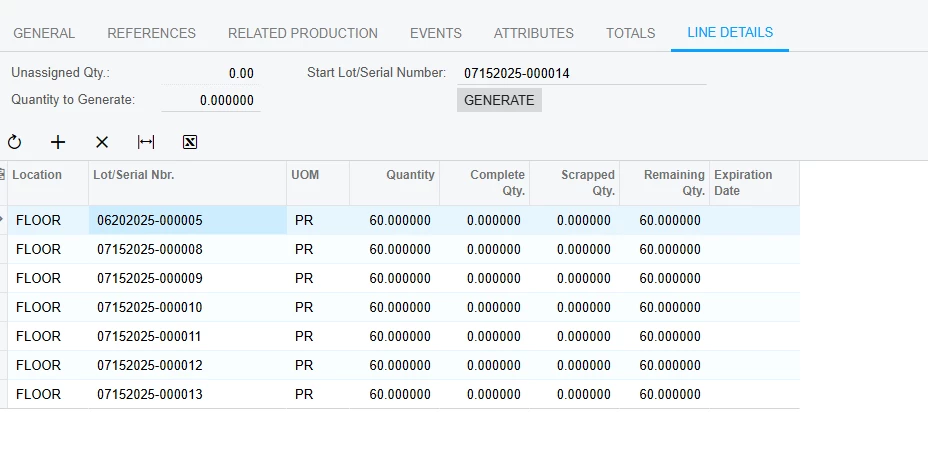
The import scenario functionality has this at the order level but there is no where to specific qty. 



At the line details level it looks like I would need to manually assign lot # and qty 
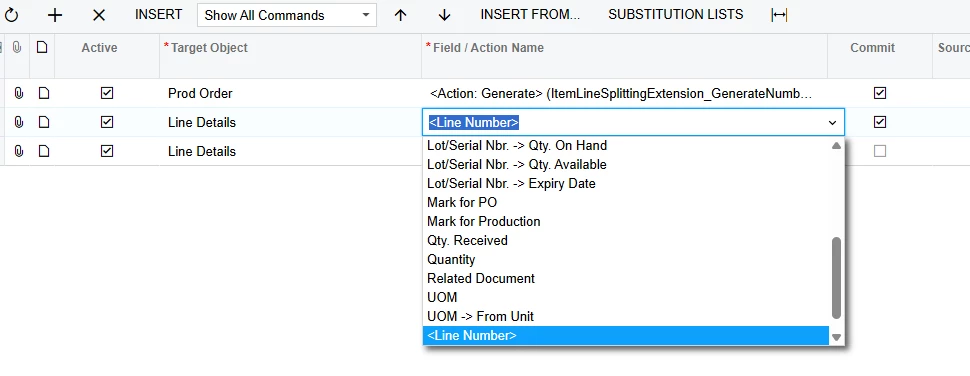
 

At the end of the day we are looking for a non-manual way to serialize our full cases of product. I know there have been several product ideas around this but I am look for a practical solution, not to pray and wait.

Has anyone implemented anything like this?

3 replies

Forum|alt.badge.img+2

@chese79 

Please try the below option.

You can define the lot size in the stock item, and based on that, create a Generic Inquiry using a SQL View that duplicates the lines according to the lot size.

For example, if your Qty to Produce is 100 and the Lot Size is 10, the SQL view can generate 10 rows, each representing a production batch of 10 units. This allows you to see the data split by lot in the Generic Inquiry.

You can then use this view in your GI to display the duplicated lines, and further use a Business Event along with an Import Scenario to create related ten rows in production order line details tab.


Forum|alt.badge.img
  • Author
  • Freshman II
  • July 16, 2025

How do you get to the SQL view? This is new for me.


thx

Chris


Chris Hackett
Community Manager
Forum|alt.badge.img
  • Acumatica Community Manager
  • September 24, 2025

Hi ​@chese79 were you able to find a solution? Thank you!

