Question

Error closing Production Order: “Updating ‘Production Item Split’… Specify the quantity greater than 0” Body:

  • Mar 4, 2026 12:51 AM UTC
  • 5 replies
  • 132 views
  • Translate All

Forum|alt.badge.img

I’m getting the below error when trying to Close a Production Order:


Error: Updating 'Production Item Split' record raised at least one error. Please review the errors.
Specify the quantity greater than 0.   

  • Which screen/section should I review to find the split line with 0 quantity?

  • What is the recommended fix for old production orders where the split record has 0 qty (update split, clear allocation, add a completion, etc.)?


5 replies

Forum|alt.badge.img+11
  • Captain II
  • Mar 4, 2026 8:06 AM UTC

​@jvarughese23 


What version of Acumatica are you using?

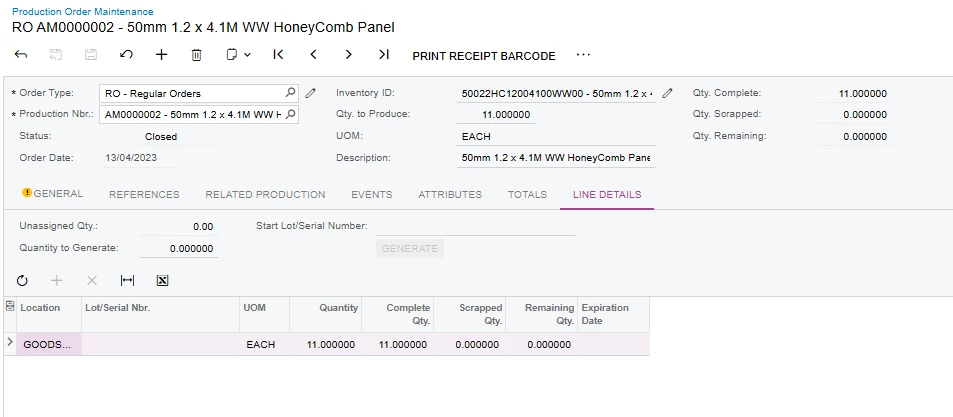
You should be able to access this via the production order screen, ‘Line Details’ tab:


Translate

Forum|alt.badge.img
  • Author
  • Varsity II
  • Mar 4, 2026 12:33 PM UTC

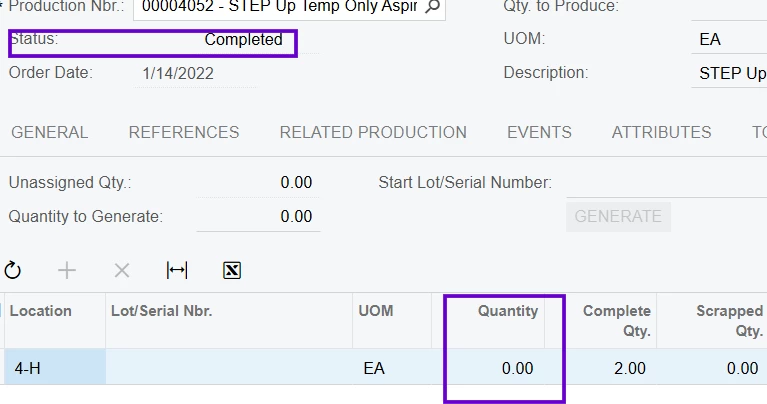
​@aiwan  2025 R2 , The Production Orders were in Completed Status  so i am unable to Edit the Field 


Translate

Forum|alt.badge.img+11
  • Captain II
  • Mar 4, 2026 12:54 PM UTC

That’s an interesting issue…..


So do you guys not set the qty for a production order when creating it? Or was this just forgotten?

You can ensure this doesn’t happen again by setting the below settings to ‘Do Not Allow’:

I’d recommend talking to your VAR on how to get past this one.

What is your production order qty? I have tried to add one for 0 but it did not allow me to.

Does it let you?

Translate

Forum|alt.badge.img
  • Author
  • Varsity II
  • Mar 4, 2026 1:14 PM UTC

​@aiwan Production quantity is 2 , No    it wont allow to change  

Translate

Chris Hackett
Community Manager
Forum|alt.badge.img
  • Acumatica Community Manager
  • Jul 9, 2026 10:42 PM UTC

Hi ​@jvarughese23 were you able to find a solution? Thank you!

Translate