

Solved

Don't Track Inventory

  • Oct 23, 2022 3:07 PM UTC
  • 3 replies
  • 247 views
  • Translate All

Forum|alt.badge.img

Hi Everyone,

Is it possible to create an invoice even my inventories quantity on hand are set to 0? Our client doesn’t track quantity. I created Sales Order from Bigcommerce to Acumatica successfully but failed when I tried to make an invoice for it.
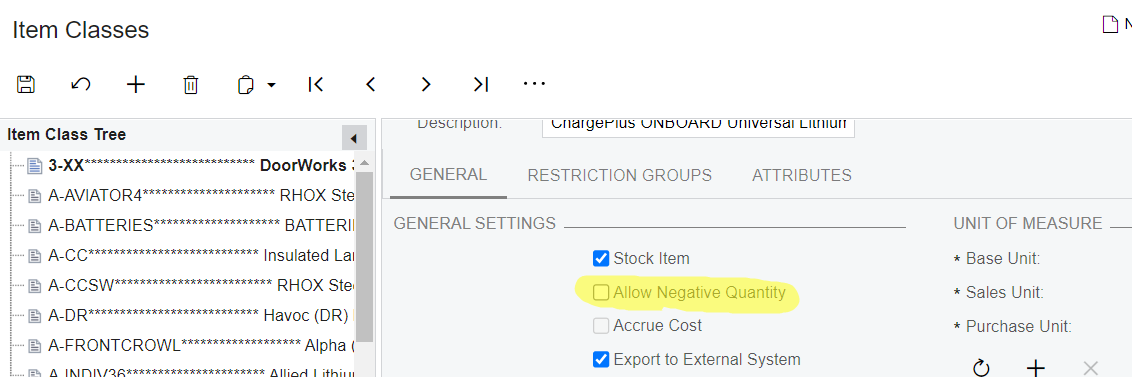



Best answer by angierowley75

Allowing quantity to go negative is not best practice - and could have unexpected results if your item cost valuation is average.  Please make sure you vet this option out fully.

View original

3 replies

Forum|alt.badge.img
  • Author
  • Jr Varsity III
  • Oct 24, 2022 7:28 AM UTC

I think, I saw the answer now


Translate

angierowley75
Acumatica Moderator
Forum|alt.badge.img+3
  • Acumatica Moderator
  • Answer
  • Oct 24, 2022 12:41 PM UTC

Allowing quantity to go negative is not best practice - and could have unexpected results if your item cost valuation is average.  Please make sure you vet this option out fully.

Translate

Forum|alt.badge.img
  • Semi-Pro II
  • Nov 25, 2022 7:13 AM UTC

If you do not require quantity tracking overall, just use Invoice Orders instead of the default Sales Order - no Shipments are generated and it skips straight to the Invoice.

I have noticed that ‘Enable Negative Quantity’ in Item Class will not behave as expected. Shipments won’t be generated regardless if there is zero stock available to ship, with a generic ‘order does not contain items for shipment….’ error message.

Hopefully Acumatica tailors the option to let users properly ship despite negative inventory in the future. It may not be best practice, but a company which experiences these issues (inaccurate inventory) ends up having to adjust quantities on-the-fly regardless in order to process the shipment. If someone has to reconcile over/under quantities, it might as well be done systematically at the end of the month by a trained accountant.

Translate
