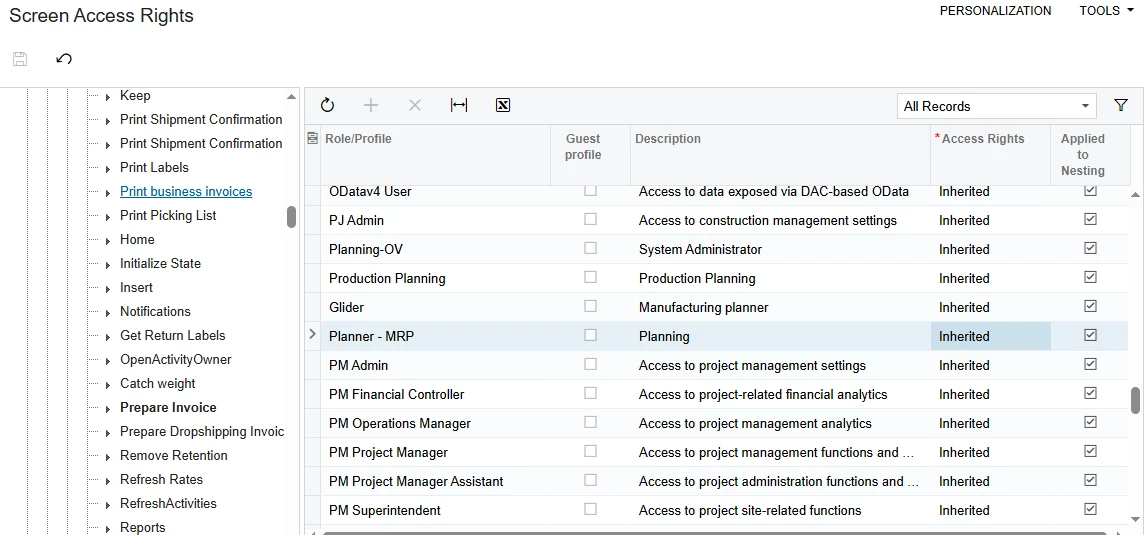
Hi community,
I am trying to remove the "Prepare Invoice" (Prepare Invoice / SO302000) button/action on the Shipments screen for a specific role called "Planner - MRP".
However, I am running into an issue when setting the permissions in both Access Rights by Role (SM201025) and Access Rights by Screen (SM201020):
-
In Access Rights by Role (
SM201025): When I select thePrepare Invoiceaction under Shipments and change Access Rights to Revoked (Rechazado), it automatically reverts back to Inherited (Heredado). The "Applied to Nesting" (Aplicado al Anidado) checkbox is checked and greyed out/read-only, so I cannot uncheck it to break inheritance. -
In Access Rights by Screen (
SM201020): Navigating directly to thePrepare Invoicenode in the tree and selecting the Planner - MRP role shows Inherited, but the dropdown is locked or automatically reverts, and the "Applied to Nesting" box remains checked without allowing edits.
Environment Details:
-
Screen: Shipments (
SO302000) -
Action/Button: Prepare Invoice (
Prepare Invoice) -
Target Role: Planner - MRP
Has anyone encountered this issue where an action's inheritance cannot be overridden at the role or screen level? Is there a parent node, workflow condition, or Automation Definition that forces this action to remain inherited?
Any insights or recommended workarounds would be greatly appreciated!