

Solved

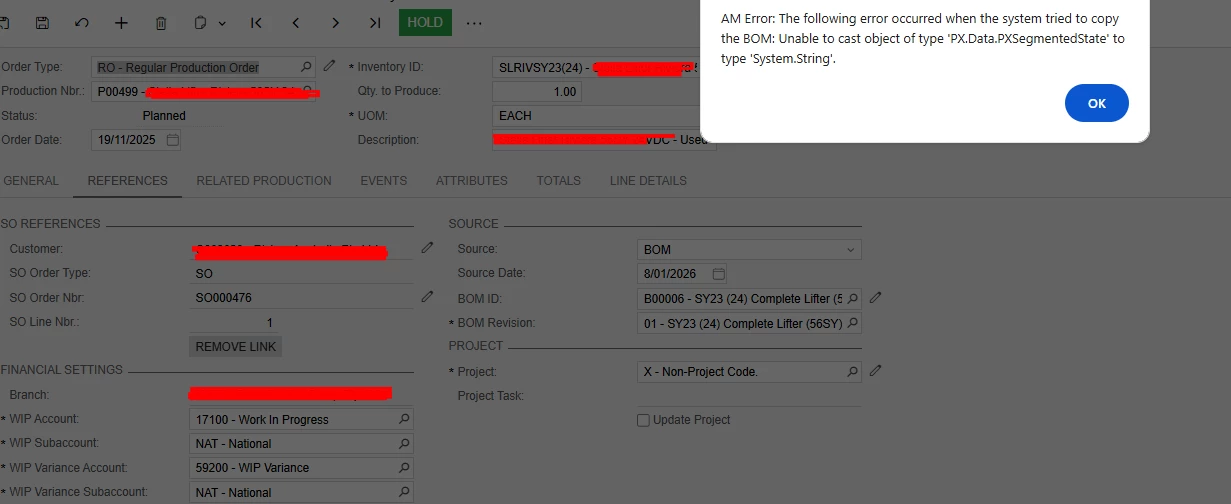
AM Error: The following error occurred when the system tried to copy the BOM: Unable to cast object of type 'PX.Data.PXSegmentedState' to type 'System.String'.

  • November 18, 2025
  • 3 replies
  • 63 views

Forum|alt.badge.img

Hi All. Do you know why I get this error when linking the BOM in Production Order. The Production order was created from SO if that helps, but there were also 2 items in SO that was marked for Production and linking the BOM is fine without error. Can you please help?

 

Best answer by zmitchell00

If you are on 24R2, this is a known issue with phantom type materials not having a BOM defined (or they had a BOM set that is now inactive). I would check both stock item level and item warehouse details level to make sure an active BOM is set for any materials that are phantom BOMs. 


3 replies

Forum|alt.badge.img+4

Do you have any customizations published? If so, have you tried reproducing the error with the customizations unpublished?


Forum|alt.badge.img
  • Author
  • Jr Varsity III
  • November 20, 2025

@aleksandrsechin - There are customizations published but not for that screen. Though I have republished the customizations and tried linking again, but still got the same error. I did not try without customizations though. I will try again after unpublishing customization. Thanks


  • Freshman II
  • Answer
  • January 7, 2026

If you are on 24R2, this is a known issue with phantom type materials not having a BOM defined (or they had a BOM set that is now inactive). I would check both stock item level and item warehouse details level to make sure an active BOM is set for any materials that are phantom BOMs.
