Solved

25R2 and Inventory Planning Filters

  • March 2, 2026
  • 12 replies
  • 288 views
  • Translate All

Forum|alt.badge.img

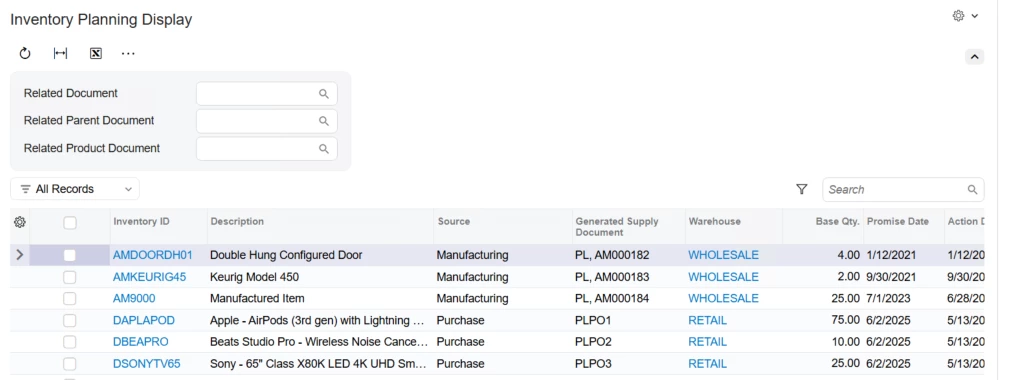
Our client is using Filters on the Inventory Planning Display in 24R2.  While testing for 25R2, I noticed the option to setup filters is gone.  This is a critical piece for our client.  Is there a work around that I am missing?  The client has many users of this screen that need standard filters to review the results.

Has anyone else noticed or experienced this issue?

Best answer by jfbrut91

This issue appears to have been fixed in version 2025R201Patch3

View original

12 replies

jdobish
Captain II
Forum|alt.badge.img+2
  • Captain II
  • March 2, 2026

I just noticed that as well. It is odd that those are not an option any more, i didn’t realize that when I was in their previously. 

Translate

Debbie Baldwin
Community Manager
Forum|alt.badge.img+2

​@TShoaff - this is a known issue - please log a case. Thanks!

Translate

Forum|alt.badge.img

same here for two of our customers, logging case to add to requirement

Translate

Forum|alt.badge.img
  • Jr Varsity III
  • April 2, 2026

We discovered this back in January and our Var logged a case with Acumatica as well. 

Translate

Forum|alt.badge.img+1

issue is now fixed on the Acumatica 2026 R1 Build 26.100.0175 , 

Release notes:

AC-355884: On the Inventory Planning Display (AM400000) form, users could not apply or save filters because 

the Filter Settings button was missing in both the Classic and Modern UIs.


Translate

Forum|alt.badge.img+1
  • Jr Varsity I
  • April 14, 2026

​@TShoaff I can see it is fixed in 26R1


Translate

Forum|alt.badge.img
  • Jr Varsity III
  • April 14, 2026

issue is now fixed on the Acumatica 2026 R1 Build 26.100.0175 , 

Release notes:

AC-355884: On the Inventory Planning Display (AM400000) form, users could not apply or save filters because 

the Filter Settings button was missing in both the Classic and Modern UIs.


Any chance this will be fixed in 2025R2?

Translate

Forum|alt.badge.img+1

We also have this issue after upgrading to 2025R2 and our VAR also logged a case. Fixing it in 2026R1 is not helpful to us as we only upgrade annually. Please advise when or if 2025R2 will be fixed. Thanks!

Translate

Also we released with MYOB Acumatica 2025 R2 2025.200 


These filters are missing for planning MRP, will be great to get a hotfix that can be applied. 

Its annoying to do a work around of applying the filters manually each time you want to run MRP.

Thanks

Translate

jfbrut91
Jr Varsity III
Forum|alt.badge.img
  • Jr Varsity III
  • Answer
  • June 15, 2026

This issue appears to have been fixed in version 2025R201Patch3

Translate

Forum|alt.badge.img+1

We have been updated to Build 25.201.0213.3 and the issue is resolved.

Translate

Forum|alt.badge.img+1

issue is now fixed on the Acumatica 2026 R1 Build 26.100.0175 , 

Release notes:

AC-355884: On the Inventory Planning Display (AM400000) form, users could not apply or save filters because 

the Filter Settings button was missing in both the Classic and Modern UIs.


Any chance this will be fixed in 2025R2?

This has been fixed in 2025 R2 as well, 

2025 R2 Service Pack 1 Build 25.201.0213.3 - Acumatica ERP 2025 R2 Service Pack 1 Build 25.201.0213.3 - April 17, 2026 | Community

2025 R2 GA Build 25.200.0248.6 - Acumatica ERP 2025 R2 GA Build 25.200.0248.6 - April 17, 2026 | Community

Regards,

KH

Translate