Solved

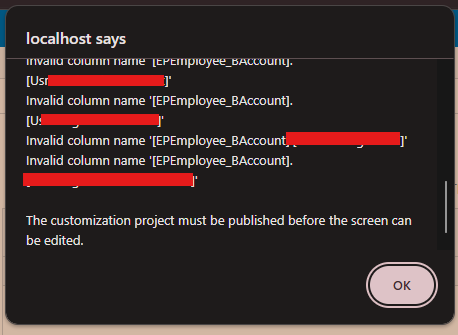
Why do I get Invalid column name

  • March 30, 2025
  • 4 replies
  • 117 views

Forum|alt.badge.img

I altered the EPEmployee table and added the above columns using a script. After that, I added the corresponding DAC records. However, even after publishing the customization, I still encounter this issue. Why am I getting this error?

Script e.g:
ALTER TABLE EPEmployee ADD  
    Usr____ VARCHAR(150) NULL,  
    Usr____ VARCHAR(50) NULL;

 

Best answer by Naveen Boga

@rashmikamudalinayake10 I recommend below steps.

  • Remove the .DLL File

    • Navigate to the Bin folder of the respective instance and remove the .DLL file.

    • This will prevent errors and allow you to log in to the instance.

  • Review Customization Projects

    • Open Customization Projects and access the relevant customization package.

    • Review the Database Scripts for any missing fields or discrepancies.

  • Update and Publish the Customization

    • Ensure all required database fields are included in the customization package.

    • Once updated, publish the package to apply the changes.

Following these steps should help resolve the issue. Let me know if you need further assistance.

4 replies

Naveen Boga
Captain II
Forum|alt.badge.img+20
  • Captain II
  • Answer
  • March 30, 2025

@rashmikamudalinayake10 I recommend below steps.

  • Remove the .DLL File

    • Navigate to the Bin folder of the respective instance and remove the .DLL file.

    • This will prevent errors and allow you to log in to the instance.

  • Review Customization Projects

    • Open Customization Projects and access the relevant customization package.

    • Review the Database Scripts for any missing fields or discrepancies.

  • Update and Publish the Customization

    • Ensure all required database fields are included in the customization package.

    • Once updated, publish the package to apply the changes.

Following these steps should help resolve the issue. Let me know if you need further assistance.


Yuriy Zaletskyy
Jr Varsity II
Forum|alt.badge.img+4

And the DAC itself, along with Acumatica version will remain secret?


Forum|alt.badge.img

@Naveen Boga Thanks. It worked. After that I created a new DB Script and the corresponding DAC records. Then Could able to create the fields.


Naveen Boga
Captain II
Forum|alt.badge.img+20
  • Captain II
  • April 1, 2025

@rashmikamudalinayake10 Awesome! Thanks for sharing the update. Glad I could help resolve this problem.