

Solved

Rich Text Edit Issues

  • January 22, 2024
  • 6 replies
  • 249 views

Hello I am currently attempting to add some rich text edit fields to my customised page in Acumatica. I have tried following two different posts with two different issues following this acumatica - How to add a memo / formatted text field ala Cases - Stack Overflow post gives me no errors but the field does not work and is only a single line which cannot have anything inputted into  as seen on the right of the image below 

 

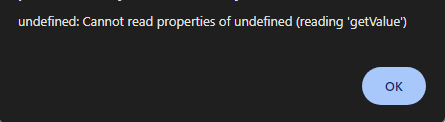
The second post i have tried following being acumatica - How can I add a rich text box such as in the details tab in the Cases (CR306000) screen? - Stack Overflow gives me a field which works perfectly i can put data in and it saves. However whenever i go to the page it is on i get an error reading “ undefined: Cannot read properties of undefined (reading 'getValue')”
 

Anyone able to help? Do not mind on which method ends up working 

Thank you!

Best answer by Rakshanda

HI ​@oliverdunn ,

I also faced same issue as yours ,used below for richtext field ,

     <px:PXRichTextEdit ID="edBody" runat="server" DataField="UsrBody" Style="border-width: 0px; border-top-width: 1px; width: 100%;"
         AllowAttached="true" AllowSearch="true" AllowLoadTemplate="false" AllowSourceMode="true">
         <AutoSize Enabled="True" MinHeight="216" />
         <LoadTemplate TypeName="PX.SM.SMNotificationMaint" DataMember="Notifications" ViewName="NotificationTemplate" ValueField="notificationID" TextField="Name" DataSourceID="ds" Size="M" />
     </px:PXRichTextEdit>

Hope above helps!!

6 replies

Naveen Boga
Captain II
Forum|alt.badge.img+19
  • Captain II
  • 3449 replies
  • January 22, 2024

@oliverdunn Strange! 

If possible, can you please share the customization package here?


  • Author
  • Freshman I
  • 2 replies
  • January 22, 2024

@Naveen Boga Sure thing.

The rich text edit field is “UsrEstimatorNotes”

Thank you


Naveen Boga
Captain II
Forum|alt.badge.img+19
  • Captain II
  • 3449 replies
  • January 24, 2024

@oliverdunn In the customization project, I see multiple screens, can you please let me know in which you added this and what is the field name?


  • Author
  • Freshman I
  • 2 replies
  • January 24, 2024

@Naveen Boga The opportunities screen (CR304000)


Chris Hackett
Community Manager
Forum|alt.badge.img
  • Acumatica Community Manager
  • 3298 replies
  • March 19, 2024

Hi @oliverdunn were you able to find a solution? Thank you!


Forum|alt.badge.img+1
  • Jr Varsity II
  • 44 replies
  • Answer
  • July 23, 2025

HI ​@oliverdunn ,

I also faced same issue as yours ,used below for richtext field ,

     <px:PXRichTextEdit ID="edBody" runat="server" DataField="UsrBody" Style="border-width: 0px; border-top-width: 1px; width: 100%;"
         AllowAttached="true" AllowSearch="true" AllowLoadTemplate="false" AllowSourceMode="true">
         <AutoSize Enabled="True" MinHeight="216" />
         <LoadTemplate TypeName="PX.SM.SMNotificationMaint" DataMember="Notifications" ViewName="NotificationTemplate" ValueField="notificationID" TextField="Name" DataSourceID="ds" Size="M" />
     </px:PXRichTextEdit>

Hope above helps!!


