

Question

Removal of default roles in Relations

  • August 5, 2026
  • 3 replies
  • 49 views

Hey all,

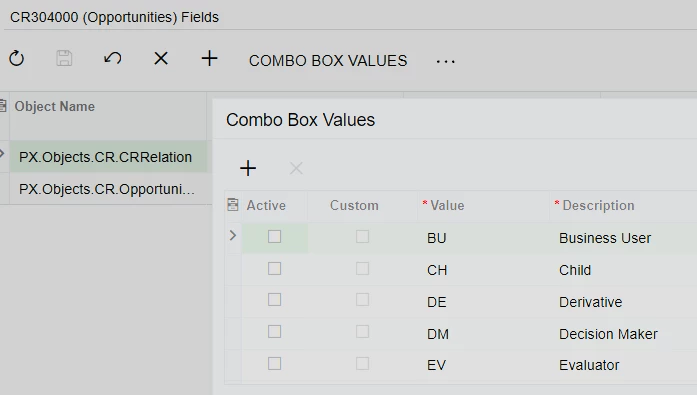
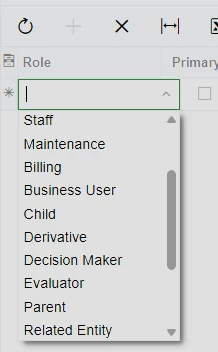
Having an issue relating to the Roles of Relations attached to records. I have a customization that adds the custom set we’d like to use, but am unable to remove the default set, even when setting them as inactive in the customization project. I thought it might be due to some superseding project, so I looked and did find a single one above it, but even inactivating one option there and publishing did not remove any options. I was trying to stick to the low/no code options for simplicity since there explicitly is an option, but no dice. Any options to try?

The only other thread I saw with the same issue was just due to not publishing, but these definitely have been. 

Published customization options:
 

Result:


3 replies

Forum|alt.badge.img+4
  • Jr Varsity II
  • August 6, 2026

Hi ​@awomack ,

Can you try replacing your custom dropdown string list so that only your customized values are displayed in the dropdown?

You can do this by using PXCustomizeStringAttribute in the graph extension's Initialize() method. This allows you to replace the string list at runtime and remove any values you don't want to display.

Hope above helps!!


Forum|alt.badge.img+3
  • Captain I
  • August 6, 2026

@awomack 

It looks like the Role field is populated by the CRRoleTypeList.FullList (PXStringList) attribute at runtime, so simply marking the standard values as Inactive in the Customization Project may not remove them.

You could try replacing the list in a CacheAttached event instead, for example:

protected virtual void _(Events.CacheAttached<CRRelation.role> e)
{
    PXStringListAttribute.SetList<CRRelation.role>(
        e.Cache,
        null,
        new[] { "CU", "PM", "AP" },
        new[] { "Customer", "Project Manager", "Approver" });
}

I haven't tested this specific scenario, but it would be worth trying.


Forum|alt.badge.img+3
  • Captain II
  • August 11, 2026
  • Verify the default Role records directly in the database and check their Active/status values.
  • Check whether the default Roles are coming from another customization or from the base application.
  • If they are base application values, the low/no-code customization option may only allow you to add values, not remove the predefined ones.
  • If the values are customization-created records, you may need to explicitly remove/deactivate the records rather than just changing the customization definition.
